If you have an old iPhone or iPad, you can turn it into a working second display for free using a new piece of software called OpenDisplay. It is a free, open-source alternative to Apple Sidecar, Duet Display, and Luna Display.
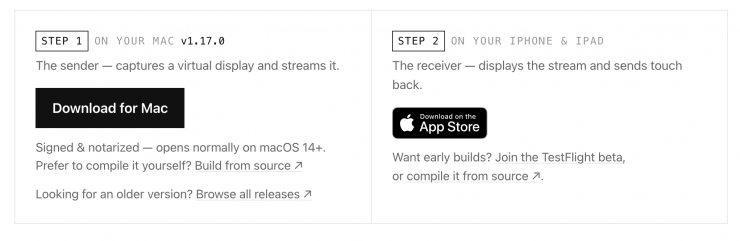
You download the sender on your Mac and the receiver on your iPhone or iPad, and then connect them using Wi-Fi or the charging cable. Your Mac will then create another display, and you can simply drag any window onto the external device exactly like a normal monitor.
The Mac creates a virtual display with the private CGVirtualDisplay API (the same technique used by BetterDisplay and DeskPad), captures it with ScreenCaptureKit, hardware-encodes H.264 with VideoToolbox, and streams it over a single TCP connection. Through the USB cable via usbmux, or over WiFi. The phone decodes and renders with AVSampleBufferDisplayLayer and sends touch coordinates back, which the Mac injects as mouse events.
The screen runs at native Retina resolution and can reach 60 FPS over USB. You can tap to click, drag windows with your finger, scroll using two fingers, and rotate the device into portrait mode. It even supports several devices at the same time.
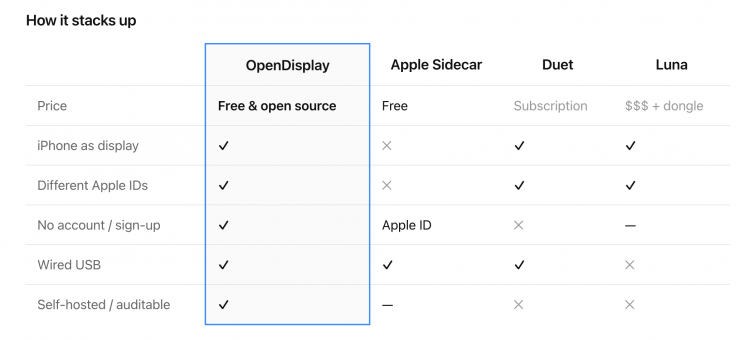
OpenDisplay is completely free with no subscriptions.
OpenDisplay is licensed under GPL-3.0. You can use, study, and adapt it freely, including commercially. If you distribute a modified version, it must remain open source under the same license with the original attribution intact, so improvements flow back to everyone instead of into closed forks. (Releases up to v0.4.x were MIT-licensed and remain available under those terms.)