The Nikon & RED ‘Image Recipes’ are based on some of the most popular RED LUTs, and they are available not only to users of the Nikon ZR, but also the Z6III, Z50II, Z5II, and ZF cameras, which are imaging cloud compatible.
Nikon states that these ‘Image Recipes’ faithfully emulate RED LUTs so users can quickly apply them to videos and photos when shooting in H.265/H.264 or ProRes to get a look that is already baked in. This is handy for Nikon ZR users if you need to turn material around quickly or need to hand off material to someone who doesn’t want Log or RAW images. For owners of other select Nikon cameras other than the ZR, it gives them access to RED-inspired looks.
The ‘Image Recipes’ are essentially just picture profiles, and it is probably best to think of them in the same way you would think of Sony’s S-Cinetone.
Here are the 9 Image Recipes you get:
- R1_CineBias by RED.NP3
- R2_CineBias-T – Cool Atmosphere by RED.NP3
- R3_CineBias-C – Crisp Teal Contrast by RED.NP3
- R4_CineBias-CC – Noir Vibes by RED.NP3
- R5_CineBias WC – Grit & Glow by RED.NP3
- R6_CineBias-TC – Green Edge Experimental by RED.NP3
- R7_CineBiasOffset by RED.NP3
- R8_CineBias Achromic by RED.NP3
- R9_CineBias BleachBypass by RED.NP3
R1_CineBias by RED.NP3
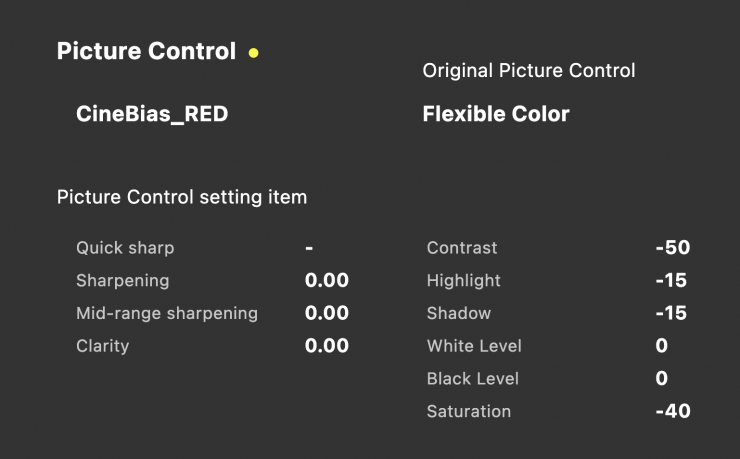
CineBias offers a clean, cool-toned aesthetic with a soft cinematic touch. The blues and greens are subtly enhanced, while skin tones retain a natural yet slightly cooled-down look. Shadows are deep but smooth, adding dimension without harshness. The contrast is moderate, giving the image clarity and depth while maintaining a soft, atmospheric feel. This look works well for storytelling where a modern, cinema vibe is key.
When using this recipe, Nikon recommends setting [Active D-Lighting] to [Extra high] or [Extra high 1] on your camera. Selecting either of these options preserves details in highlights while achieving rich, cinema-like tonal gradations in your image.
R2_CineBias-T – Cool Atmosphere by RED.NP3
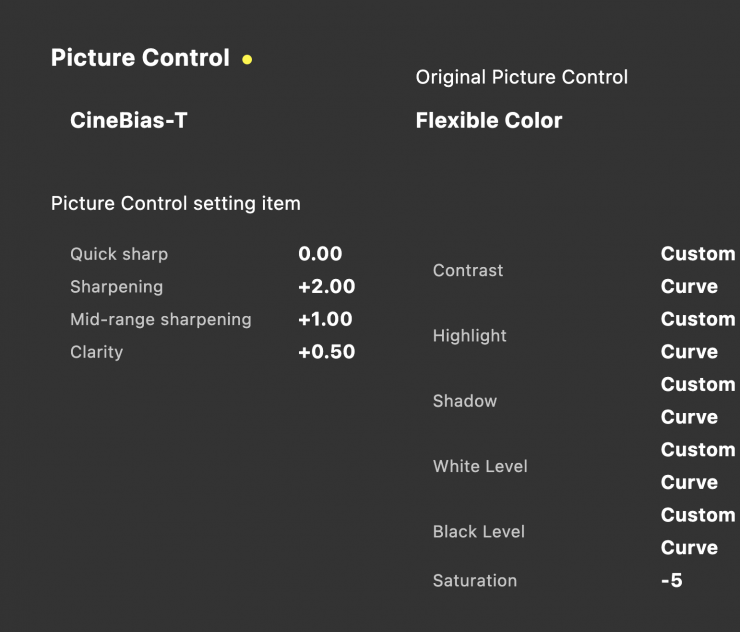
The “Cool Atmosphere” look wraps the image in a gentle teal-green hue, casting a moody, cinematic vibe. The cool tones soften the scene, adding a serene, introspective quality. Blues shift subtly toward teal, while greens deepen, enriching the environment. Skin tones are cooled down, giving a slightly desaturated, ethereal appearance. Shadows are present but not harsh, maintaining a balanced contrast. This look brings a sense of calm and reflection. It’s ideal for indoor scenes where you want to capture a soft, cool atmosphere.
When using this recipe, Nikon recommends setting [Active D-Lighting] to [Extra high] or [Extra high 1] on your camera. Selecting either of these options preserves details in highlights while achieving rich, cinema-like tonal gradations in your image.
R3_CineBias-C – Crisp Teal Contrast by RED.NP3
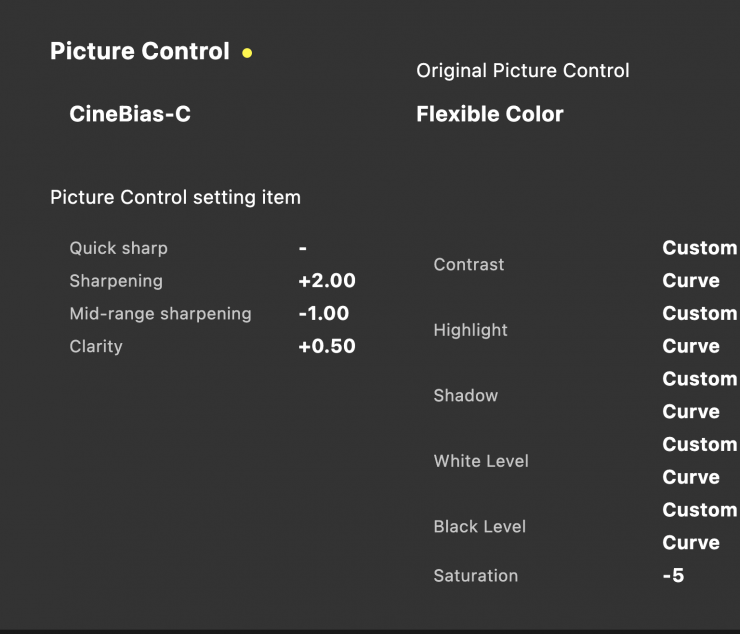
The “Crisp Teal Contrast” look infuses the image with sharp, dramatic contrasts, enhancing both shadows and highlights. Cool tones dominate, with a slight bluish tint giving the scene a fresh, edgy feel. Colors retain their richness without being overly saturated, while skin tones stay natural with a cooler undertone. Shadows are deep, adding a bold sense of depth and structure. This look brings intensity and clarity, perfect for portraiture where depth and mood are essential.
When using this recipe, Nikon recommends setting [Active D-Lighting] to [Extra high] or [Extra high 1] on your camera. Selecting either of these options preserves details in highlights while achieving rich, cinema-like tonal gradations in your image.
R4_CineBias-CC – Noir Vibes by RED.NP3
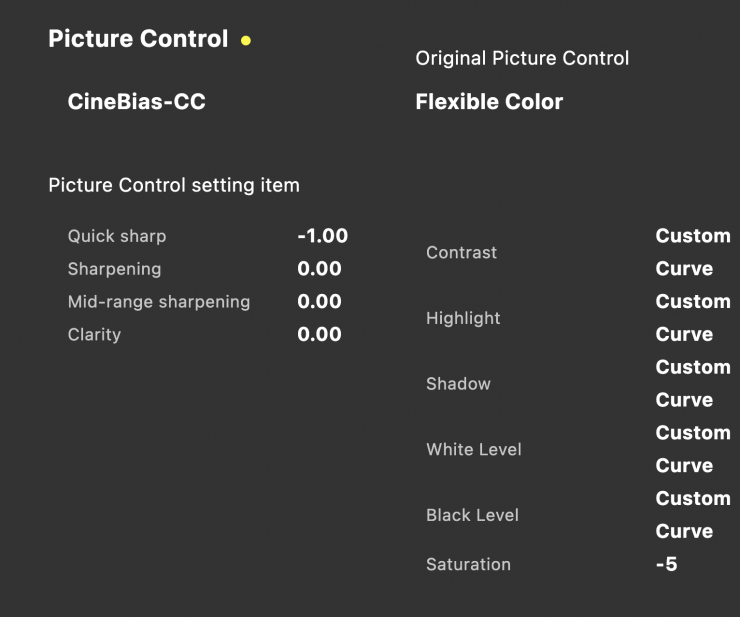
The “Noir Vibes” drenches the image in an atmospheric teal tint, creating a moody, almost surreal aesthetic. Greens and blues stand out, while warm tones like reds and oranges are dialed back, adding to the cool ambiance. Skin tones are cool with a soft, desaturated finish that blends into the color palette. Shadows are rich and dark, amplifying the dramatic, mysterious feel. This look feels cinematic and bold, perfect for dystopian or dramatic storytelling where the cool, eerie vibe is intentional.
When using this recipe, Nikon recommends setting [Active D-Lighting] to [Extra high] or [Extra high 1] on your camera. Selecting either of these options preserves details in highlights while achieving rich, cinema-like tonal gradations in your image.
R5_CineBias WC – Grit & Glow by RED.NP3
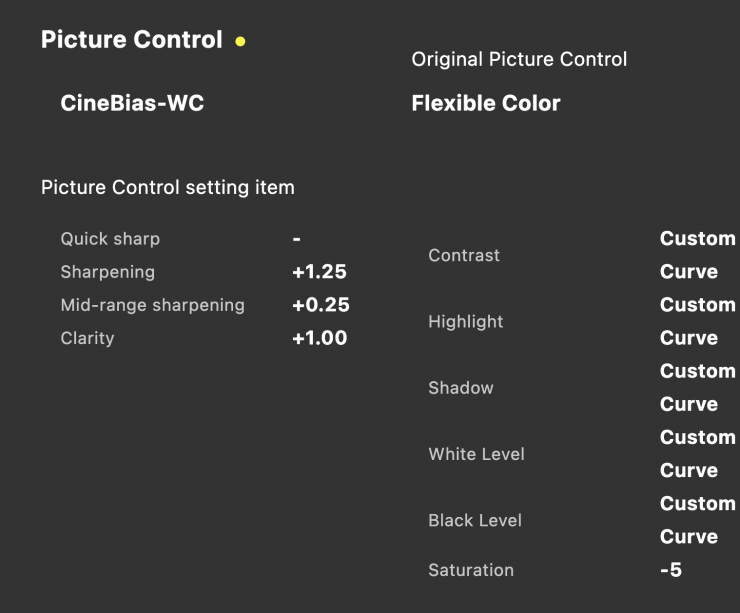
The “Grit & Glow” look thrives on high contrast, blending deep, rich shadows with vibrant highlights. Colors pop with energy—especially oranges and reds—adding warmth against the cool, shadowy backdrop. Skin tones maintain a cool edge with just a hint of warmth, creating a balanced yet intense vibe. The dark areas are bold, adding a raw, edgy feel. This look feels powerful and dynamic, ideal for narrative scenes with tension.
When using this recipe, Nikon recommends setting [Active D-Lighting] to [Extra high] or [Extra high 1] on your camera. Selecting either of these options preserves details in highlights while achieving rich, cinema-like tonal gradations in your image.
R6_CineBias-TC – Green Edge Experimental by RED.NP3
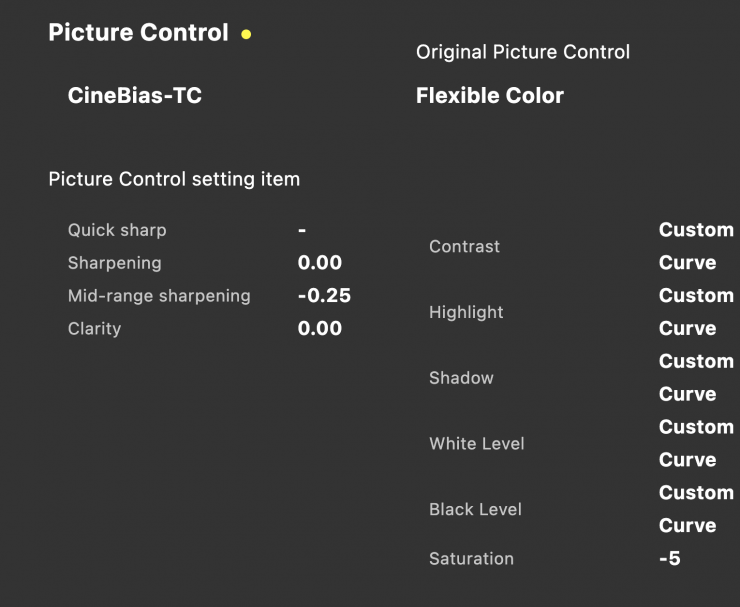
The “Green Edge Experimental” pushes creative boundaries with a strong greenish tint that dominates the color palette. Shadows are dark and dramatic, while mid-tones carry a distinct cool-green overlay, giving the image an avant-garde flair. Skin tones are muted and cool, blending seamlessly with the surreal aesthetic. Bold blues and greens add a punch of color, enhancing the edgy, artistic vibe. This look is perfect for experimental photography, giving a surreal, edgy world.
When using this recipe, Nikon recommends setting [Active D-Lighting] to [Extra high] or [Extra high 1] on your camera. Selecting either of these options preserves details in highlights while achieving rich, cinema-like tonal gradations in your image.
R7_CineBiasOffset by RED.NP3
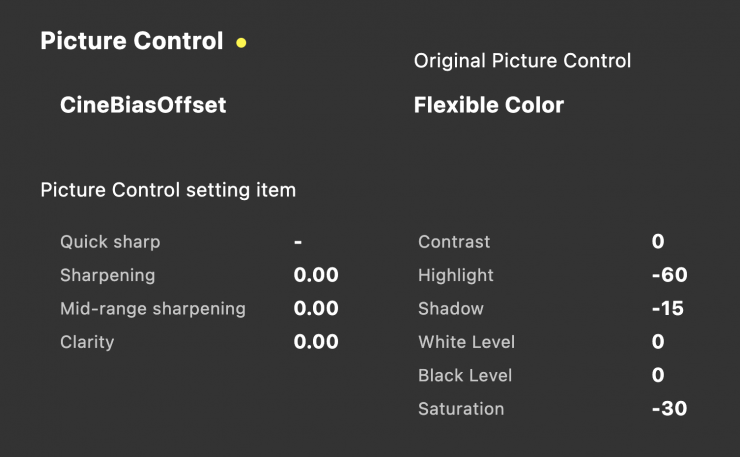
The “CineBiasOffset” look features a subtle, cinematic color grading with a cool, muted tone. The overall palette leans towards soft blues and greens, creating a calm and introspective mood. Skin tones have a natural appearance but with a slightly de-saturated warmth that blends into the cool ambiance. Shadows are gentle, adding depth without overpowering the scene. This look feels refined and understated, ideal for narrative work where a natural yet cinematic vibe is desired.
When using this recipe, Nikon recommends setting [Active D-Lighting] to [Extra high] or [Extra high 1] on your camera. Selecting either of these options preserves details in highlights while achieving rich, cinema-like tonal gradations in your image.
R8_CineBias Achromic by RED.NP3
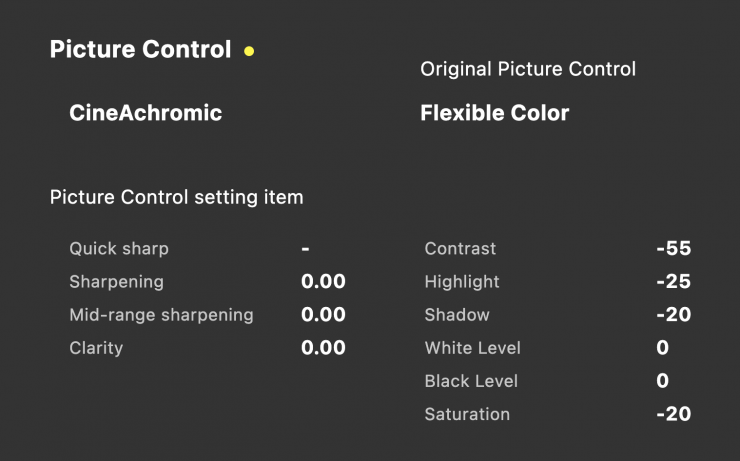
The “CineBias Achromic” strips the image of color, presenting a pure black-and-white aesthetic. The grayscale tones are balanced, with deep blacks, soft mid-tones, and bright highlights that create strong contrast without harshness. This look emphasizes textures, facial features, and lighting, drawing the viewer’s attention to details that color might otherwise distract from. It evokes timelessness and emotion, perfect for portraits that aim to tell a raw, authentic story.
When using this recipe, Nikon recommends setting [Active D-Lighting] to [Extra high] or [Extra high 1] on your camera. Selecting either of these options preserves details in highlights while achieving rich, cinema-like tonal gradations in your image.
R9_CineBias BleachBypass by RED.NP3
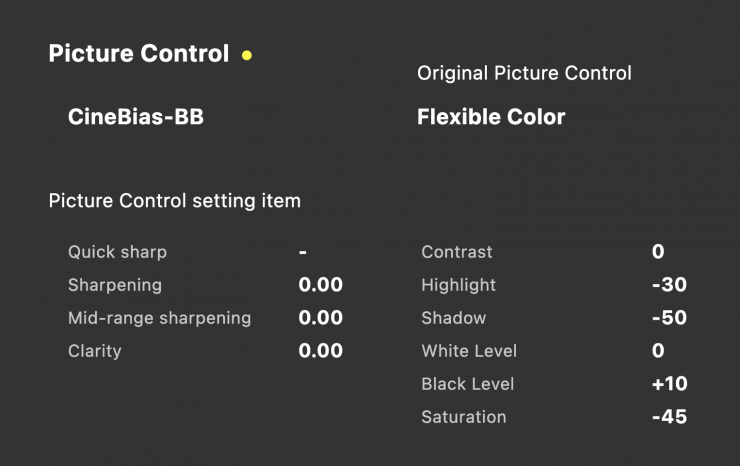
The “CineBias BleachBypass” look introduces a high-contrast, de-saturated style reminiscent of classic film processing techniques. Colors are muted, with a cooler, almost metallic cast that enhances the dramatic feel. Skin tones are pale and light with desaturated undertones, while shadows are deep and bold, giving the image a gritty, edgy vibe. This look feels intense and striking, perfect for editorial shoots or cinematic projects with a darker, more serious tone.
When using this recipe, Nikon recommends setting [Active D-Lighting] to [Extra high] or [Extra high 1] on your camera. Selecting either of these options preserves details in highlights while achieving rich, cinema-like tonal gradations in your image.
Where are they stored on your camera?
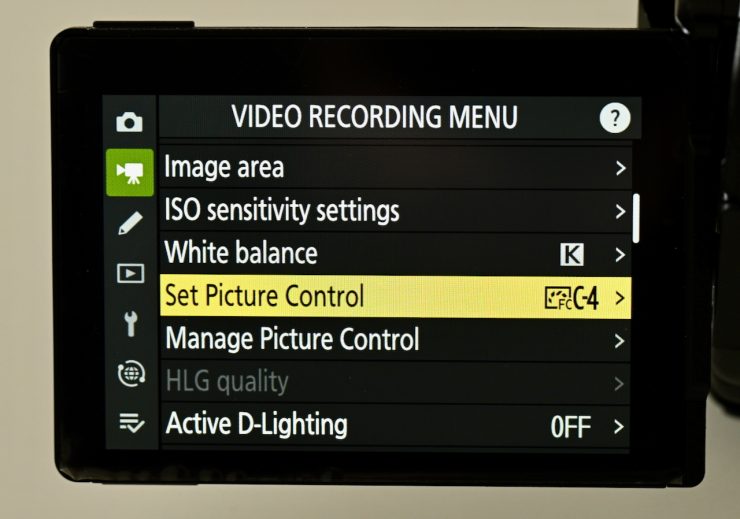
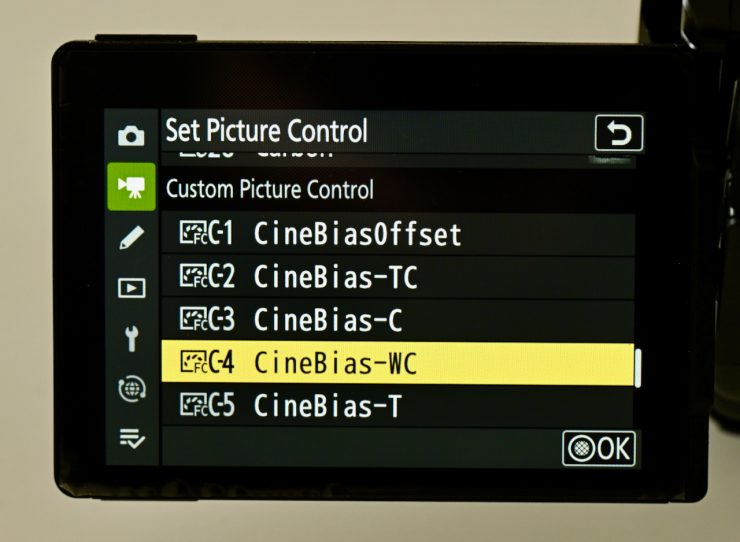
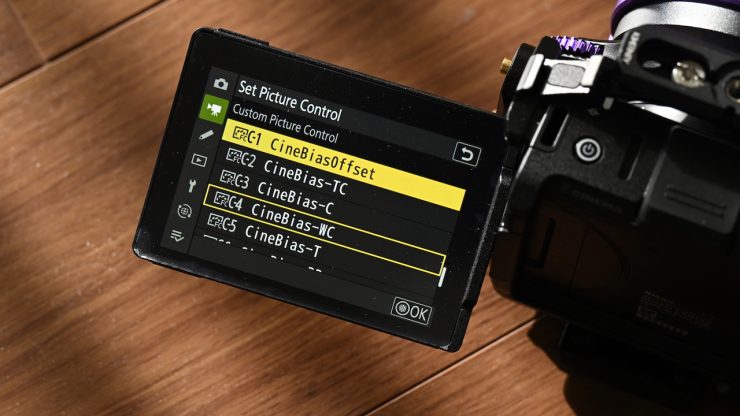
The Image Recipes will be stored in the Set Picture Control menu option. Here is where you can select the Custom Picture Control profiles.
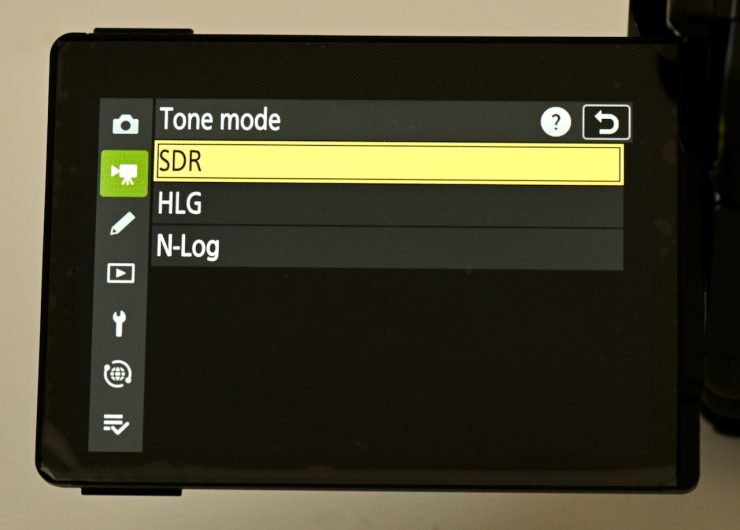
Please note that they only work when the tone mapping is set to SDR. They will not work if you select HLG or N-Log.
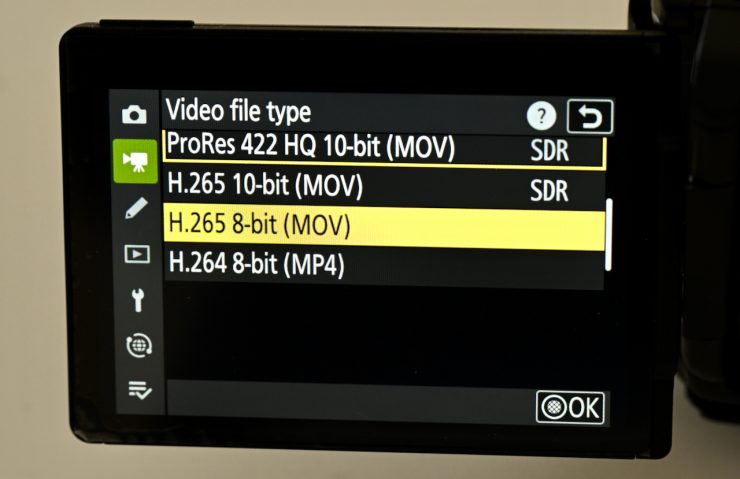
As I mentioned earlier, they will only work when selecting:
- ProRes 422 HQ 10-bit (MOV)
- H.265 10-bit (MOV)
- H.265 8-bit (MOV)
- H.265 8-bit (MP4)
Above, you can see a quick test I did comparing the various Image Recipes to the Standard Nikon Picture Profile. I have kept the exposure and WB the same for all of the shots, so you can clearly see what they do.
With any baked-in picture profiles, you need to think very carefully if they are appropriate for what you are doing. You can make changes in post, but you won’t have the flexibility of a Log or RAW image. I found that I could make some minor adjustments to the Image Recipes, but with some of them, the colors are going to be very difficult to change. If you need to spend time correcting something in post, there is little reason to shoot with a baked-in look in the first place.
I would have liked to have seen Nikon include some way of dialing in a percentage of the picture profile, so you don’t necessarily have to go with such an extreme look. Also, you need to change different settings in your camera when choosing the various Image Recipes, which isn’t ideal for beginners.
In saying that, it’s nice that Nikon offers these for free, and if you don’t like them, you don’t have to use them.
I couldn’t load the Image Recipes up on the Z9, so I don’t think that camera is compatible.
The ‘Image Recipes’ are downloadable for free only through the Nikon Imaging Cloud (Free service).