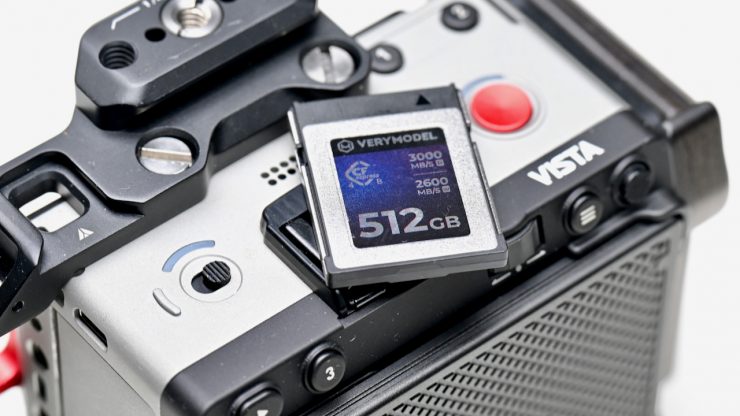
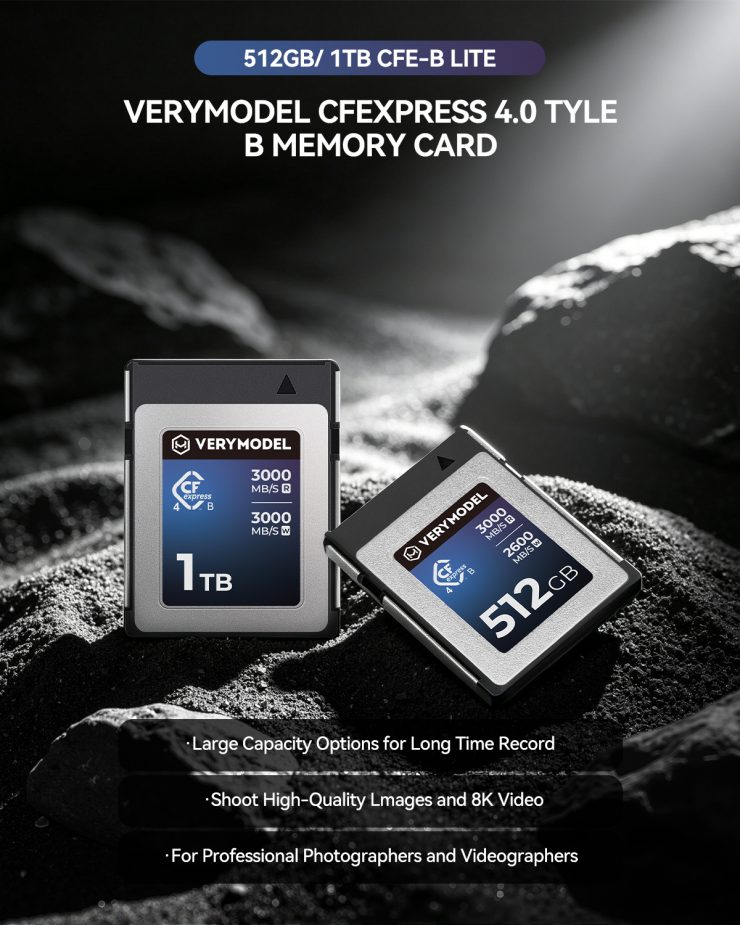
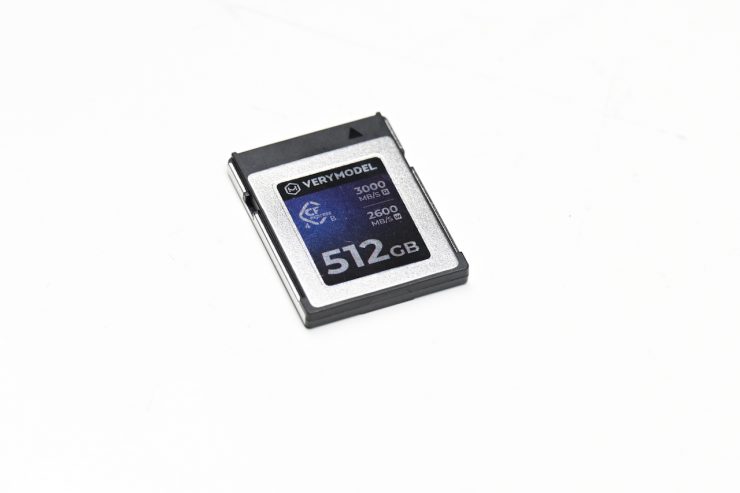
The VERYMODEL CFexpress Type B 4.0 Memory Cards are available in capacities of 512GB and 1TB. They are being touted as affordable, high-performance CFexpress Type B 4.0 cards.
If you have never heard of VERMODEL, they are a Pergear partner brand. Despite the slightly unusual name, I never judge a book by its cover, and every review is done in the same independent way regardless of who makes the product or how much it costs.
Key features
- Up to 3,000 MB/s read and write speeds
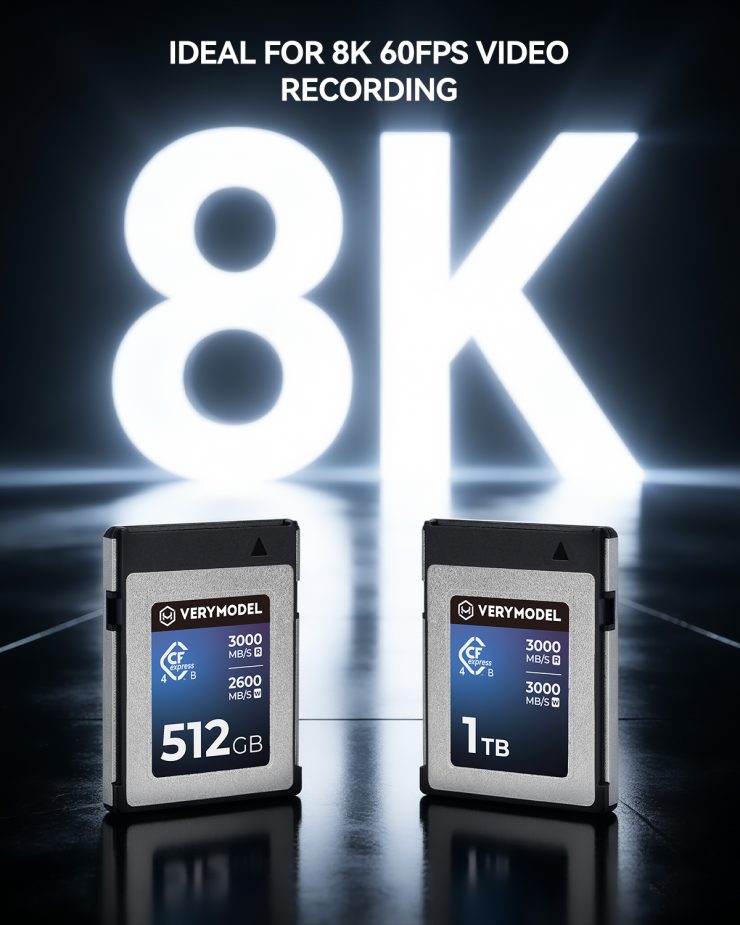
- Designed for 4K/8K video recording, including 8K 60fps.
- Available in 512GB and 1TB.
- Compatible with selected Canon, Nikon, Panasonic, Fujifilm, and DJI devices
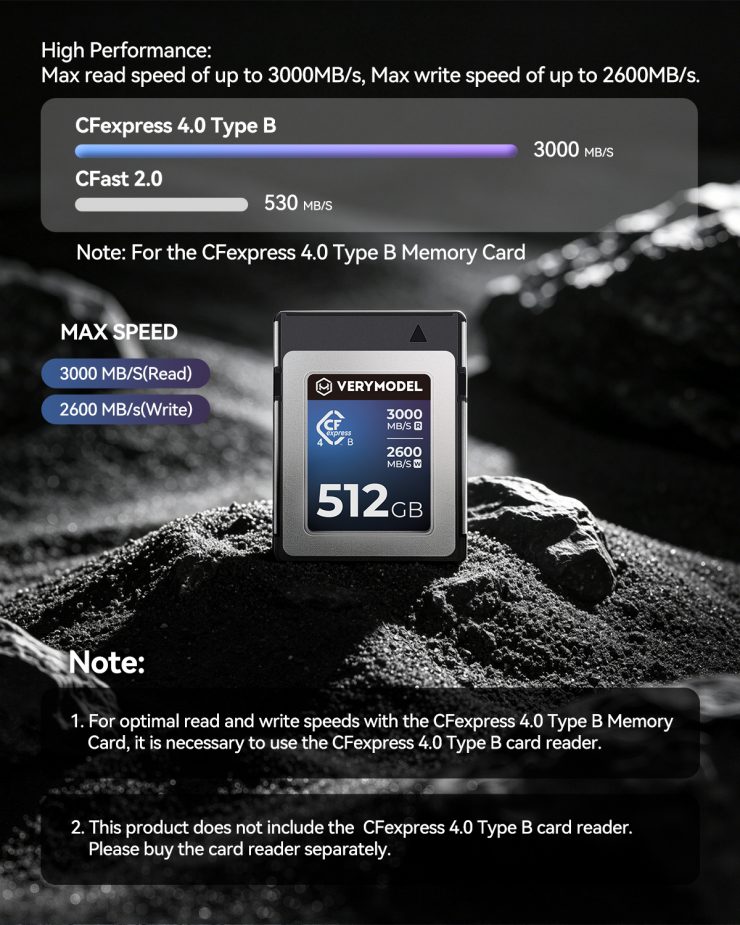
The VERYMODEL CFexpress 4.0 Type B Memory Card has claimed read speeds of up to 3000MB/s, write speeds of up to 2600MB/s, and sustained write speeds of up to 700MB/s.
The CFexpress 4.0 Type B memory cards are claimed to provide continuous, drop-free 8K RAW video capture at high bitrates, as well as high-frame-rate 4K/8K recording.
The cards will work with Nikon Z9/Z8/Z7 II/Z6 II, Canon EOS R3/R5/R5 C, C500 Mark III, 1DX Mark III, Panasonic S1/S1R, Fujifilm X-H2S, DJI Ronin 4D, and other cameras that utilize CFexpress Type B media.
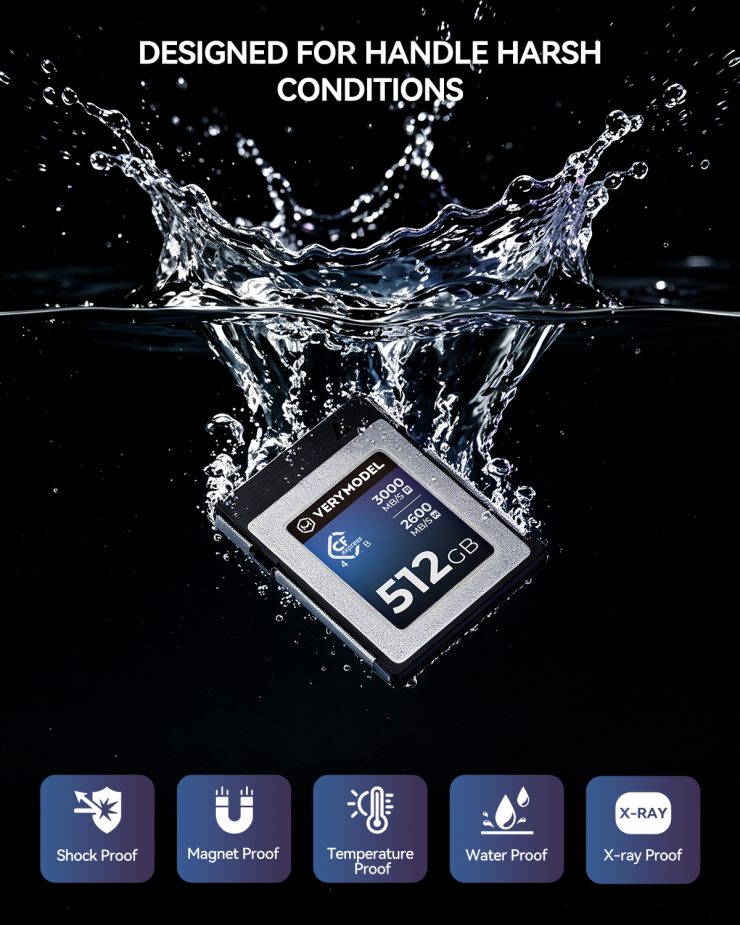
The cards are said to be shockproof, magnet-proof, waterproof, temperature-resistant, and X-ray-proof.
CFexpress cards have been around for quite a few years now, but after an initial price drop, they have now gone back up due to the global chip shortage. With the CFexpress Type B 4.0 standard, the cards are getting faster, which pairs well with their longevity and use in future cameras.
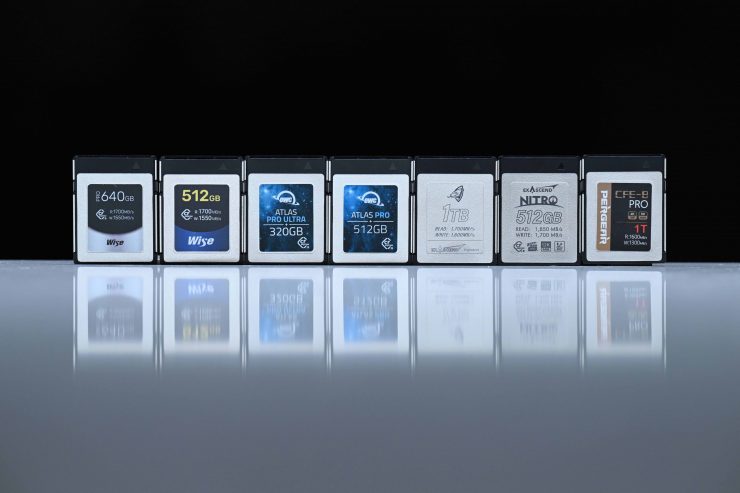
What you clearly need to know with most types of media is that they aren’t all created equal. Different cards have varying degrees of performance, and often card manufacturers won’t quote minimum sustained speeds; instead, they quote maximum possible read and write speeds. This can make choosing the right card confusing.
Fast Speeds
With the older PCIe Gen3 interface, the fastest cards can provide speeds of up to around 1850 MB/s read and 1800 MB/s write, which is over 3 times faster than the best CFast 2.0 and XQD cards. The latest CFexpress Type B 4.0 cards that utilize PCIe Gen 4 double the data rate of PCIe Gen 3, allowing PCIe Gen 4 devices to transfer data at much faster speeds. CFexpress Type B 4.0 cards can reach speeds of well over 3,000 MB/s. The only trouble is even the most data-intensive camera that utilizes CFexpress Type B cards doesn’t require more than 850MB/s sustained speeds, so you could make a case that 4.0 isn’t actually required… yet.
As I mentioned earlier, according to VERYMODEL, the 512GB card has a minimum sustained write speed of sustained write speeds of up to 700MB/s, which means it can handle high-resolution and high-frame-rate recording from a good proportion of the cameras that utilize CFexpress Type B media.
So how do these speeds compare to some other CFexpress Type B 4.0 cards on the market?
What you clearly need to be aware of is that these listed speeds are largely irrelevant in the real world, and you are not going to see maximum read or write speeds. The most important speed to try and find out is sustained read and write speeds, and minimum sustained write speeds, which are generally a lot lower than maximum speeds. Unfortunately, a lot of manufacturers don’t quote sustained minimum write speeds.
So what are the claimed sustained write speeds of some other 512GB CFexpress Type B 4.0 cards? Well, below you can see.
So what are the claimed minimum sustained write speeds of the cards? Well, below you can see the ones that I was able to find information about.
Capacity
CFexpress cards can be found in capacities up to 4TB. 512GB, 1TB, and 2TB capacity cards tend to be the most popular, but with more cameras coming to market that are recording in higher resolutions and higher bitrates, the need for larger capacity cards has only increased.
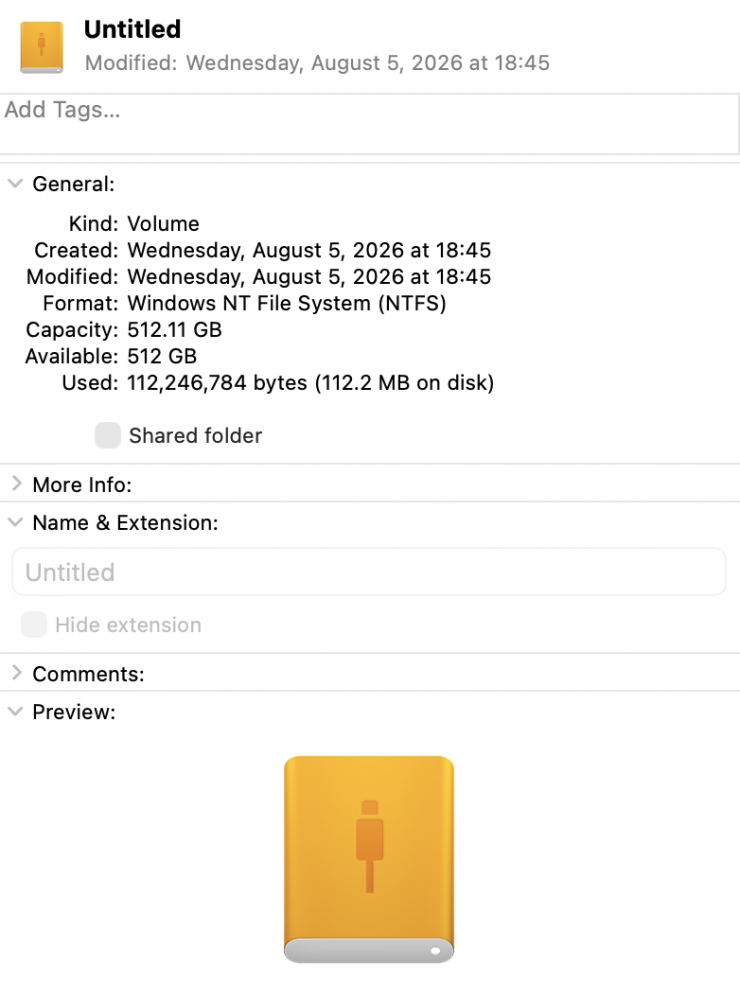
When I mounted the VERYMODEL 512GB CFexpress Type B 4.0 card, it showed the actual capacity as being 512.11GB. Given the RED Mini Mag controversy, it is good to know that you are getting what is being advertised. However, with some memory cards and media, companies reserve more space for buffer-cleaning purposes, which offers more stable writing performance.
Record 8K RAW
Cameras with dual-lane PCIe 3.0 interfaces can certainly take advantage of the high write speeds CFexpress offers. Cameras such as the Canon C500 Mark II, Canon C300 Mark III, Canon R5 II, Canon R5C, Canon R3, Panasonic GH6, and the Nikon Z9 all use a dual-lane PCIe 3.0 interface. I am also assuming that is the case with the RED V-Raptor. I am not currently aware of any camera that can take advantage of faster CFexpress Type B 4.0 cards.
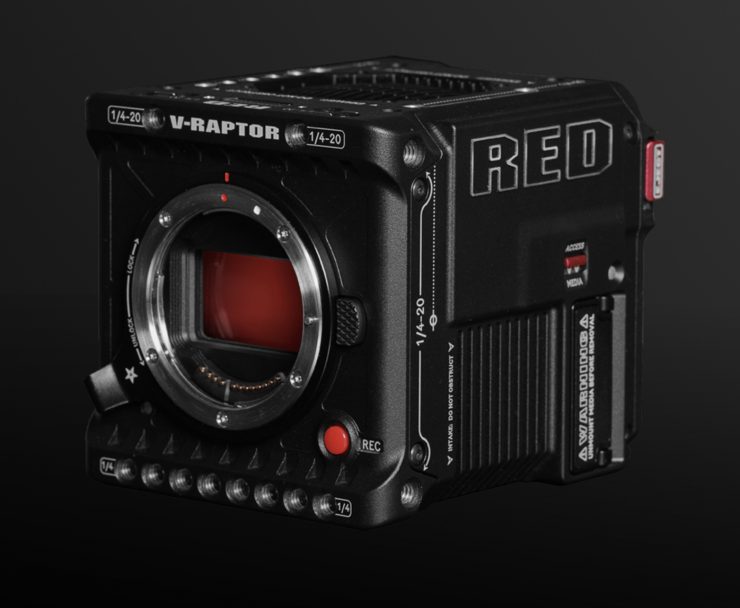
The maximum data rates when recording on the RED V-Raptor can reach up to 800MB/s so you need a card that is capable of sustaining those speeds. This is why certain cameras require certified media to be used because sometimes the data rates that are required can’t be met by just any card.
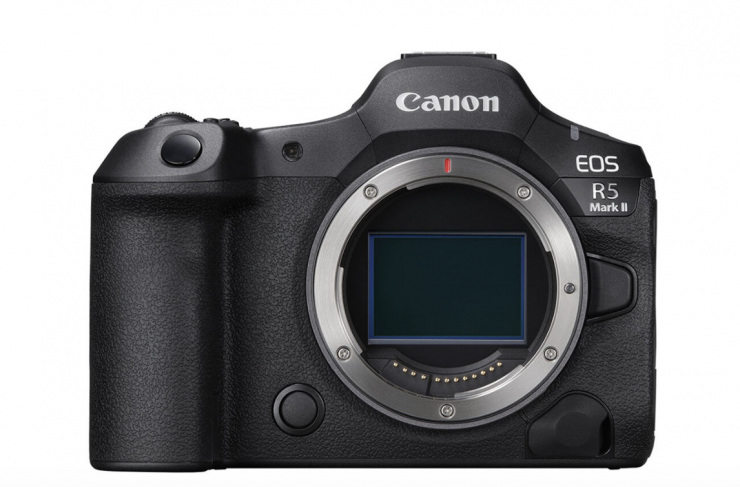
In contrast, the Canon R5 II and R5 C only need a card that is capable of sustaining around 325MB/s to record 8K RAW. This means you don’t necessarily need to buy a high-performance CFexpress Type B card if you are just using this camera.
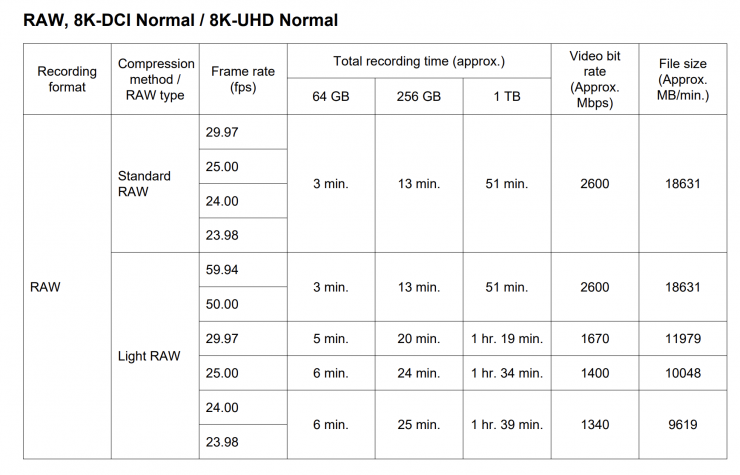
Above, you can see the card requirement speeds listed by Canon for recording 8K on the R5 II. To record 8K DCI in Standard RAW, the data rate being produced by the camera is 325 MB/s.
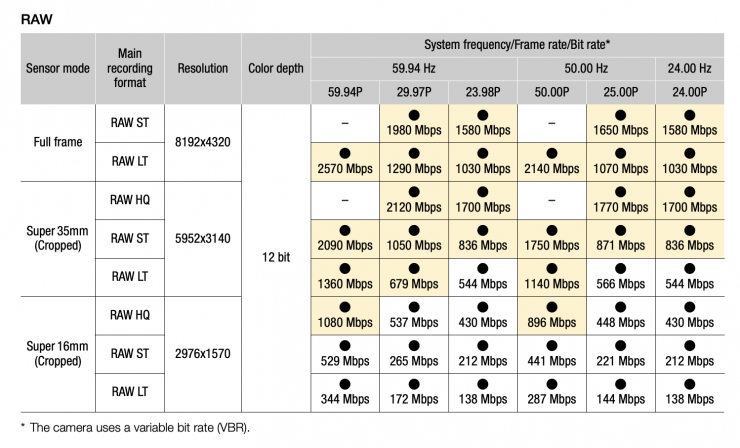
Above, you can see the card requirement speeds listed by Canon for recording 8K on the R5 II. To record 8K DCI 59.94p in RAW LT, the data rate being produced by the camera is 321.25 MB/s.
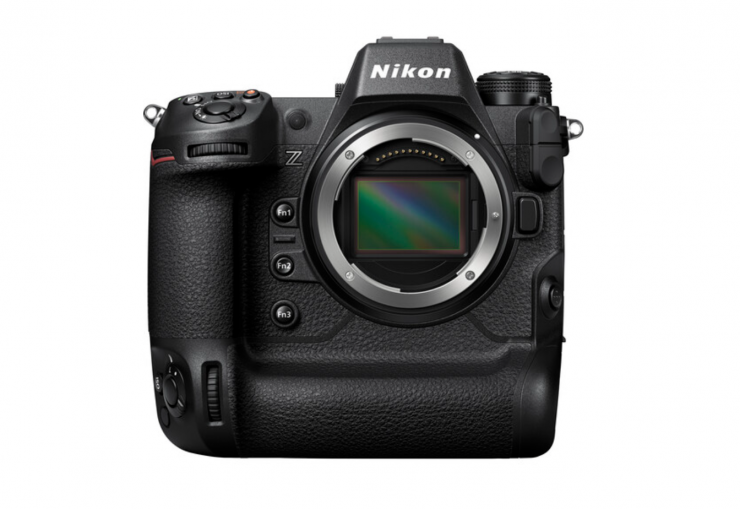
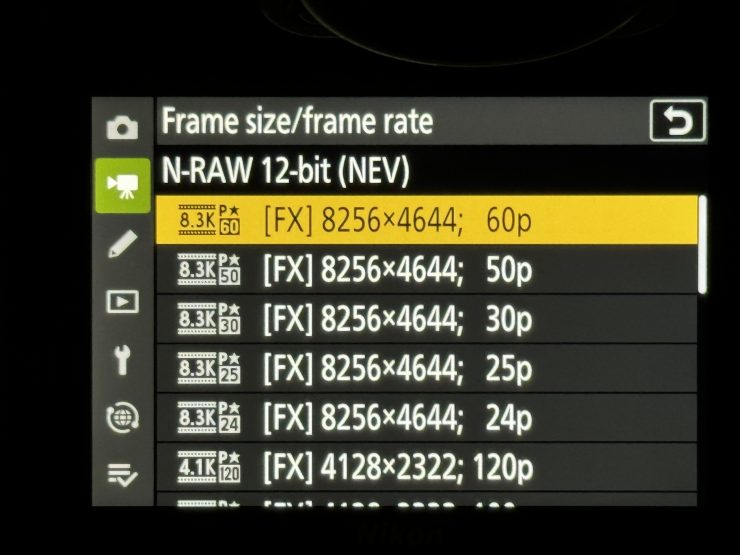
The card may have problems recording 8K RAW from the Nikon Z9, as the data rate for recording 8K 60p in N-RAW (High-quality setting) is 850MB/s. I will test this further down in the review.
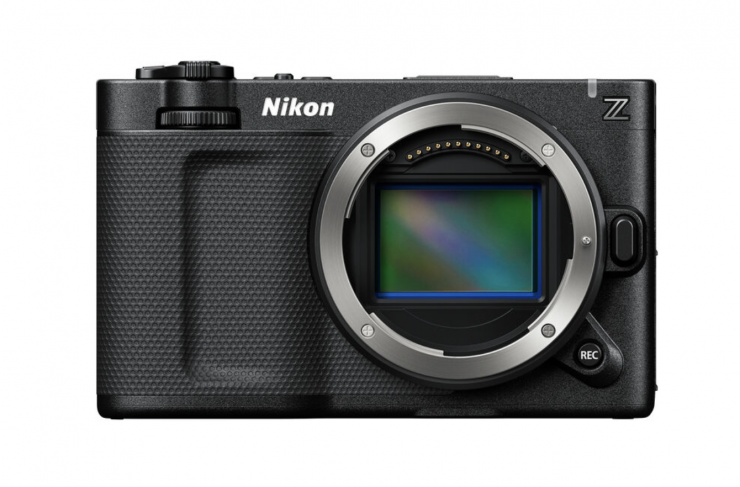
If you are recording 6K 59.94p R3D NE in the Nikon ZR, the data rate required is 472.85MB/s. If you record 6048 x 3402 at 29.97p in Apple ProRes RAW HQ, the data rate required is 625MB/s. 625MB/s is getting close to the VERYMODEL 512GB CFexpress Type B 4.0 card’s maximum sustained write speed of 700MB/s.
In cameras such as the Nikon Z6/ Z6 II and Z7/ Z7 II that only feature a single-lane PCIe 2.0 interface, the camera can only read and write to CFexpress cards at throttled-down speeds that are similar to what you would already get with an XQD card. As these cameras don’t even use the full write speed capabilities of XQD cards, CFexpress won’t offer any increased in-camera performance. In fact, I found that the CFexpress 4.0 card wouldn’t work in the Z6.
Fast Media Offload
What you clearly need to remember, and this goes for any type of media, is that transfer speeds will vary depending on both the read and write speeds of your card, your card reader, what type of hard drive you are transferring to, and the specifications of your computer.
If you are using a CFexpress card and transferring to an HDD drive, you won’t be getting fast transfer speeds. If you are transferring to a very fast SSD then you will see lightning-fast offload speeds as long as your computer utilizes USB4 or Thunderbolt 3/4/5.
Real-world speed tests
I did a few tests to see what the sustained read/write speeds of the VERYMODEL 512GB CFexpress Type B 4.0 were.
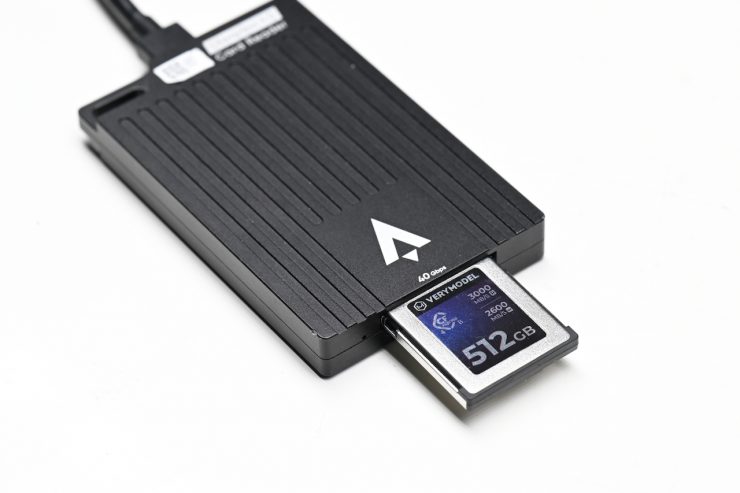
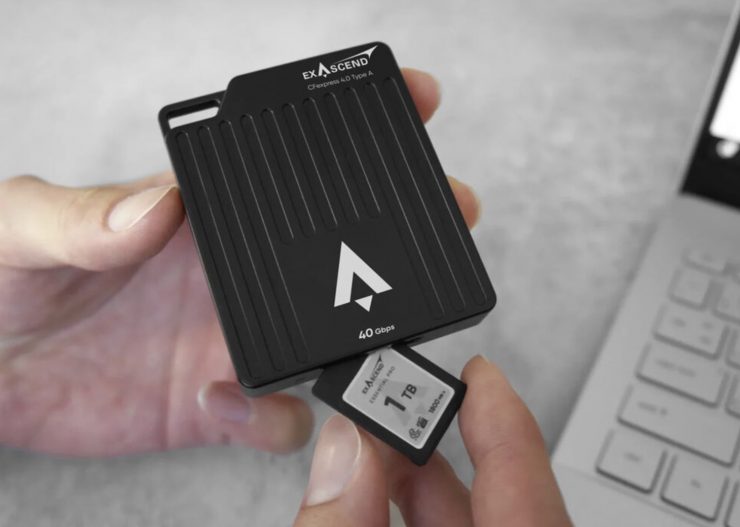
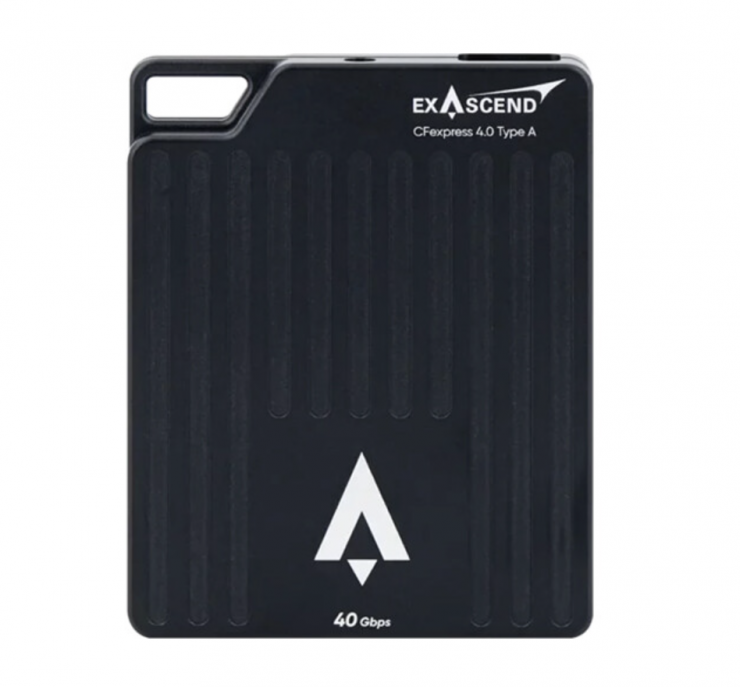
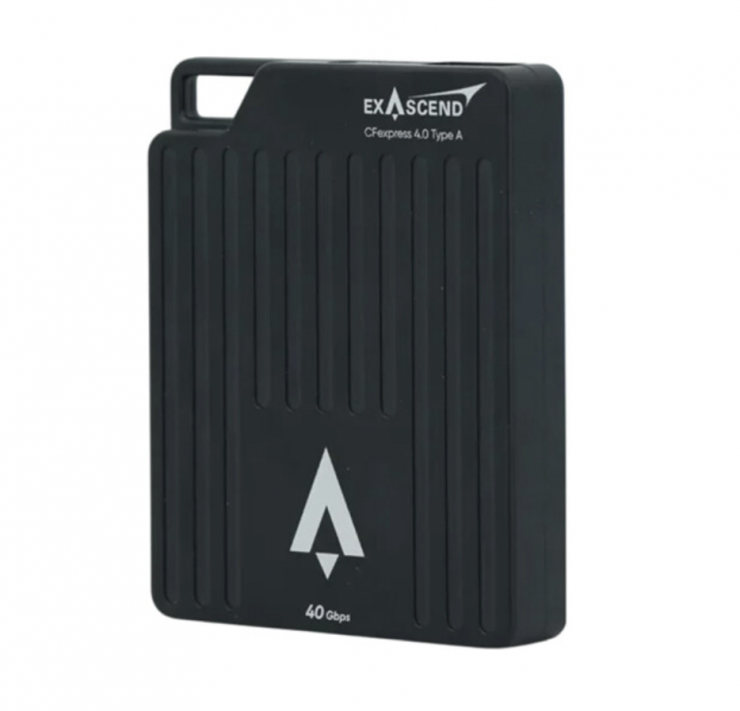
For the sustained read/write speeds, I was using an Exascend Nitro CFexpress 4.0 Type A Card Reader and a 14″ MacBook Pro with Thunderbolt/USB4. The card reader can utilize a 40 Gb/s USB-C interface.
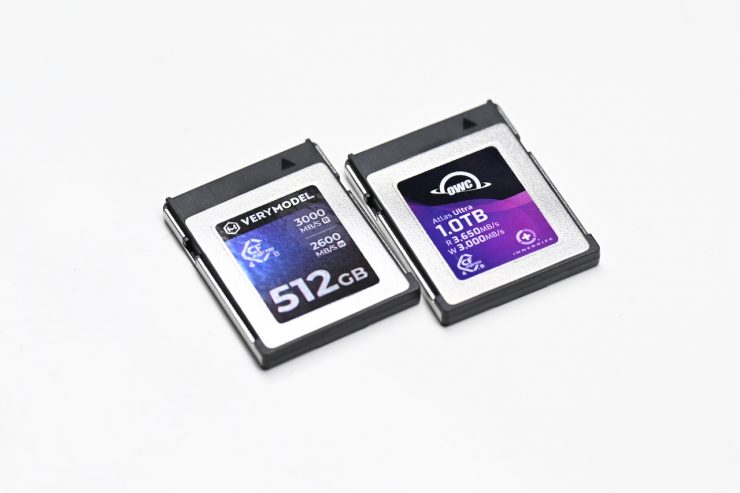
Not all cards are created equal, and just because they have high write and read speeds listed on the packaging, this doesn’t mean that they will all have the same real-world speeds.
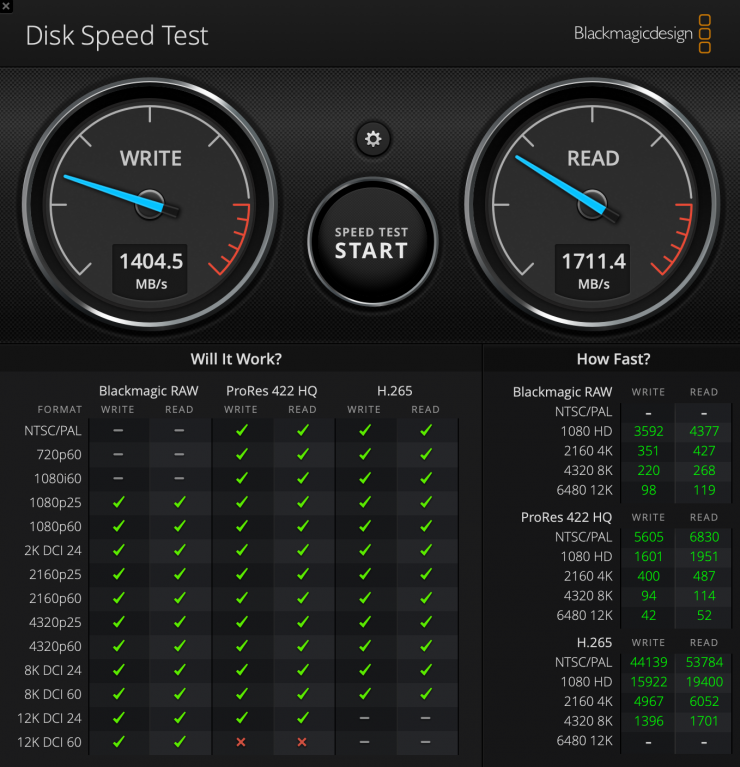
Above, you can see the results for the VERYMODEL 512GB CFexpress Type B 4.0 card with the stress set to 5GB. According to Blackmagic Design, you should select the ‘5 GB’ option for the most technically accurate test, which averages out any fluctuations in disk performance. Choosing the highest stress test value ensures that Disk Speed Test will not report artificially fast results due to the disk cache on conventional hard drives. Once the disk cache has been flooded with data, the real speed of the disks will be seen, which will be slower than the disk cache speed.
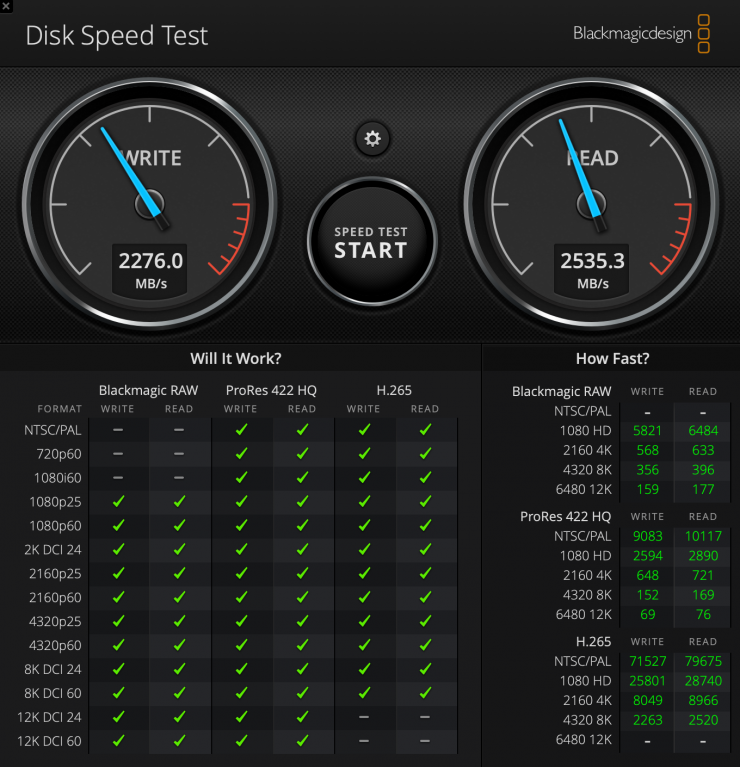
As a comparison, above you can see a test using the Wise Advanced 512GB CFexpress 4.0 Type B Memory Card.
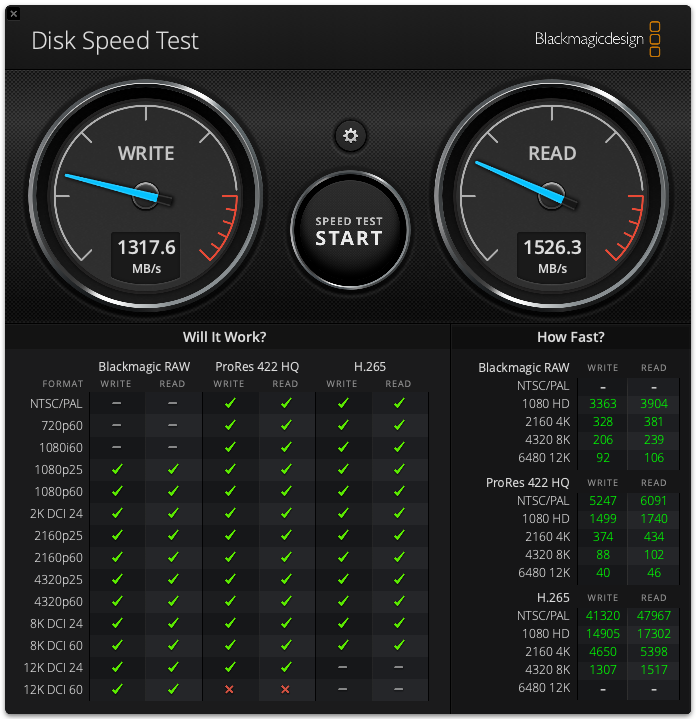
As another comparison, above you can see the exact same test using the Exascend VIGOR 1TB card with the stress set to 5GB.
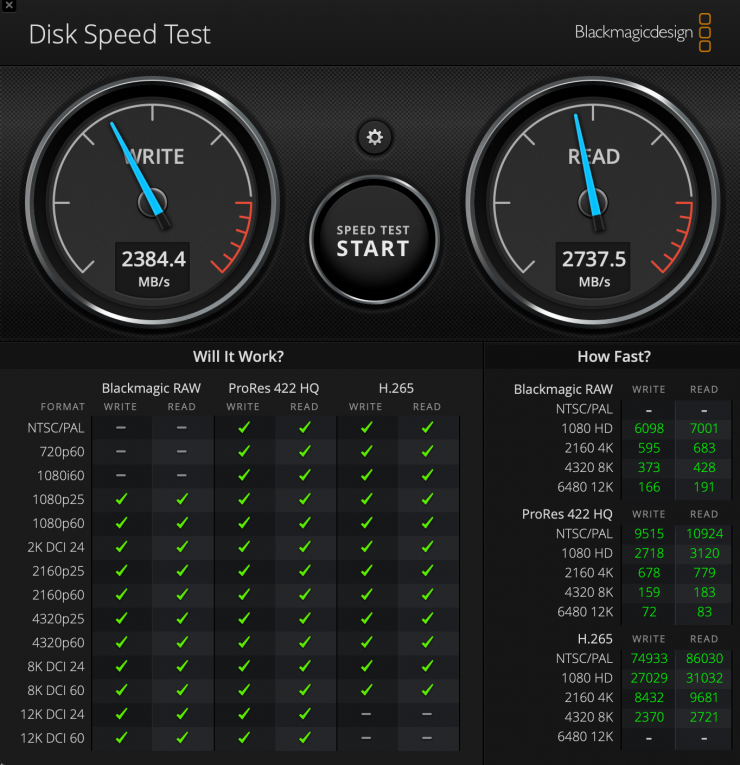
As another comparison, above you can see the exact same test using the OWC Atlas Ultra 2TB CFexpress Type B 4.0 card.
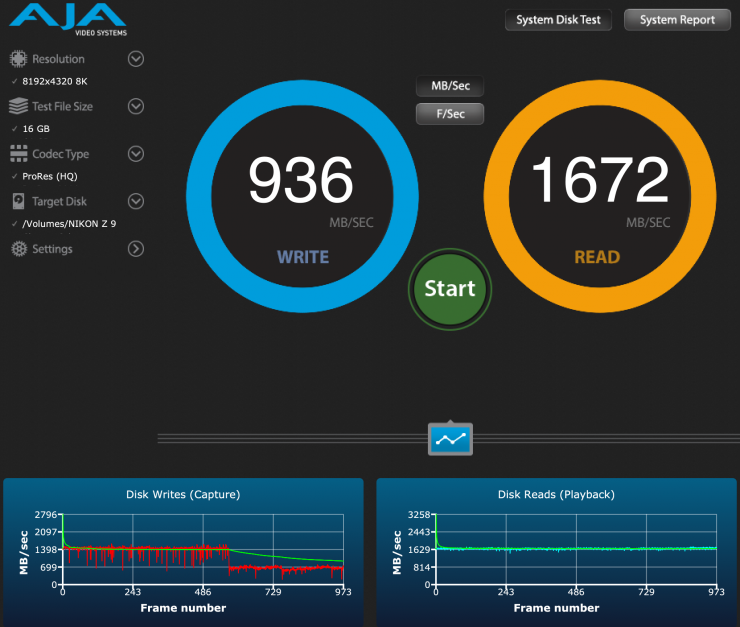
I also tested the VERYMODEL 512GB CFexpress Type B 4.0 card using the AJA System Test Lite software under a 16GB load to see what the read and write speeds were. In this test, the card did struggle, and the performance dropped off after writing around 550 frames.
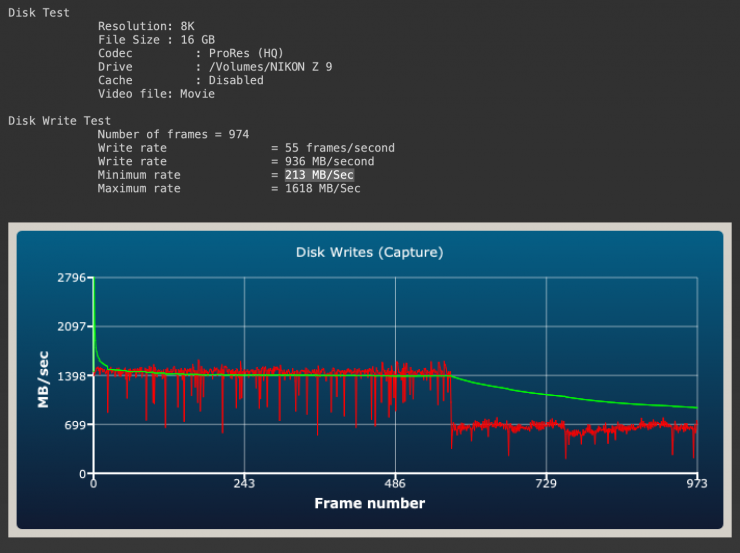
The minimum write speed was 213 MB/Sec which wasn’t great.
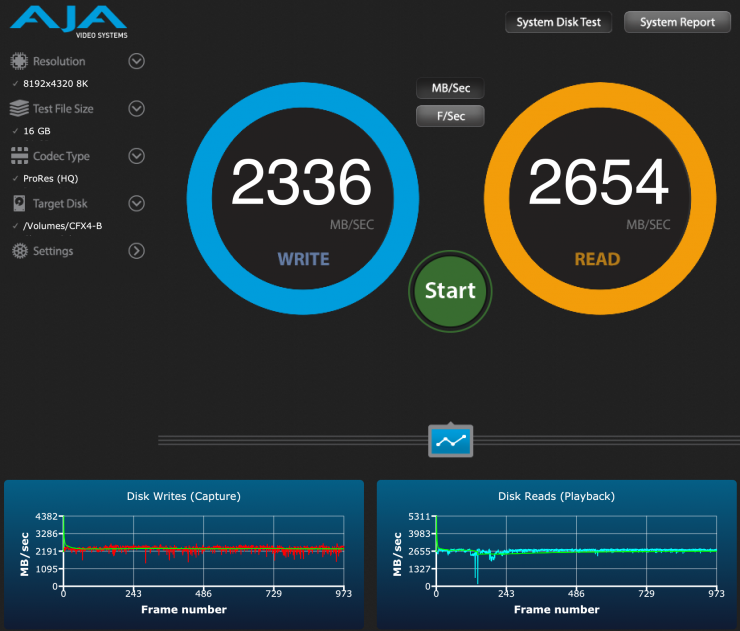
As a comparison, above you can see the same test for the Wise Advanced 512GB CFexpress 4.0 Type B Mk-II card under a 16GB. As you can see, the sustained speeds were very impressive.
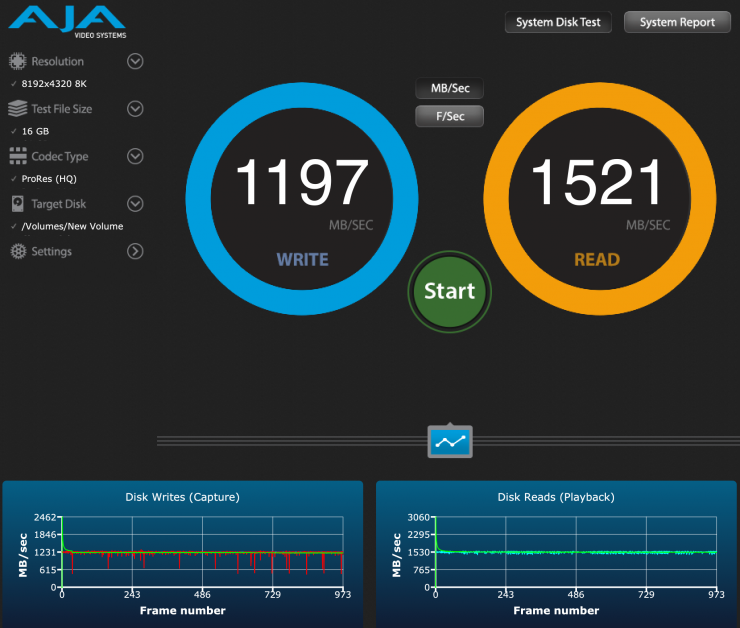
As another comparison, above you can see the same test using the Exascend VIGOR 1TB card.
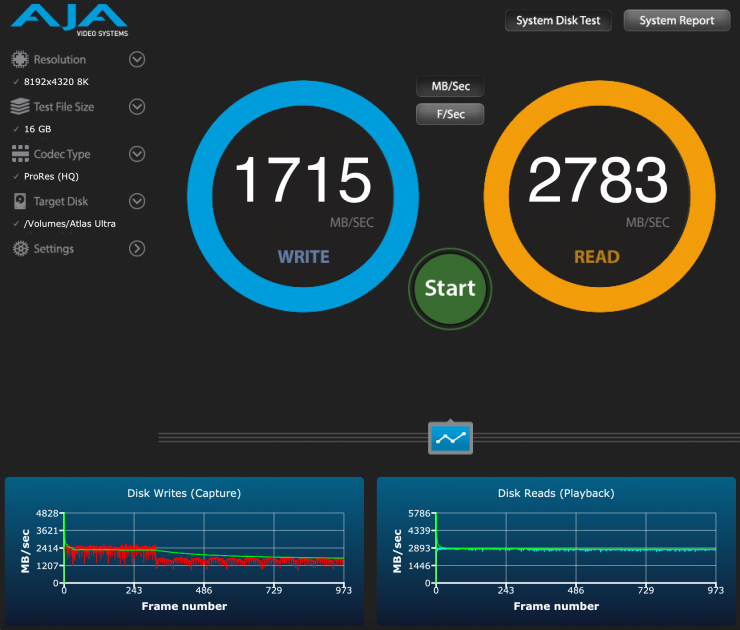
As another comparison, above you can see the same test using the OWC Atlas Ultra 2TB CFexpress Type B 4.0 card.
What if I fill the VERYMODEL 512GB CFexpress Type B 4.0 card up with data and do that same speed test again?
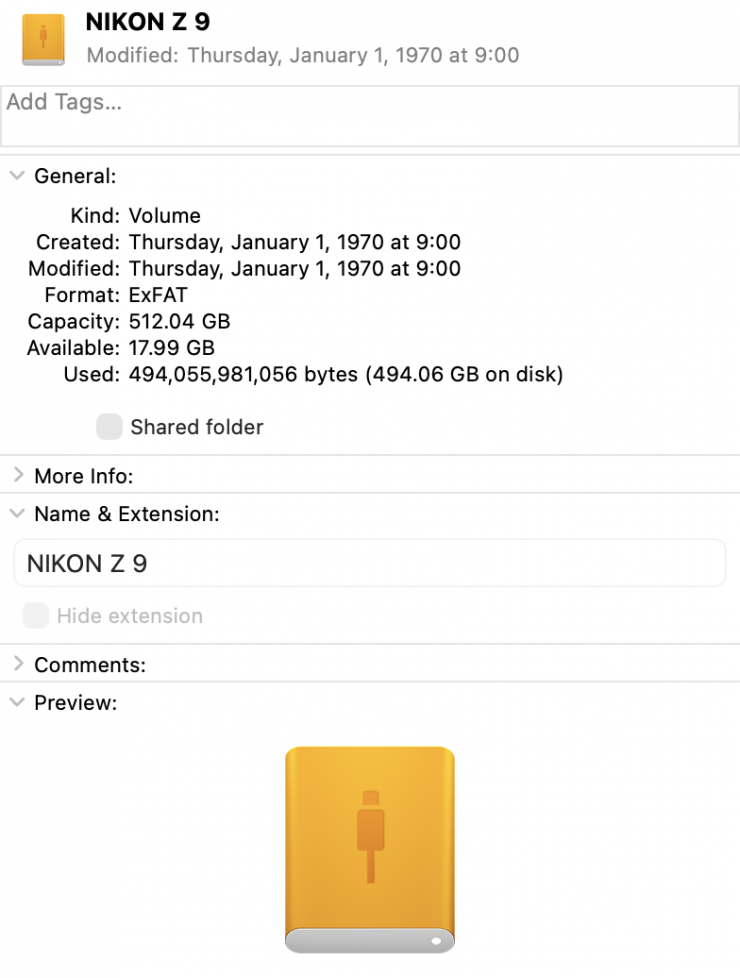
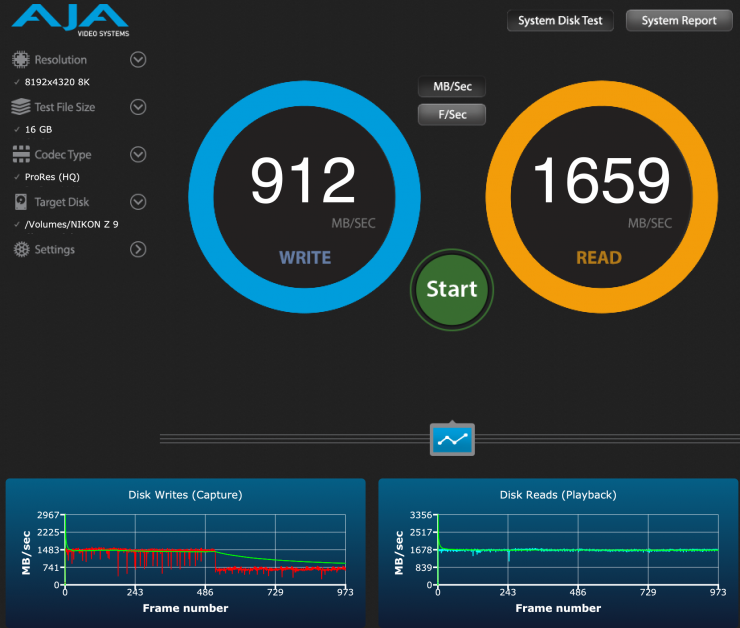
Above, you can see that when the card had 494GB on it, the speed did decrease slightly, but not by much.
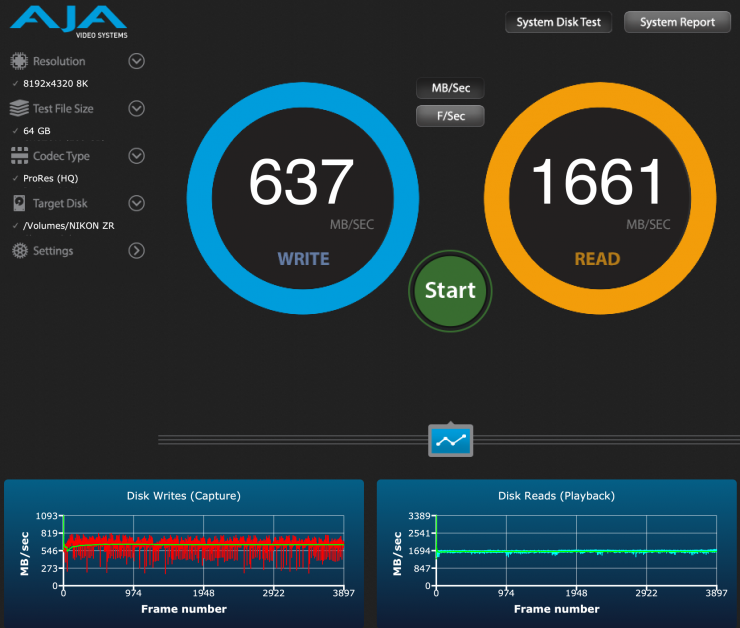
Ok, now let’s see what happens if I set the stress test to 64GB, which exceeds what any camera is capable of. As you can see, the sustained write performance dropped considerably to 637 MB/s.
Frame/sec
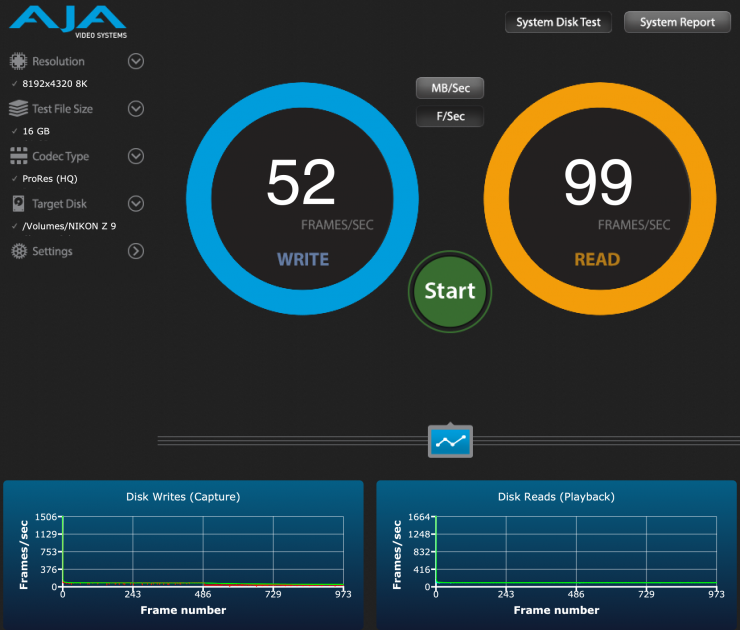
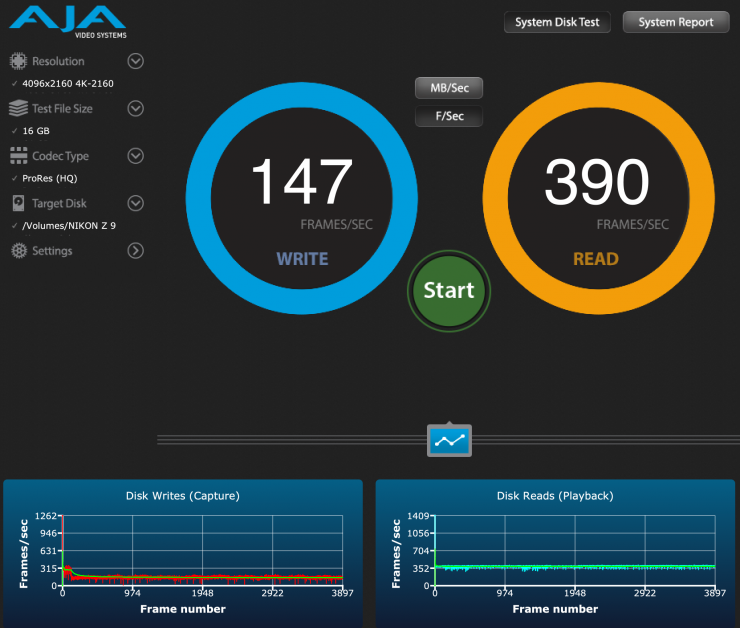
I also did another test to see how many frames per second the VERYMODEL 512GB CFexpress Type B 4.0 card could handle while recording 8K ProRes 422HQ. As you can see, it could sustain recording 52fps in 8K ProRes 422HQ. It could also sustain recording a whopping 147fps when shooting 4K DCI in ProRes 422HQ.
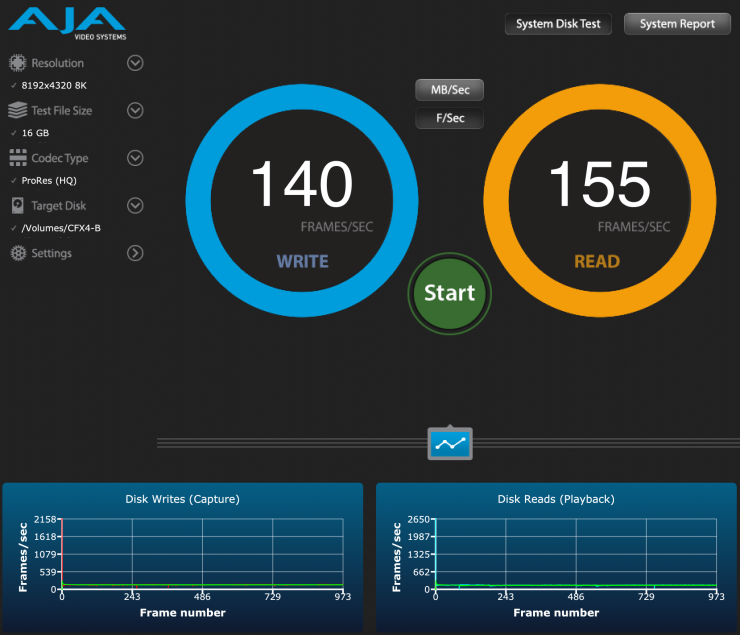
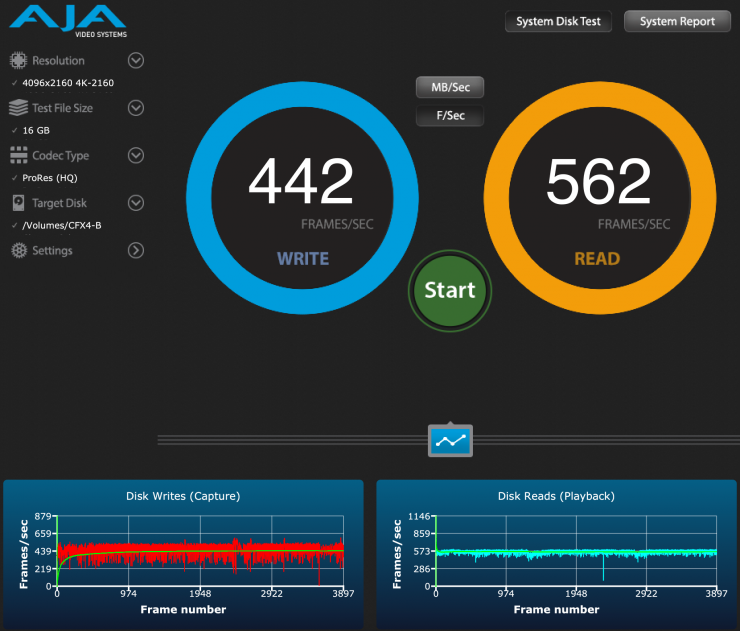
As a comparison, above you can see the same test for the Wise Advanced 512G CFexpress 4.0 Type B Mk-II card. As you can see, it could sustain recording 140fps in 8K ProRes 422HQ. It could also sustain recording a whopping 442fps when shooting 4K DCI in ProRes 422HQ.

As a comparison, above you can see the same test using the OWC Atlas Ultra 2TB CFexpress Type B 4.0 card.
What you clearly need to remember, and I am going to reiterate this over and over, is that the CFexpress Type-B card readers can be a stumbling block when it comes to speed. There are currently only a very small number of Thunderbolt 4/USB4 CFexpress 4.0 card readers available.
Below are some of the card readers that are CFexpress 4.0.
- Wise Advanced CFexpress 4.0 Type B Card Reader $99.99 USD
- ProGrade Digital CFexpress Type B USB 4.0 Single-Slot Card Reader $104.99 USD
- OWC Atlas CFexpress 4.0 Type B Card Reader $99.99 USD
- Nextorage NX-SB1PRO CFexpress Type B Card Reader $99.99 USD
- Xcellon CFexpress 4.0 Type B Card Reader $94.99 USD
- Glyph Technologies Capture+ CFexpress 4.0 Type B Memory Card Reader $149.99 USD
- Novachips CFexpress 4.0 Type B Card Reader $99 USD
- Sabrent USB4 CFexpress Type B Card Reader $79.99 USD
- Angelbird Performance CFexpress Type B Card Reader $259.99 USD
Real World Testing
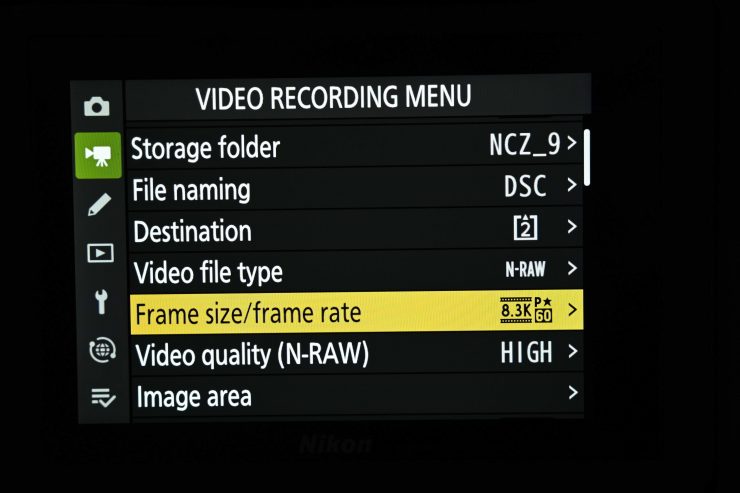
I tested the VERYMODEL 512GB CFexpress Type B 4.0 card with the Nikon Z9 and set the camera to record 8K 60p N-RAW. The Z9, when recording 8K 60p in N-RAW (High Quality setting) requires a card with a sustained data rate of up to 850 MB/s.
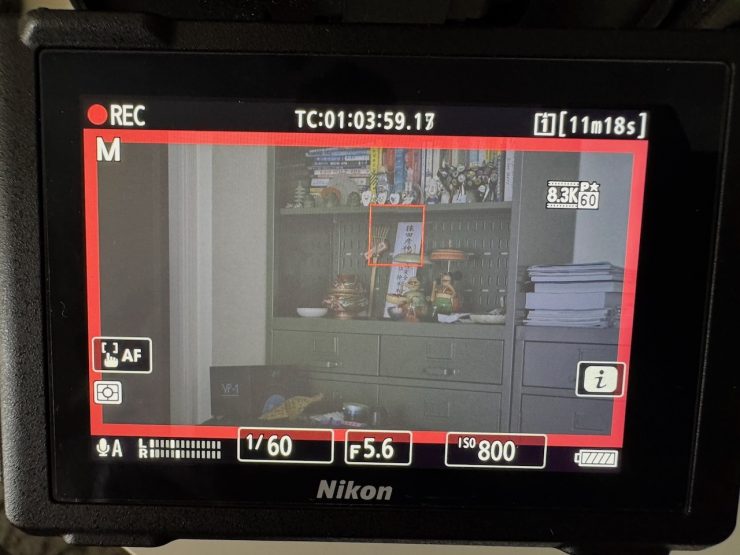
I was able to record 8K 60p N-RAW in the High Quality setting for only about 15 seconds before it stopped. This didn’t come as any big surprise, as the performance of the card doesn’t meet the requirements for recording 8K 60p N-RAW.
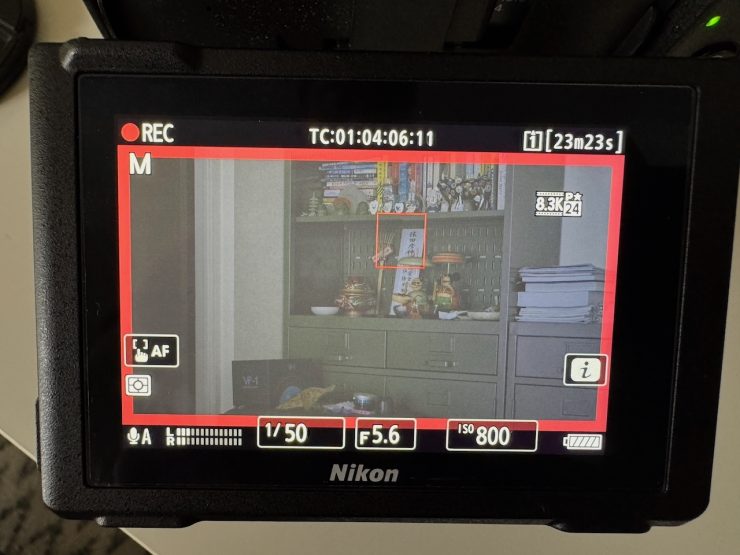
I then tried recording 8K 23.98p N-RAW in the High Quality setting, and I didn’t have any issues at all.
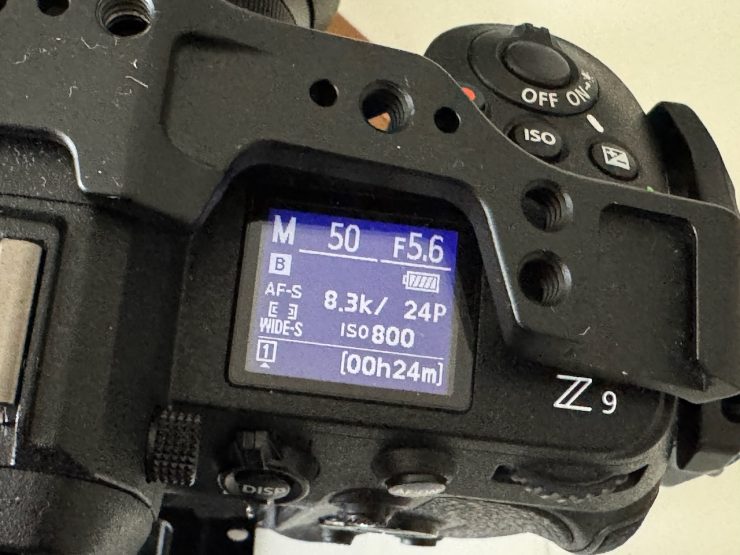
With the 512GB capacity, I was able to record 24 minutes of 8K 23.98p in N-RAW (High Quality setting) material.
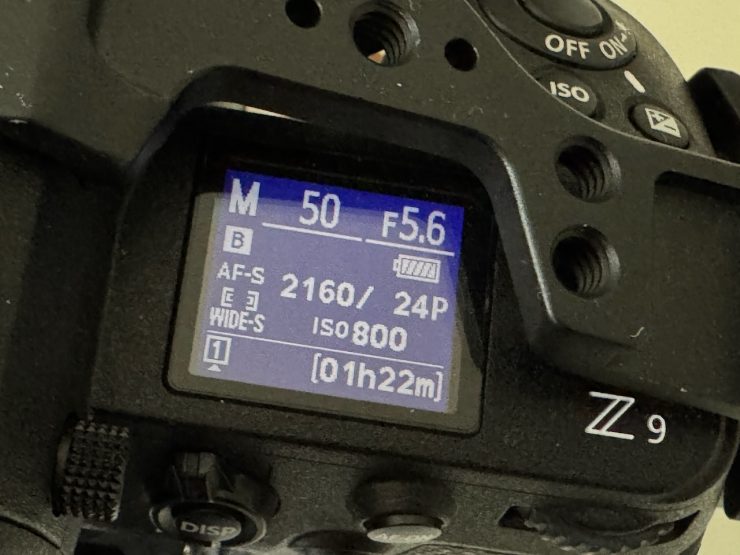
If I wanted to record 23.98p 4K ProRes 422HQ, I could get 1 hour and 22 minutes.
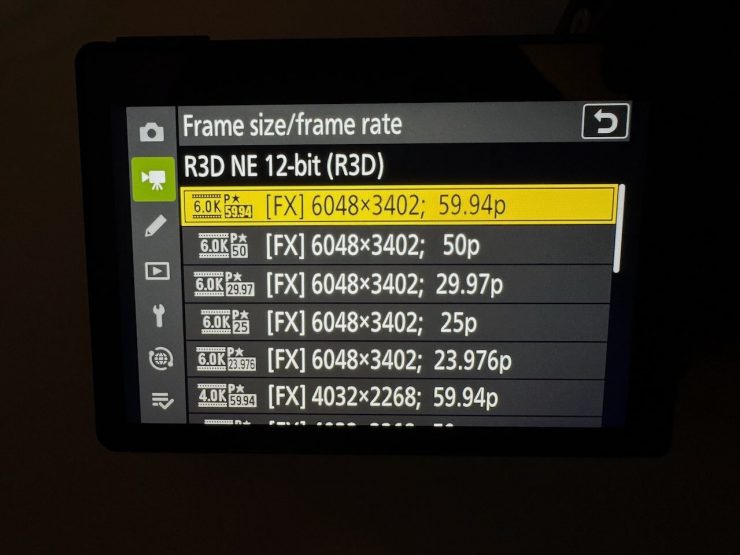
I also tried recording 6K 59.94p R3D NE on the Nikon ZR, and I didn’t have any issues at all. The card could record 17 minutec and 59 seconds of 6K (6048 x 3402) 59.94p material.
I could also record 6048 x 3402 at 29.97p in Apple ProRes RAW HQ without any issues. Even though the data rate required is 625MB/s, which is getting close to the VERYMODEL 512GB CFexpress Type B 4.0 card’s maximum sustained write speed of 700MB/s, I didn’t encounter any problems.
Warranty
The VERYMODEL CFexpress Type B cards have a 2-year warranty.
Pricing & Availability
The VERYMODEL 512GB CFexpress 4.0 Type B Card is $249 USD, and the 1TB version is $369 USD.
US Amazon: Link: https://amzn.to/4xzjcaR (No code required, 5% off at checkout) Valid time: 8/9/2026 ~6/10/2026/23:59 PM
CA Amazon: 5% OFF Code: KCXIPPHV Link: https://amzn.to/4yqmIVw Valid time: 13/9/2026 ~ 30/9/2026/23:59 PM)
EU Amazon: (No code required, 5% off at checkout) Link: https://amzn.to/3Tg58ES Valid time: 13/9/2026 ~5/10/2026/23:59 PM)
JP Amazon: (No code required, 8% off at checkout) Link: https://amzn.to/3SZK3OX Valid time: 8/9/2026 ~6/10/2026/23:59 PM)
Pergear.com: (No code required, 5% off at checkout) Link: https://bit.ly/4xiIgmi Valid time: 8/9/2026 ~6/10/2026/23:59 PM)
How does the price compare to the competition?
So how do these speeds compare to some other CFexpress 4.0 cards on the market?
So how much do the cards cost per/GB? Well, you can see below.
| PRICE/GB | |
| VERYMODEL 512GB CFexpress Type B 4.0 | $0.48 USD |
| Delkin Devices 512GB POWER 4.0 | $0.64 USD |
| Lexar 512GB Professional GOLD CFexpress 4.0 | $0.86 USD |
| ProGrade Digital 512GB CFexpress 4.0 Type B Gold | $0.78 USD |
| Lexar 512GB Professional DIAMOND CFexpress 4.0 | $1.05 USD |
| Delkin Devices 512GB BLACK CFexpress Type B 4.0 | $0.84 USD |
| Nextorage 512GB NX-B3SE Series CFexpress 4.0 Type B | $0.56 USD |
| Angelbird 512GB AV PRO SE CFexpress v4 Type B | $0.78 USD |
| OWC 512GB Atlas Pro CFexpress 4.0 Type B | $0.78 USD |
| Glyph Technologies 512GB Capture+ CFexpress 4.0 Type B | $0.78 USD |
| Exascend 512GB Element Pro CFexpress 4.0 Type B | $0.55 USD |
| Exascend 512GB Essential Pro CFexpress 4.0 Type B | $0.97 USD |
| Silicon Power 512GB CreatePro CR40B CFexpress 4.0 Type B | $0.78 USD |
| Silicon Power 512GB StudioPro CFexpress 4.0 Type B | $0.48 USD |
| Exascend 512GB Nitro Pro CFexpress 4.0 Type B | $1.95 USD |
| Wise Advanced 512GB CFexpress 4.0 Type B | $0.86 USD |
Conclusion
If you are working on professional productions, you want to use the best available and reliable media possible. Yes, no media is foolproof, and cards can fail regardless of their price and certification, but it is always good to know that a camera manufacturer has done a lot of the hard work for you. There is a reason why certain cards are approved by camera manufacturers, and others are not.
If you own a camera that utilizes CFexpress Type B recording media and you don’t have a lot of money to spend on cards, then the VERYMODEL 512GB CFexpress Type B 4.0 provides very good value for money. If you need to record 8K 60p in RAW with the Nikon Z9, or 8K RAW on the RED V-Raptor, then it isn’t going to be suitable, but for use with most cameras and recording resolutions and frame rates, it will be up to the task.
The card’s performance was ok, but not as good as other competing options that I have tested; but in saying that, those options were considerably more expensive. Like with a lot of things, you pay for what you get.
No current camera on the market that utilizes CFexpress Type B media comes even remotely close to maxing out any of the speeds that some of the new 4.0 cards offer, but it is always better to have a high buffer so that nothing is getting strained or pushed to capacity. The other benefit of these 4.0 cards is that you can offload material incredibly quickly with one of the new card readers. This alone probably makes them worth looking at.
It is arguably going to be a hard sell for VERYMODEL as it’s a name that shooters are not familiar with, and they may well have a predetermined bias to go with a brand that they know and trust.
The VERYMODEL 512GB CFexpress Type B 4.0 is a budget-priced card that will work well for a lot of shooters who aren’t looking for a huge capacity, but you do need to be aware of the performance limitations when working with a few cameras.