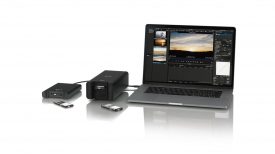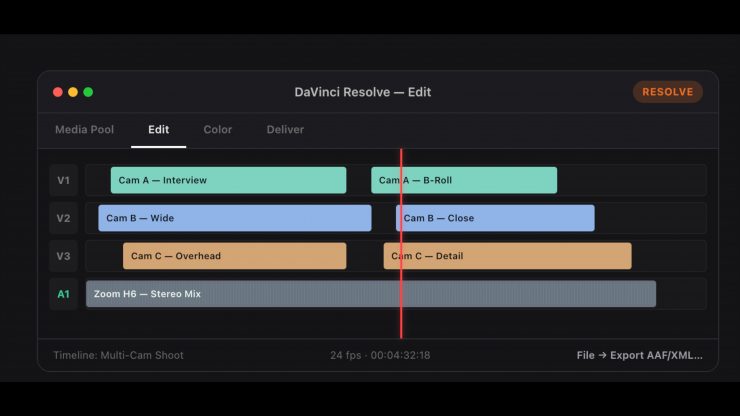
WaveXML lines up the Zoom / Sound Devices tracks with the picture, and it also syncs the camera footage. You then export an XML and keep cutting in your NLE. WaveXML beta is a fully functioning app that is free, with no clip or feature limits.
Some shooters, especially if you are working on your own or in small teams, like to use a separate audio recorder if there is no sound recordist. They mainly do this because a lot of the more affordable cameras can have bad preamps and lack 32-bit recording. It also provides you with a backup. The only issue is that if you aren’t using any timecode devices to sync them up, the footage and audio have to be synced back up later on.
If you have been around long enough, you would remember using PluralEyes to sync up audio and video when there were no matching timecodes. PluralEyes (which was essentially discontinued by Maxon) required you to do an XML round-trip where you would place material on a timeline, sync waveforms, and then import a new sequence. WaveXML sort of works in a similar way.
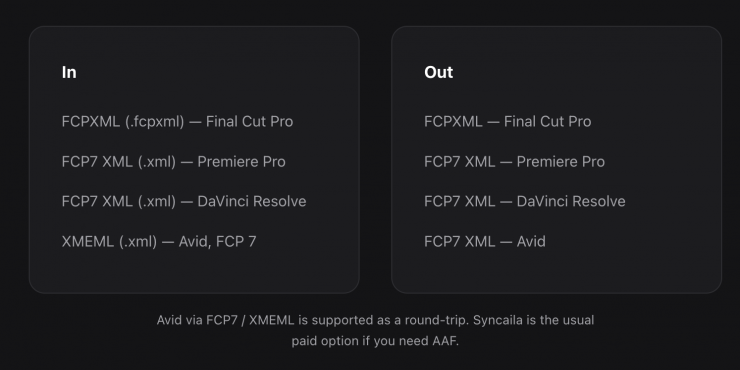
WaveXML is a Mac app that does a similar job to PluralEyes. You export FCP7 XML or FCPXML, match the recorder to the cameras, export XML, and keep cutting in the NLE. Everything is done locally on your machine, and no media is ever uploaded.
- In: FCPXML (Final Cut), FCP7 XML (Premiere, Resolve), XMEML (Avid / FCP 7)
- Out: XML back to the same NLE
- Layout: one camera per video track, recorder on its own audio track, don’t nest the multicam yet
- Not in this beta: Windows, Linux, AAF, a Premiere panel
WaveXML syncs based on audio waveforms, and as long as there’s overlapping audio between your camera and external recorder, it can find the alignment point, even if the camera audio is poor quality. WaveXML will work with any camera as long as there is audio to match. A built-in camera mic picking up room sound is usually enough.
Arguably the best way to operate if you don’t have timecode devices is to send a scratch track to your camera, which can be as easy as running a 3.3mm cable from your recorder’s headphone out to your camera’s 3.5mm mic input.
You would then import everything into your NLE and export an XML with the cameras on video tracks and the audio recorder on its own audio track. You then drop the XML into WaveXML and press synchronize. Once that is done, you import the synced XML and mute the scratch audio track.
Below is an easy-to-follow step-by-step way of using WaveXML.
Before you export
Lay the sequence out in your NLE first:
- Picture — one camera per video track. Don’t nest the multicam yet.
- Recorder — dual-system audio on its own audio track, not mixed under the cameras.
- Then File → Export XML (FCP7 XML from Premiere or Resolve, FCPXML from Final Cut).
This tutorial has the track layout for each NLE.
Step 1: Drop XML
Open WaveXML and drop the .xml or .fcpxml file onto Drop a timeline XML, or click to open.
WaveXML reads the sequence and draws it on the timeline. Media stays where it already is — WaveXML does not upload anything.
If clips are offline, use Fix Paths in WaveXML to point at the media folder, or relink in the NLE and export XML again.
Step 2: Synchronize
Press Synchronize. Optional: Sync → Quality (1–4). Higher is more thorough. 4 is the default.
WaveXML matches overlapping audio between cameras and recorder tracks, then shows the aligned timeline.
Step 3: Export XML
Press Export XML. Save the file, then import it back into the NLE you exported from.
That’s the whole loop: Drop XML → Synchronize → Export XML.
You may be asking, why would I need this in 2026 when NLEs have something already built-in? DaVinci Resolve has an Auto Sync / Auto Align that is also based on waveforms; Adobe Premiere has Create Multi-Camera Source Sequence, and Final Cut Pro has Synchronize Clips / multicam. All of these options work with varying degrees of success, but you need to have good scratch and recorded audio to do so.
Syncaila is arguably the closest PluralEyes alternative. It works with macOS and Windows, XML and AAF, Premiere / Resolve / Final Cut / Avid / EDIUS. There is a lifetime licence, and one key allows you to use it on up to three machines. They also offer a 20-day full trial and a forever-free cap (20 clips on 2 tracks).
If you are a Windows user and need AAF, Syncaila is a good option. WaveXML is not trying to be a replacement for it; it’s simply an alternative option.
At the end of the day, WaveXML is free, so it’s always good to have alternative tools available that can get you out of a jam.
Like a lot of new apps that have yet to get Apple certification, macOS may block WaveXML the first time (unidentified developer). This is fairly common, but you can just do a Google search to see how to bypass it.