Apple is entering the subscription model with an all-new suite of creative apps. Apple Creator Studio includes Final Cut Pro, Logic Pro, Pixelmator Pro, Motion, Compressor, and MainStage, plus new AI features and premium content in Keynote, Pages, and Numbers. All in a single monthly or annual subscription.
What’s Included
- Final Cut Pro
- Motion
- Compressor
- Logic Pro
- MainStage
- Pixelmator Pro
- Keynote
- Pages
- Numbers
- Freeform remains free for everyone
Let’s get into the subscription prices.
Subscription Pricing
- Apple Creator Studio will be available beginning Wednesday, January 28, for $12.99 USD per month or $129 USD per year. All new subscribers will enjoy a one-month free trial of Apple Creator Studio, and with the purchase of a new Mac or qualifying iPad,13 customers can receive three months of Apple Creator Studio for free.14
- Education savings are available for college students and educators15 for $2.99 USD per month or $29.99 USD per year.
- Apple Creator Studio is available to download on the App Store as a universal purchase.
- Up to six family members can share all of the apps and content included in Apple Creator Studio with Family Sharing.
- One-time-purchase versions of Final Cut Pro ($299.99 USD), Logic Pro ($199.99 USD.), Pixelmator Pro ($49.99 USD), Motion ($49.99 USD), Compressor ($49.99 USD), and MainStage ($29.99 USD) are available on the Mac App Store.
- Free versions of Keynote, Pages, Numbers, and Freeform continue to be available and are included with every new iPhone, Mac, and iPad.
What is the difference between the subscription version and a one-time purchase of Final Cut Pro?
Apple states that a subscription to Apple Creator Studio bundles Apple’s creative apps for one low monthly payment.
A one-time purchase will still be available, but access to some of the premium content is available only to Apple Creator Studio subscribers. If you already own Final Cut Pro, it will continue to be updated.
When it comes to software, I was never a fan of subscription models, but that’s been the way it’s gone for many years, so it’s not surprising that Apple has gone to this model with Apple Creator Studio. Final Cut Pro has been priced at $299 for a long time, with free updates and versions, so that was a great deal. You can still go this route, but you are probably better off moving to Creator Studio if the other apps are useful for your creative needs and for tasks beyond video production, including productivity apps. You really have to be a power user to justify the subscription.
Fine Print
- 1- The Apple Creator Studio version of Final Cut Pro for Mac will be compatible with Mac models with Intel or Apple silicon chips running macOS 15.6 or later. Some features require Apple silicon. Final Cut Pro for iPad will be compatible with iPad models with the A16, A17 Pro, or M1 chip or later running iPadOS 18.6 or later.
- 2- Pixelmator Pro for iPad is compatible with iPad models with the A16, A17 Pro, or M1 chip or later running iPadOS 26 or later. The Apple Creator Studio version of Pixelmator Pro requires macOS 26.
- 3- The Apple Creator Studio version of Logic Pro for Mac requires macOS 15.6 or later and a Mac with Apple silicon. Logic Pro for iPad requires iPadOS 26 or later and an iPad with the Apple A12 Bionic chip or later. Some features require the Apple A17 Pro chip or later.
- 4- Apple Creator Studio versions of Keynote, Pages, and Numbers will require iOS 18.0 or later, iPadOS 18.0 or later, or macOS Sequoia 15.6 or later. Some intelligent features, including image generation, will require iOS 26, iPadOS 26, or macOS Tahoe. Premium content and features in Freeform are not currently available and are expected to be included in the Apple Creator Studio subscription later this year.
- 5- The one-time-purchase versions of Final Cut Pro require macOS 15.6 or later, Logic Pro requires macOS 15.6 or later, and Pixelmator Pro requires macOS 12.0 or later. MainStage is available for any Mac supported by macOS 15.6 or later. Motion requires macOS 15.6 or later. Compressor requires macOS 15.6 or later, and some features require a Mac with Apple silicon.
- 6- Transcript Search in Final Cut Pro requires a Mac with Apple silicon and macOS 15.6 or later, or an iPad with the Apple M1 chip or later, iPad (A16), or iPad mini (A17 Pro) and iPadOS 26 or later. Available only in U.S. English.
- 7- Visual Search requires a Mac with Apple silicon and macOS 15.6 or later, or an iPad with the Apple M1 chip or later, iPad (A16), or iPad mini (A17 Pro) and iPadOS 26 or later. Available only in U.S. English.
- 8- Session Players require an iPad with the Apple M1 chip or later, or Mac with Apple silicon is recommended.
- 9- Apple Pencil hover works with iPad Pro 13-inch (M4), iPad Pro 12.9‑inch (6th generation), iPad Pro 11-inch (M4), iPad Pro 11‑inch (4th generation), iPad Air 13-inch (M2), and iPad Air 11-inch (M2).
- 10- Apple Pencil squeeze is only available when using Apple Pencil Pro with iPad Pro 13- and 11-inch (M4 and M5), iPad Air 13- and 11-inch (M2 and M3), and iPad mini (A17 Pro).
- 11- Apple Pencil double-tap works with Apple Pencil (2nd generation) with iPad mini (6th generation), iPad Air (4th and 5th generations), iPad Pro 11-inch (1st, 2nd, 3rd, and 4th generations), and iPad Pro 12.9-inch (3rd, 4th, 5th, and 6th generations); and with Apple Pencil Pro with iPad mini (A17 Pro), iPad Air 11-inch and 13-inch (M2 and M3), and iPad Pro 11-inch and 13-inch (M4 and M5).
- 12- Some features of Apple Creator Studio require an Apple Intelligence-capable device. For a list of Apple Intelligence availability and technical requirements, see support.apple.com/121115. Some artificial intelligence features of Apple Creator Studio utilize third-party models and may have usage limits and restrictions.
- 13- A new Mac or iPad purchased from Apple or an Apple Authorized Reseller. iPad must have at least 6 GB of memory and an A16, A17 Pro, or M-series chip or later.
- 14- New and qualified returning subscribers only. Plan renews at $12.99 per month or $129 per year based on plan selected. Only one offer per Apple Account and only one offer per family if they’re part of a Family Sharing group, regardless of the number of devices that they or their family purchase. This offer is not available if the account holder or their family has previously accepted an Apple Creator Studio subscription’s three-month free offer. Offer is good for the latter of (i) three months after eligible device activation or (ii) three months after first availability for subscription to Apple Creator Studio. Plan automatically renews until cancelled. Restrictions and other terms apply.
- 15- New subscribers only. Education Savings Plan automatically renews at $2.99 per month or $29.99 per year based on the plan selected, until cancelled. Offer is good for college students and educators only and does not extend to a Family Sharing group. Verification required. Terms apply. Limited-time offer; offer may end at any time.
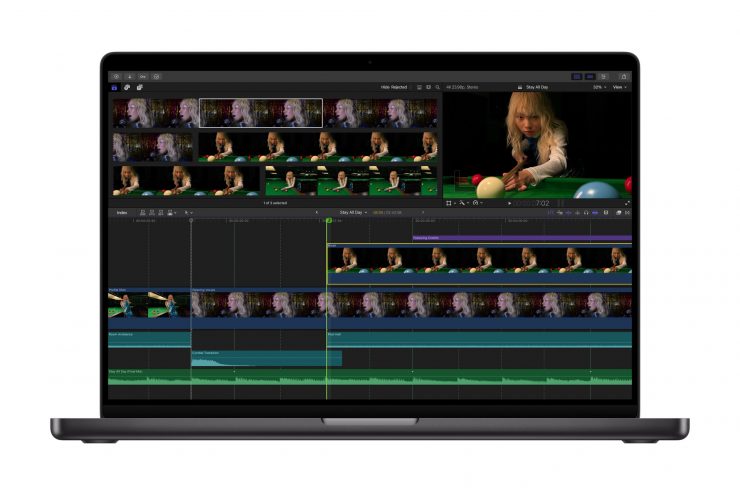
The apps included with Apple Creator Studio for video editing, music making, creative imaging, and visual productivity give modern creators the features and capabilities to tailor their content while realizing their artistic vision with new intelligent features and premium content built on familiar experiences of Final Cut Pro, Logic Pro, Pixelmator Pro, Keynote, Pages, Numbers, and later Freeform.

Final Cut Pro introduces new video-editing tools and intelligent features for Mac and iPad to improve efficiency. For the first time, Pixelmator Pro is coming to iPad with a uniquely crafted experience that is optimized for touch and Apple Pencil.
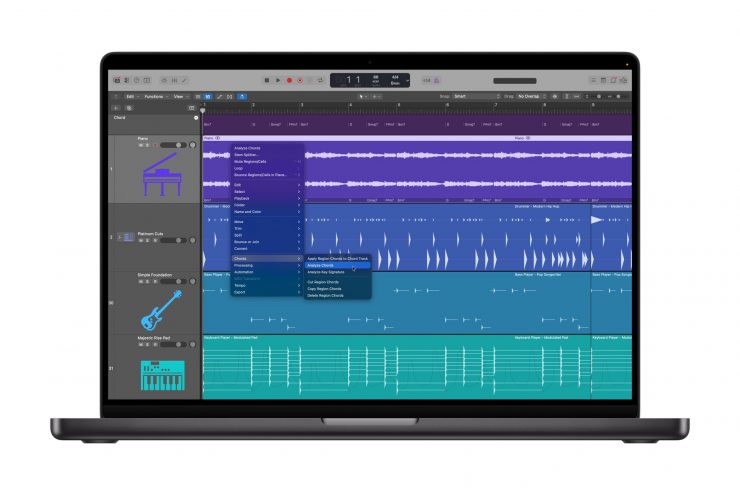
Music creation with Logic Pro for Mac and iPad introduces additional intelligent features, such as Synth Player and Chord ID, to help you write, produce, and mix a range of popular music.

With Keynote, Pages, Numbers, and Freeform, Apple Creator Studio subscribers can be more expressive and productive through new premium content and intelligent features across Mac, iPad, and iPhone.
Transcript Search
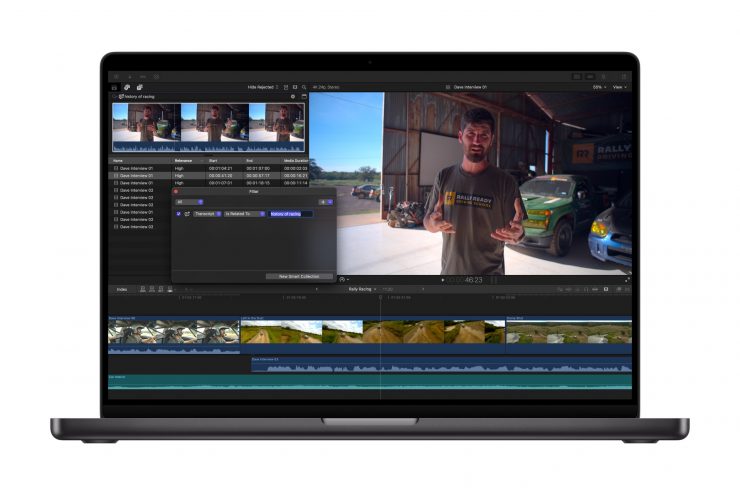
With Transcript Search on Mac and iPad, users can now easily find the perfect soundbite in hours of footage by typing phrases into the search bar to see exact or related results. Video podcasts and interviews can be assembled quickly, eliminating extensive time spent skimming through footage. Looking for a specific video clip also gets an intelligence assist with Visual Search. Now, users can quickly pinpoint exact moments across all footage by searching for an object or action, and then add that visual to their timeline in seconds.
Beat Detection
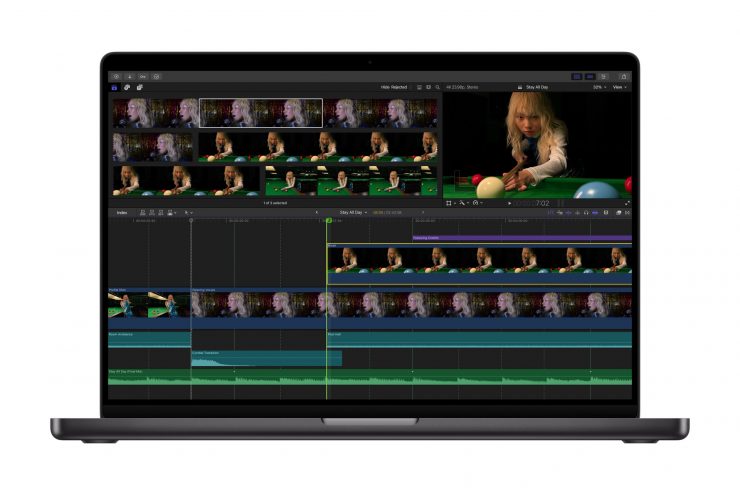
Final Cut Pro for Mac and iPad also makes editing video to the rhythm of music fast and fun with Beat Detection, an amazing new way to see musical beats, bars, and song parts right in the project timeline. Beat Detection uses an AI model from Logic Pro to instantly analyze any music track and display the Beat Grid, so users creating fast-paced videos can quickly and visually align their cuts to the music. Re-editing music tracks to different lengths is also easier than ever.
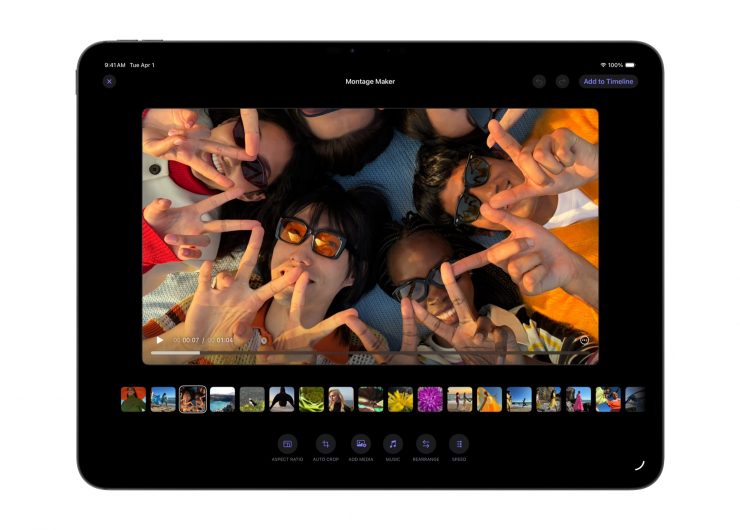
The new Montage Maker in Final Cut Pro for iPad lets users kick-start their edit in just seconds. Using the power of AI, Montage Maker will analyze and edit together a dynamic video based on the best visual moments within the footage, with the ability to change the pacing, cut to a music track, and intelligently reframe horizontal videos to vertical with Auto Crop to simplify sharing across social platforms.
Logic Pro

A new lineup of features for Logic Pro for Mac and iPad supports musical artists and helps creators deliver original music for their video content, whether as an Apple Creator Studio subscriber or a one-time-purchase Mac user.
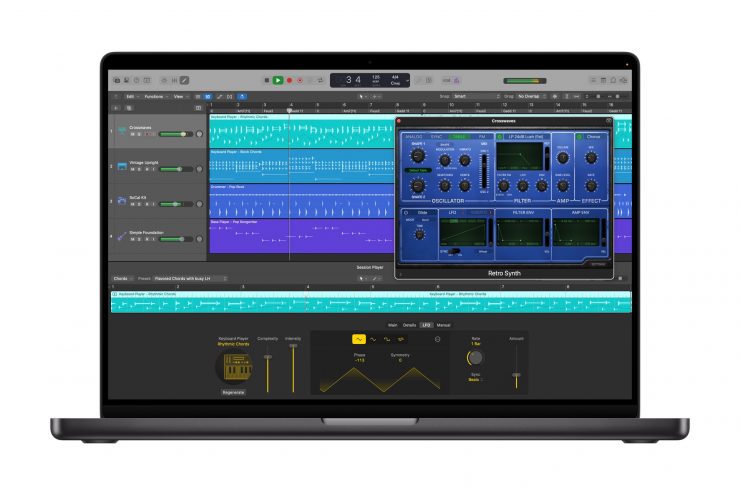
Synth Player joins the AI Session Player lineup, delivering incredible electronic music performances with a diverse range of chordal and synth bass parts, all powered by AI and the advanced software instrument technology of Logic Pro.
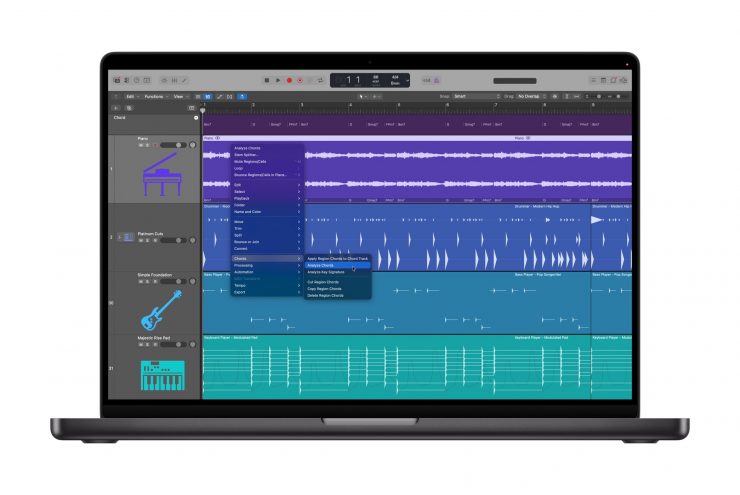
Tapping into the power of AI, Chord ID becomes a personal music theory expert by turning any audio or MIDI recording into a ready-to-use chord progression, eliminating tedious manual transcription and bringing demo ideas to life even faster. Designed to help everyone get the most out of the Session Player experience, Chord ID can analyze complex harmonic content from nearly any recording to automatically populate the chord track in Logic Pro. And since the chord track drives the performances of any AI Session Player, users can quickly audition different players, styles, and genres, allowing them creative freedom to experiment and dial in their favorite vibe.
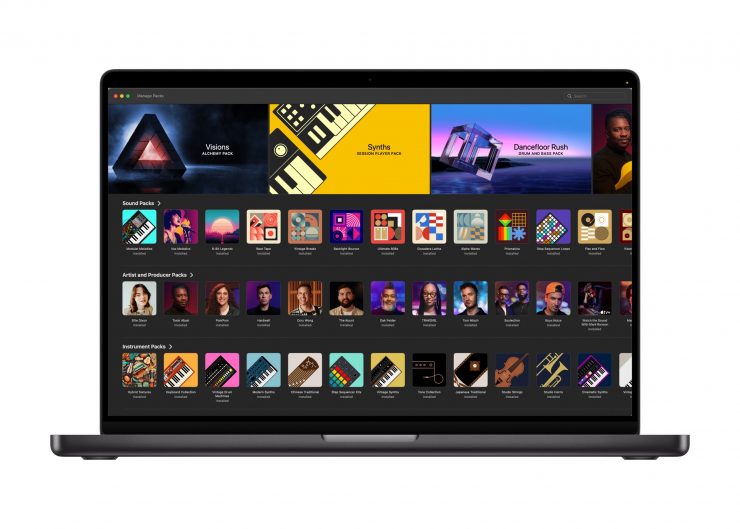
The new Sound Library in Logic Pro for Mac delivers Apple-designed packs and Producer Packs with hundreds of royalty-free loops, samples, instrument patches, drum sounds, and more. Additionally, Logic Pro for iPad users will now have access to the industry-leading Quick Swipe Comping feature from Logic Pro for Mac, an indispensable tool for vocalists and producers who want to create seamless performances inside or outside the studio.
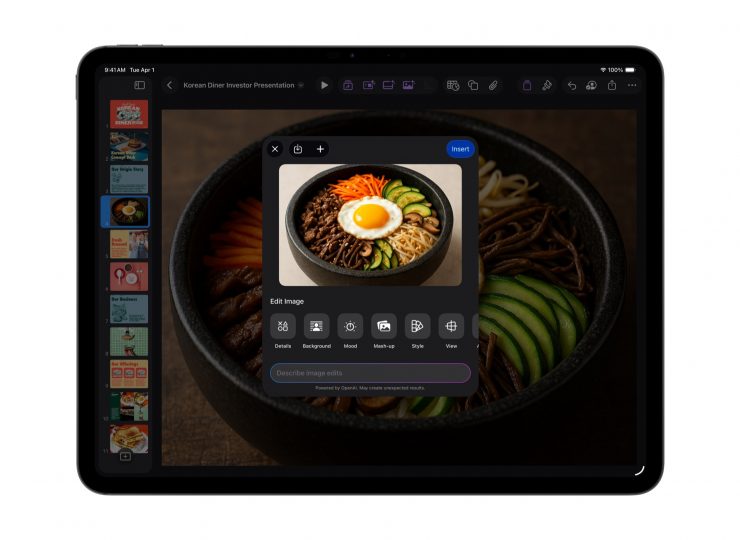
Logic Pro for iPad also presents Music Understanding features with natural language search in the Sound Browser to help users describe a loop or find similar loops, no tags, guesses, or filters required. AI-based awareness of the massive collection of loops in Logic Pro makes it easy to search either through natural language or a recording to find a similar or complementary loop or sound.
Creative Imaging Designed for iPad
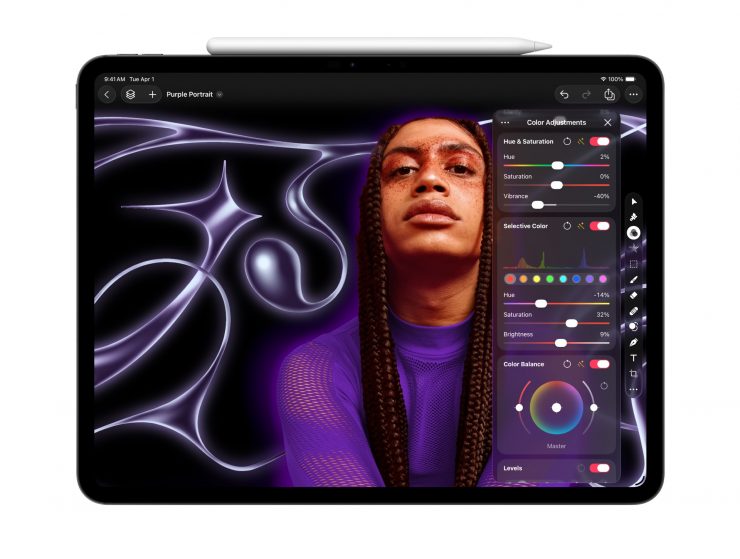
Pixelmator Pro, the award-winning image editor for Mac, comes with the all-new Apple Creator Studio. Pixelmator Pro is packed with powerful image editing tools. For the first time, Pixelmator Pro is coming to iPad, bringing an all-new touch-optimized workspace, full Apple Pencil support, and the ability to work between iPad and Mac. Pixelmator Pro for iPad offers fast, efficient image editing, leveraging the performance of Apple silicon and built from the ground up for the latest iPadOS.
Intuitive touch controls make it even easier to create desktop-class designs wherever users take their iPad. The full-featured Layers sidebar allows creators to build designs using a range of unique elements like images, shapes, text, and even video. Smart selection tools help users isolate and edit specific parts of images effortlessly, and with advanced bitmap and vector masks, users can hide or reveal discrete portions of their designs. The deep integration of hardware, software, and Apple silicon unlocks features like Super Resolution for intelligently upscaling photos, Deband for removing compression artifacts, and automatic composition suggestions with Auto Crop. With full support for Apple Pencil.
Additionally, for Apple Creator Studio subscribers, both Pixelmator Pro for Mac and iPad bring a powerful new Warp tool for twisting and shaping layers any way creatives can imagine, alongside a collection of Warp-powered product mockups.
Keynote, Pages, Numbers, and Freeform will remain free for all users to create, edit, and collaborate with others, including Apple Creator Studio subscribers. These apps will continue to receive updates, with the latest versions adopting the new visual design language with Liquid Glass across all platforms and supporting the new windowing and menu bar improvements in iPadOS 26.