Cut Point Labs LUT Tuner for Mac allows you to edit, preview, resize, compare, and export .cube 3D LUTs with still-image, video, and generated-pattern previews in a macOS tool.
It was designed for colorists, editors, finishing artists, DITs, and post-production workflows.
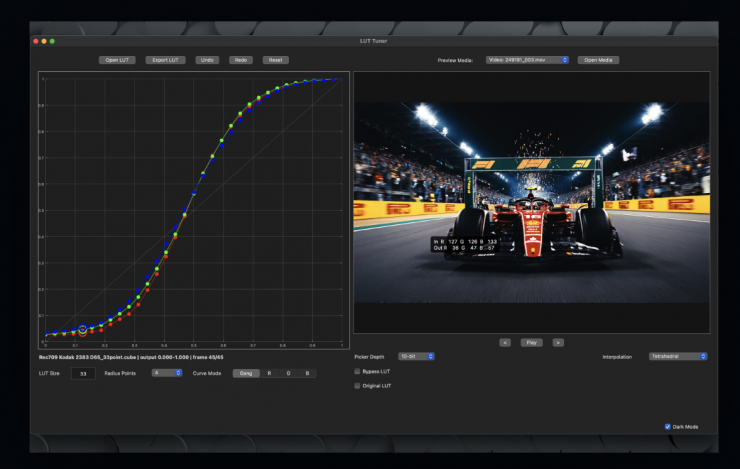
LUT Tuner is designed for post-production teams that need to inspect, adjust, compare, and export .cube 3D LUTs without opening a full grading project. The app opens a .cube LUT, displays its response curve, previews the result against still images, video clips, or generated test patterns, and exports a clean .cube file when the adjustment is ready.
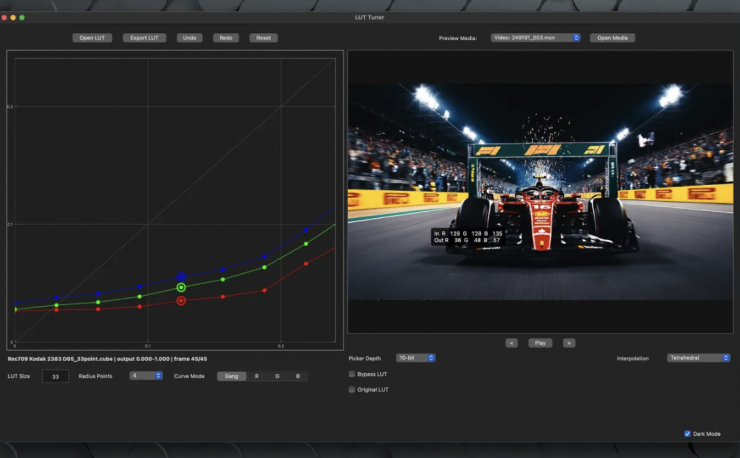
It utilizes curve-based editing, and users can adjust RGB response points with gang, red, green, and blue modes, radius-based neighboring influence, undo, redo, reset, and keyboard nudging. Keyboard shortcuts allow for precise nudging of points, with Shift and Option keys enabling half-step and quarter-step increments, respectively.
How it works is you can open a .cube LUT, choose a generated preview pattern or open media, inspect the LUT response, make targeted curve edits, compare against the original LUT, and export the edited .cube file.
LUT Tuner opens and exports standard .cube 3D LUT files that conform to the .cube 3D LUT structure. It supports common identity, creative-look, display, and technical transform LUTs. The app previews LUTs using tetrahedral interpolation by default, with trilinear interpolation available for comparison. LUT resize and export use the current sampled size shown in the LUT Size field.
You can also preview LUT behavior with generated ramps, test patterns, still images, or supported video files opened through one Open Media workflow.
There is a feature that allows you to choose the Original LUT or Bypass LUT to compare edits against the loaded baseline or inspect media without LUT processing.
LUT Tuner can preview generated patterns, still images, and supported video files. Still-image formats include PNG, JPEG, TIFF, EXR, DPX, and HEIC.
LUT Tuner supports .mov, .mp4, and .mxf video files that it can preview and decode. Common compatible codecs include ProRes, DNxHD/DNxHR, H.264, HEVC, MPEG-2, AV1, VP9, CineForm, JPEG 2000, and uncompressed video. Codec support may vary by container. ProRes RAW is not supported.
Pricing & Availability
Cut Point Labs LUT Tuner for Mac is now available on the App Store for $14.99 USD.