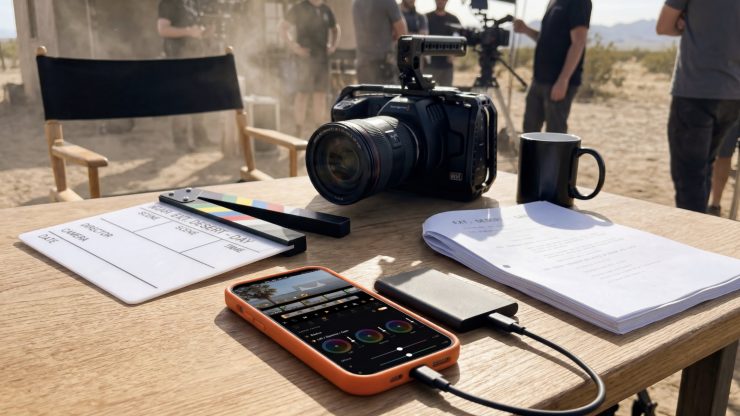
BlackRAW Visor has just launched on the Apple App Store. It’s the first and only iOS app to open .braw files directly from external USB-C / Thunderbolt SSDs. It can read files in-place without having to be copied to a device. Users can plug in their SSD, review cinema rushes on set, grade with their LUTs, export .cube for DaVinci with no laptop, no import, and zero copies.
Key features
- First and only iOS app that opens .braw files natively
- Native RAW parameter controls — ISO, white balance, tint, color space, gamma — the same set as DaVinci Resolve’s Camera RAW tab
- False color overlay for pixel-accurate exposure evaluation on set
- Live LUT preview — load your .cube and see the final look while playing
- BRAW Trim uses SDK-native passthrough: instant, lossless, keeps the file RAW
- Exports Blackmagic native .sidecar files, DaVinci Resolve picks them up directly
- Also exports EDL, FCPXML, markers as text — editor-ready handoffs from the phone
- ProRes HQ and H.265 export on device
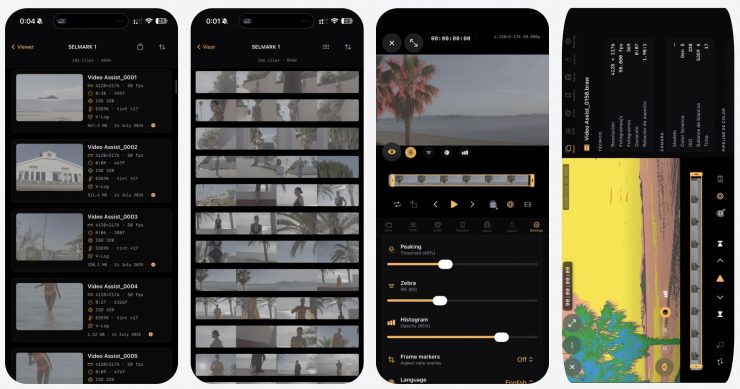
Users can plug their SSD into their iPhone via USB-C. BlackRAW Visor then detects your media instantly. You can then scrub through your timeline with Metal-accelerated playback as well as monitor with real-time histogram, focus peaking, zebra stripes, and false color.
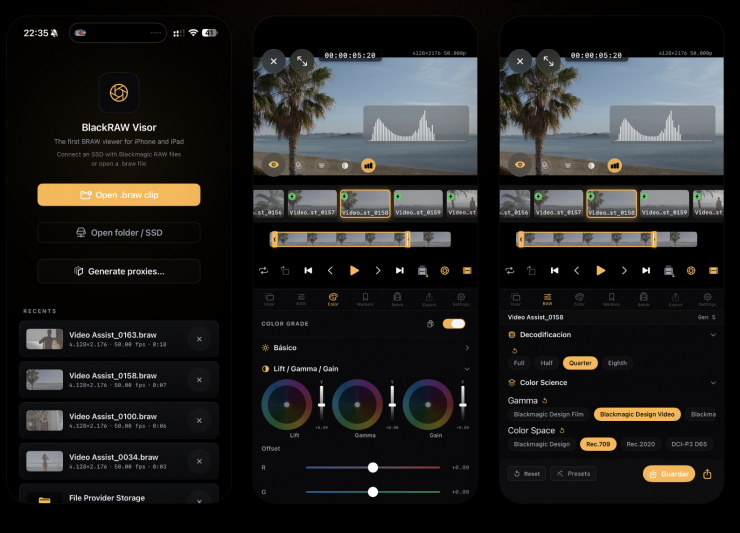
Native BRAW decoding powered by Apple’s Metal GPU framework. Full, half, quarter and eighth resolution modes. Real-time playback of 4K, 6K and 12K footage with intelligent thermal throttling that auto-degrades quality to prevent overheating.
You can also adjust every RAW parameter non-destructively and apply 3D LUTs, grade with lift/gamma/gain, and then export as ProRes 422 HQ, HEVC, or trimmed BRAW. These can be sent to DaVinci via FCPXML.
Built for DITs, colorists and cinematographers using BMPCC 4K/6K, URSA Mini, URSA Cine and Pyxis cameras. Review your rushes on set, grade with the official Blackmagic RAW SK, and export .cube LUTs compatible with DaVinci Resolve.
PLAYBACK
- Native BRAW decoding via the official Blackmagic RAW SDK
- Zero-copy Metal GPU rendering — smooth playback at native frame rates
- Full, Half, Quarter, Eighth decode quality
- Audio playback (AAC from PCM source)
- Frame-accurate scrubbing with filmstrip thumbnails
RAW CONTROLS
- White Balance (Kelvin + Tint)
- ISO, Exposure, Analog Gain
- Contrast, Saturation, Midpoint
- Highlights, Shadows, Black/White Level
- Highlight Recovery, Gamut Compression
- Gamma, Gamut, Color Science Gen 4/5
- All parameters initialize from embedded clip defaults
COLOR GRADING
- Lift / Gamma / Gain color wheels
- HSL per-channel adjustments (8 hue ranges)
- Interactive RGB curves editor
- Post-decode: Exposure, Contrast, Saturation
- Vibrance, Vignette, Temperature/Tint shift
- Copy/paste grades between clips
- Export grade as cube 3D LUT
MONITORING
- Focus Peaking with adjustable threshold
- Zebra stripes (IRE 70-100)
- False Color exposure map
- Real-time luma histogram
- Frame aspect guides (2.39:1, 1.85:1, etc.)
- Grid overlays (Rule of Thirds, Golden Ratio)
EXPORT
- MP4 HEVC (H.265) – full resolution
- Apple ProRes HQ
- BRAW Trim – SDK-native passthrough (instant, lossless)
- Proxy generation (H.264/H.265, multiple resolutions)
- Blackmagic native sidecar export (DaVinci Resolve compatible)
- EDL, FCPXML, markers as text
EXTERNAL STORAGE
- Open .braw files from external USB-C/Thunderbolt SSDs
- Browse folders with thumbnail grid
- Security-scoped bookmarks for persistent access
- Files read in-place – never copied to device
PROFESSIONAL WORKFLOW
- Frame markers with color coding and notes
- Batch timeline with in/out points per clip
- Reel auto-advance mode
- Shake-to-save sidecar gesture
- Fullscreen player with auto-hiding controls
Pricing & Availability
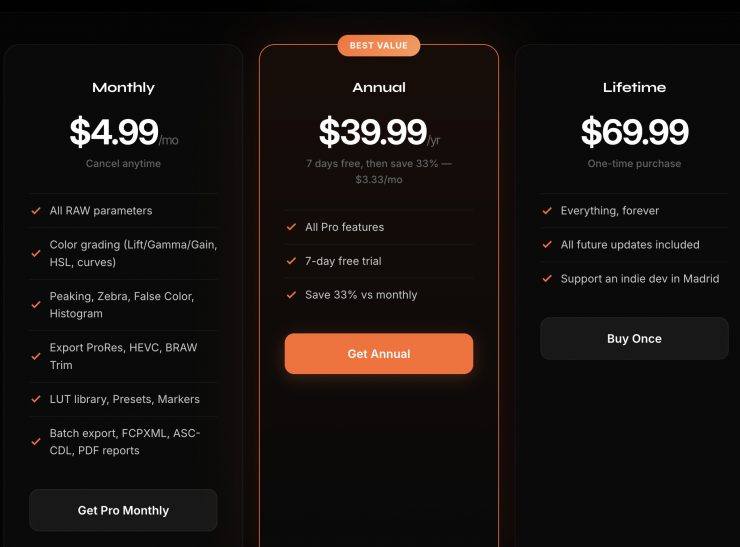
BlackRAW Visor is a subscription model. Above you can see the prices.
SUBSCRIPTION TERMS
- Pro Monthly: Auto-renewable, 1 month
- Pro Annual: Auto-renewable, 1 year (includes 7-day free trial)
- Pro Lifetime: One-time purchase
- Payment charged to Apple ID at confirmation of purchase
- Subscriptions auto-renew unless cancelled at least 24 hours before the end of the current period
- Manage subscriptions in Settings > Apple ID > Subscriptions