One of our long-time readers, Christo Montes, got in touch with me about his solution for how to fix a Sony FX6 MI Shoe error in the field.
As a freelance cameraman based in Auckland, New Zealand, Christo frequently operates in unpredictable weather. He was recently hired to work on a high-profile international golf tournament in Wellington as part of the team tasked with producing social media and extra content to support the main broadcast.

However, during practice days and before the actual tournament even started, one of their rented Sony FX6 cameras malfunctioned due to water exposure of the top handle.
The Error and the Missing Cap
The problem was caused by a sudden downpour on the golf course. The crew was caught in the rain mid-course with no cover or rain protection available for their FX6.
The protective plastic cap for the MI shoe was missing—a common occurrence with rental gear and most field-tested cameras nowadays—exposing the contacts to the sudden rain. Water seeped into the shoe, bridging the internal pins and making the camera think there was something connected there, but it couldn’t understand what.
So once they returned to base a few minutes after the downpour, the FX6 displayed a continuous error message on the viewfinder that read: “MI accessory not functioning properly….. etc.” The Multi-Interface (MI) shoe is Sony’s proprietary hot shoe, and at the time of the error, it was completely empty. However, the message continuously interrupted the operator’s view and rendered the camera inoperable.
The Field Repair
With no immediate backup camera available on the course, Christo offered to fix the malfunctioning handle in order to keep the production moving. Being familiar with the internals of the handle after his own FX6 handle disaster, he knew the MI shoe connects to the handle’s main circuit board via a ribbon cable. By physically disconnecting this, he was pretty sure that he could isolate the MI shoe and clear the error.
The Result
Powering the camera back on confirmed that the error was cleared.
Disconnecting this specific ribbon cable disables the MI shoe but does not affect the standard XLR audio inputs. So the crew was able to plug the shotgun microphone back in and keep working as if nothing happened, and the FX6 was successfully utilized for the remainder of the tournament. However, they knew that the MI shoe was not functioning, and the camera would need to go in for a repair after this job, something they informed the rental house about.
The main takeaway from this situation is that if you are in an environment that will potentially expose your camera to water, you need to ensure that your MI shoe cap is always firmly installed when not actively running a top-mounted accessory, and always carry basic rain protection. Understanding the hardware architecture of your equipment might provide critical options in emergency situations, but it is always better to prepare than to repair.
The Repair Process
DISCLAIMER & WARNING
Please read before proceeding. Opening camera equipment voids warranties and risks permanent damage to delicate internal components. This procedure is a last resort for emergency situations when no backup camera is available. It should only be attempted by individuals who are highly confident working with small electronics and ribbon cables.
Christo takes absolutely no responsibility for any damage, malfunction, or voided warranties that may occur to your equipment by following these steps. Proceed entirely at your own risk.
If you are out of options and need to bypass the MI shoe short circuit, here is the mechanical process to isolate the error.
Tools Required:

- A small Phillips-head screwdriver
- A pair of tweezers
Step 1: Remove the handle from the camera and remove all accessories from the handle.
You need to take off any monitors, cables, or anything else that is screwed on the handle and have it bare as above.
Step 2: Remove the Mic Bracket
Before opening the main handle casing, the microphone holder must be detached to expose one of the handle screws.
- Look inside the mic bracket on both sides of the metal bracket holding the assembly in place.
- Locate and unscrew the 2 screws securing it to the handle. Set the bracket and screws aside securely.


Step 2: Open the Top Handle
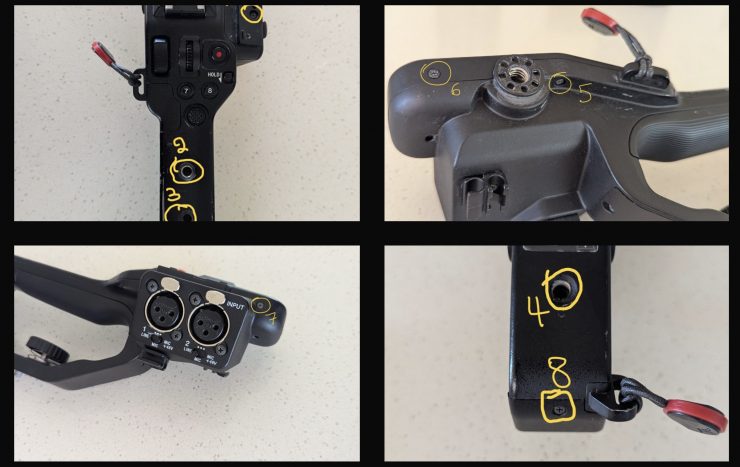
- Locate the screws along the top, the back, and the front of the handle as per the following photos. There are 8 screws that need to be removed. Keep them somewhere safe, as they are easily lost in a field environment. They are all the same size, so you don’t need to remember which one goes where
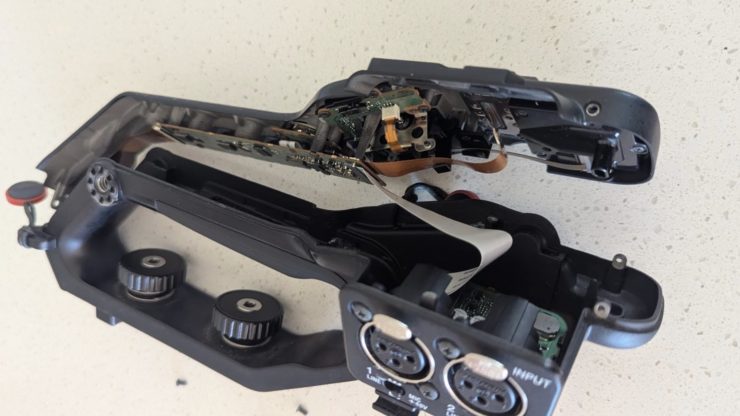
- Carefully lift the top casing off the handle to expose the main board. Be careful, as the handle is not able to open fully due to the attached audio ribbon cable. If you unplug or damage the white ribbon cable, your camera will no longer have audio.
Screws that need removal
The handle opened up

Step 3: Disconnect the MI Shoe Cable and Reassemble

- Locate the MI shoe ribbon cable. It is the thin brown ribbon cable under the white one.
- Using tweezers (or your fingers if they are thin enough), gently grip the ribbon cable and pull it straight out of its connector on the board. Note: It is held in place entirely by friction. A steady pull is sufficient; there are no mechanical latches to flip.
- Secure the loose cable inside the housing so it does not short against other components.
- Carefully place the top casing back onto the handle. Ensure all internal cables are seated correctly and are not being pinched by the casing.
- Reinsert and tighten the 8 handle screws, then reattach the mic bracket.
Christo Montes is a professional Auckland Cameraman with extensive experience shooting corporate, documentary, and broadcast content across New Zealand and internationally. He specializes in delivering high-end visuals and reliable, stress-free production services.