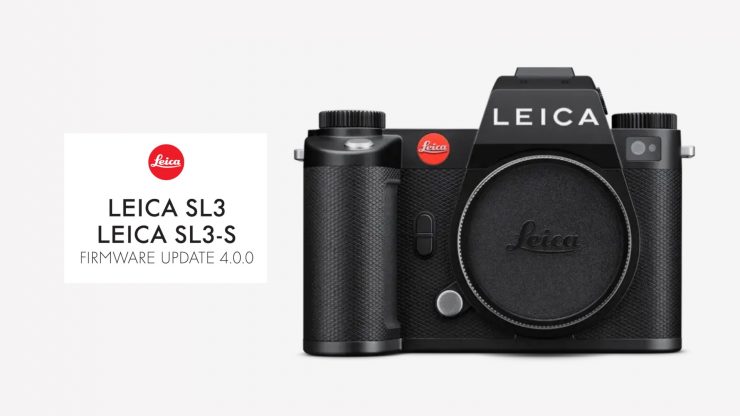
LEICA has released Firmware Update 4.0.0 for the SL3 and SL3-S that adds 4:3 Open Gate recording, direct Camera-to-Cloud connection to Adobe Frame.io, as well as AF improvements.
Open Gate Recording
The cameras now support the aspect ratios 4:3 (anamorphic) and 3:2. You can record in 5.8K (5824 x 4368) at up to 29.97p, but only in 4:2:0 10-bit at 200Mbps.
When using an anamorphic lens, the camera can now de-squeeze images during playback. Supported anamorphic desqueeze factors are: 1.25, 1.3, 1.33, 1.5, 1.6, 1.65, 1.8, 1.85, 2.0x.
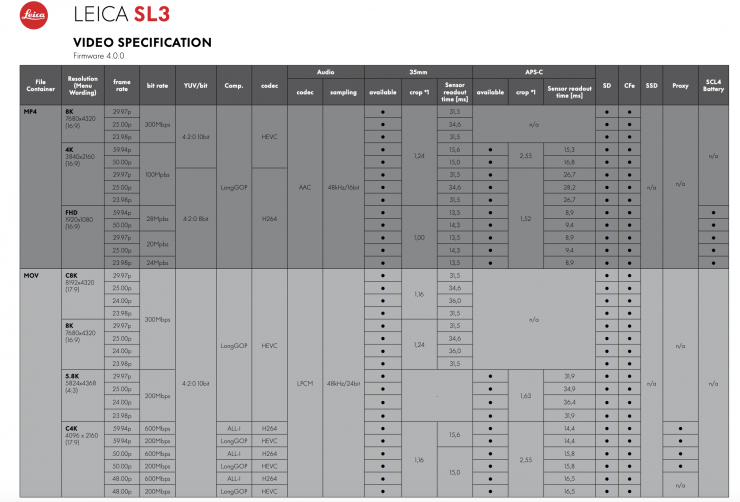
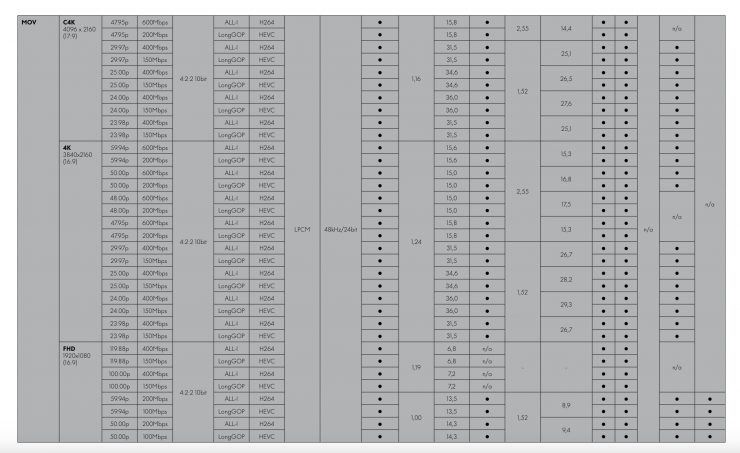
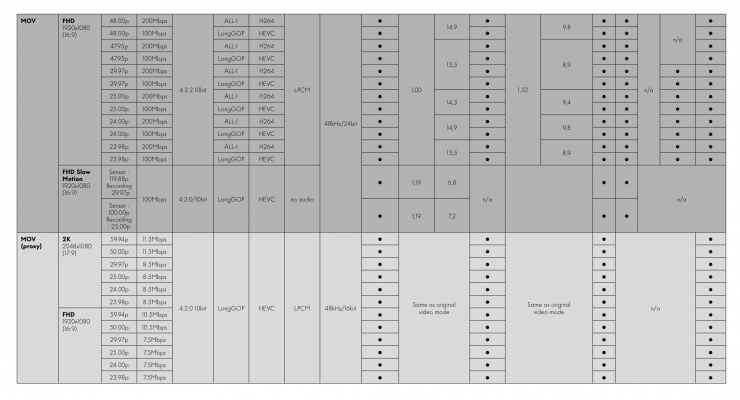
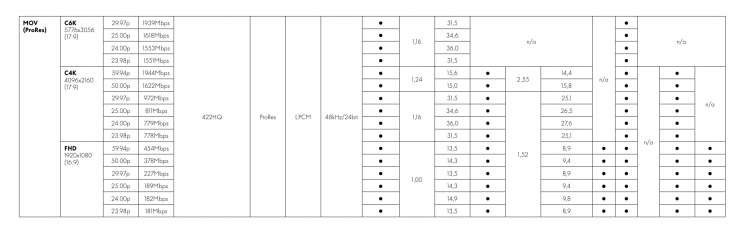
Additional video formats with lower bit rates have also been introduced
Camera-to-Cloud connection to Adobe Frame.io
A direct Camera-to-Cloud connection to Adobe Frame.io can now be established via WLAN, allowing photos and videos (proxy videos) to be uploaded directly to the cloud. This new function is located in the Connectivity menu, where both Leica FOTOS and Frame.io are now managed.
AF Improvements
The tracking algorithm automatically adjusts the size and shape of
the focus field during subject tracking. This is claimed to result in more stable and reliable performance over extended periods of time.
Automatic focusing on human features, e.g., eyes and faces, has
also been significantly improved through AI-assisted models. The AF mode was revised, and the menu structure was simplified.
Multi-Field and Spot were combined into one menu (Zone / Multi-Field
and Field / Spot). A new AF Acquisition menu is now available in both the FN list and the Control Center. Expanded subject recognition: humans (eye/face/body) and animals – including birds, dogs, wolves, cats, and big cats.
Leica Looks menu optimized
The Leica Looks menu was optimized. A new Intensity setting option was added.
The monitor refresh rate can now be set to 30 fps / 60 fps. Selecting 30 fps reduces power consumption in Live View mode.
A new Battery Condition menu now displays the overall condition of the BP-SCL6 battery.
Other Improvements
The behavior of the Auto ISO display in Live View and the Control Center when using a flash was revised. Previously, the camera sometimes displayed incorrect ISO values in flash mode, since the actual ISO value is only determined during the pre-flash. With the update, the following behavior applies:
– If a flash is connected and required for the shot, the Auto ISO
value remains hidden in Live View and the Control Center.
– If a flash is connected but not ready or not required, a preview
value is displayed.
– If no flash is connected, the Auto ISO value is displayed as
usual.
The AF profile labels (DE/EN) have been adjusted for clearer and
more consistent terminology.
Change to the default flash setting: The default for Flash mode is now On instead of Auto
RED – EU Cybersecurity Requirements: When updating from version 3.1.1 or earlier, the camera must be re-paired with the app.
Default settings adjusted in Control Center: AF Detection is now enabled by default.
Faster Start Time (after extended inactivity): The camera starts up significantly faster.
When inserting an aged or low-performance battery, a warning message now appears indicating reduced battery condition.
The icon for active Perspective Control is now displayed correctly in Review mode.
The warning message regarding limited functionality when using a
BP-SCL4 battery was revised. The message can now be disabled via the option “Don’t show again”. After eight weeks, the reminder automatically reappears to indicate the battery condition. The message is displayed only when the camera is switched on, not when waking from standby. The setting is restored to default after a camera reset.
Starting a video recording no longer cancels a previously set autofocus lock. The focus setting is therefore maintained during the transition from photo to video mode.
The menu items File Format and Compression were consolidated and are now available via the single menu item (File Format).
Improved display of grayed-out settings: Current values will now always be shown in Live View and in the menu.