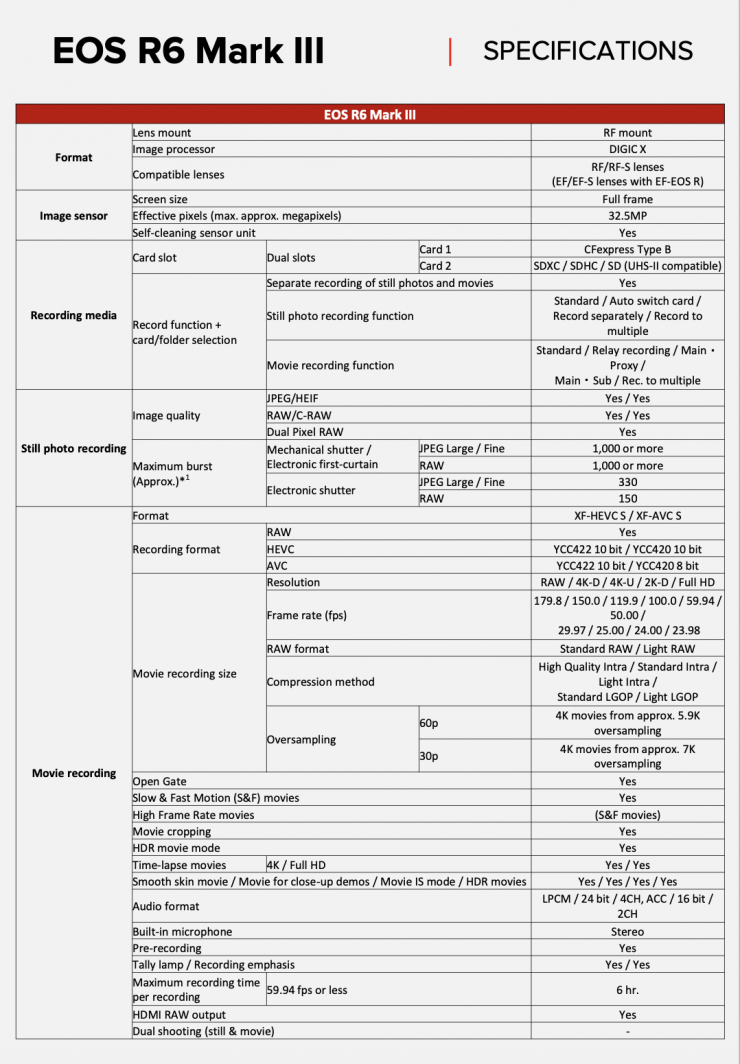
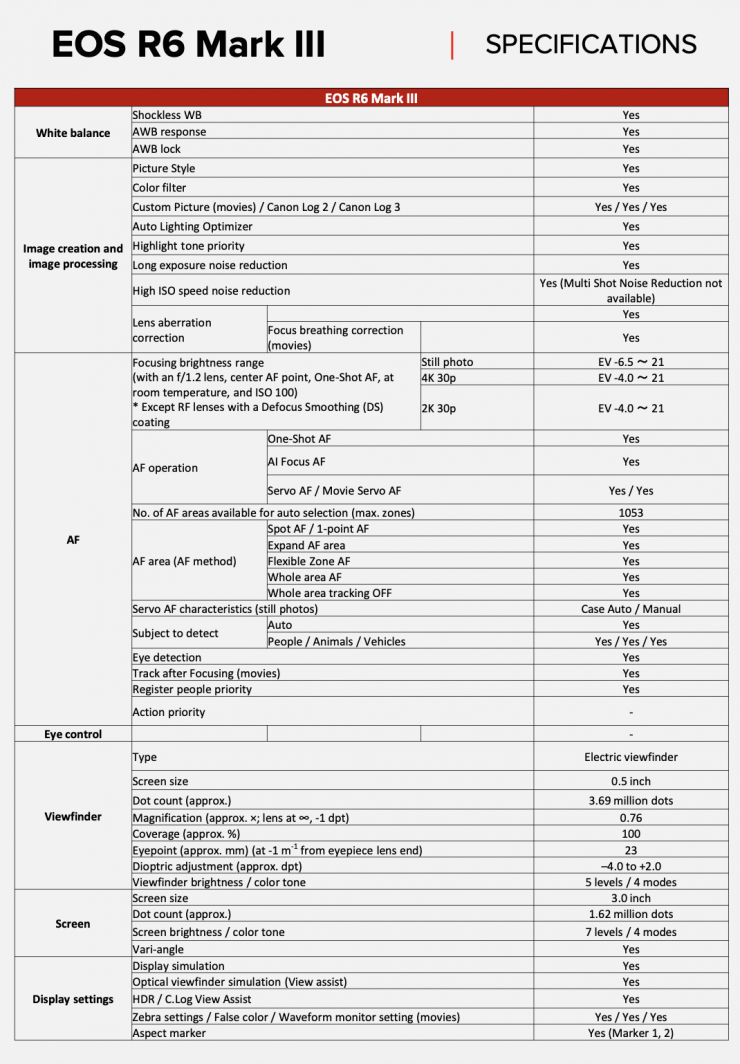
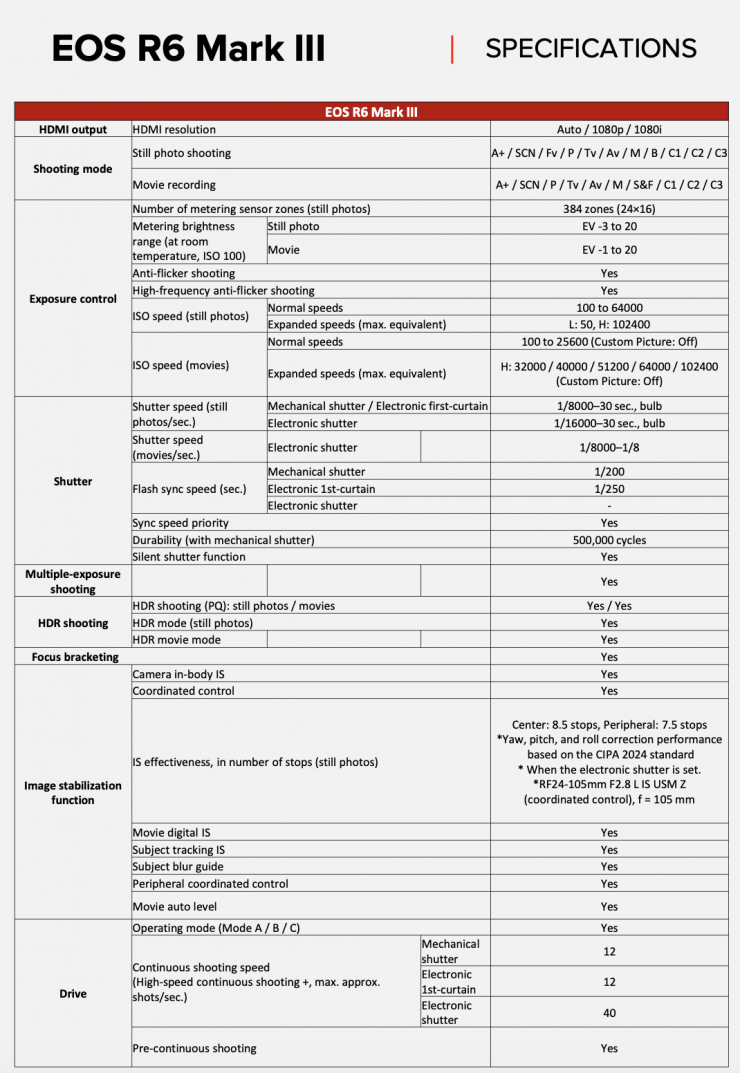
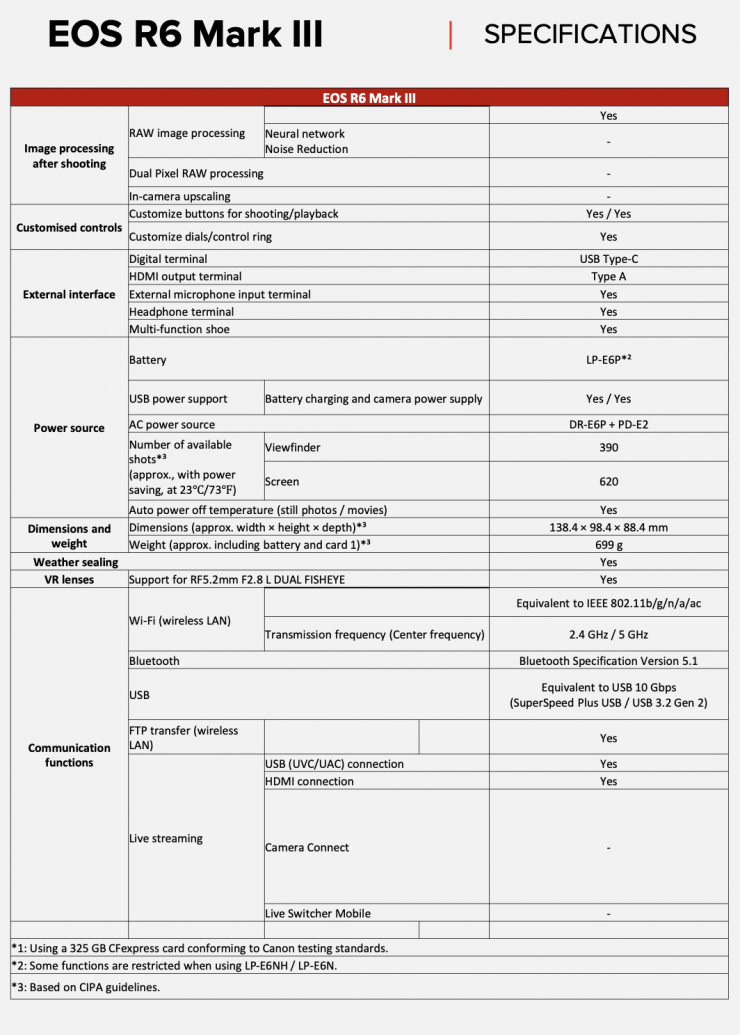
Canon has announced the new EOS R6 Mark III. The EOS R6 Mark III shares a lot of the same features and functionality as the Canon EOS C50, but in a form factor that is better suited for still photography. In saying that, the EOS R6 Mark III still has some very decent video shooting capabilities.
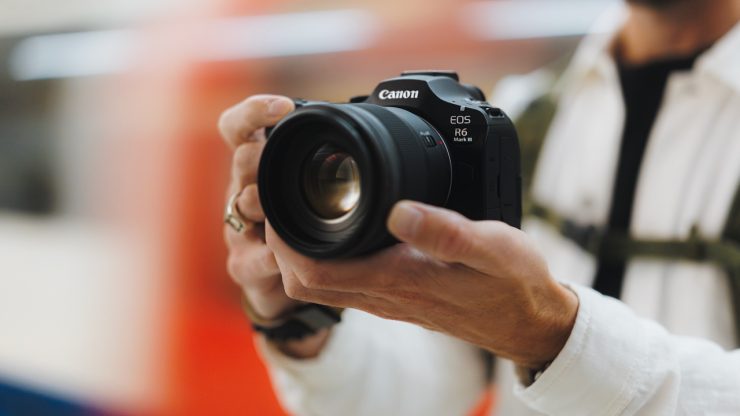
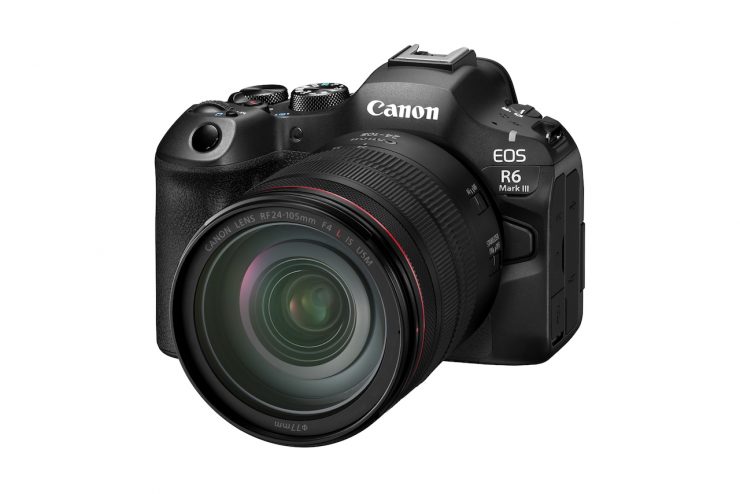
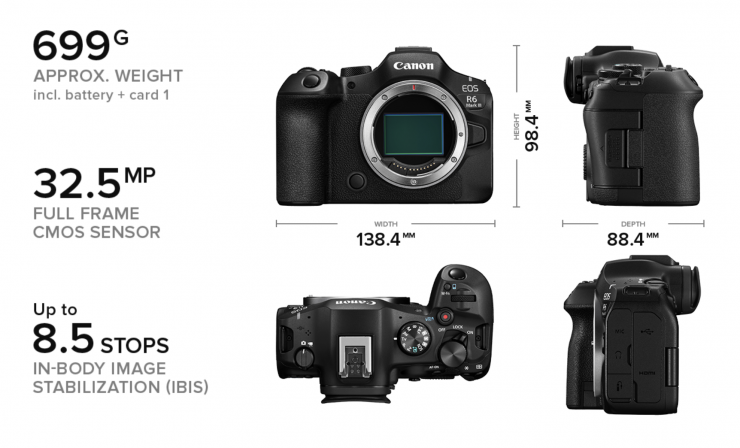
The R6 Mark III is the follow-up to the R6 Mark II, which was announced just over 3 years ago. The original R6 was announced in July 2020.

Just like the EOS C50, the R6 Mark III can shoot 7K Open Gate Internal RAW at up to 30p, 4K at up to 120p, and 2K at up to 180p.
What does the R6 Mark III have in common with the EOS C50?
- 32MP Full Frame CMOS Sensor
- 40 frames per second continuous shooting
- Dual Pixel CMOS AF II
- Pre-shooting and pre-recording
- CF Express + SD card slots
- Canon Log 2 / Canon Log 3
- 4K 60p oversampling
- 4K 120p
- 7K 60p RAW
- Open Gate
How does it differ from the EOS C50?
| EOS R6 Mark III | EOS C50 |
| IBIS | Top handle |
| EVF | Zoom lever |
| Traditional stills layout | Body screw holes |
| EOS user interface | Front record button |
| Mechanical shutter | Cinema EOS user interface |
| Flash compatibility | Cooling fan |
| Timecode | |
| Anamorphic compatibility | |
| Virtual production ready |
How does it differ from the EOS R6 II?
| EOS R6 Mark III | EOS R6 Mark II | |
| SENSOR | 32.5MP | 24.2MP |
| MAX ISO (Stills) | 64000 | 128000 |
| DRIVE PERFORMANCE | Up to 40fps (electronic shutter) Up to 12fps (mechanical shutter) | Up to 40fps (electronic shutter) Up to 12fps (mechanical shutter) |
| PRE-CONTINOUS SHOOTING | YES (RAW/JPEG/HEIF) | RAW Burst Mode |
| MEMORY CARDS | 1x CFexpress Type B 1x SD | 2x SD |
| REGISTER PEOPLE PRIORITY | Yes | No |
| VIDEO RECORDING | 4K 60p (oversampled) 4K 120p 7K 60p RAW (Light) 7K 30p Open Gate (RAW/MP4) | 4K 60p (oversampled) |
| HDMI OUTPUT | Type A | Type D |
| TALLY LAMP | Yes | No |
Sensor
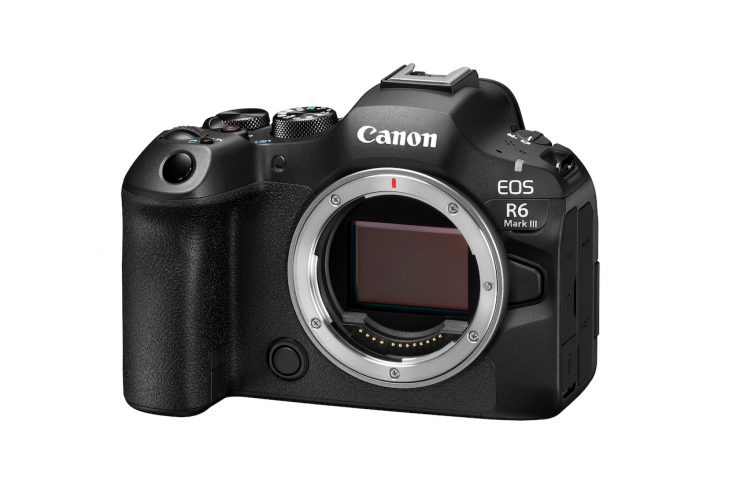
The EOS R6 Mark III utilizes the exact same 32MP 3:2 full-frame sensor that is found in the EOS C50. The previous EOS Mark II used a 24.2 megapixel CMOS sensor.
The sensor in the EOS R6 Mark III and EOS C50 does not use a Dual Gain Output (DGO), nor a back-illuminated stacked CMOS sensor that is found in the EOS C80 and EOS C400.
It’s interesting to see that the R6 Mark III and C50 don’t feature a Back Illuminated Stacked sensor like the C80 and C400, and R3. One of the reasons a lot of companies are now utilizing back-illuminated stacked CMOS sensors is that they allow for better AF performance.

The camera also uses the DIGIC DV 7 processor, which is the same one that is found in the C50, C80, C400, C500 Mark II, and C300 Mark III.
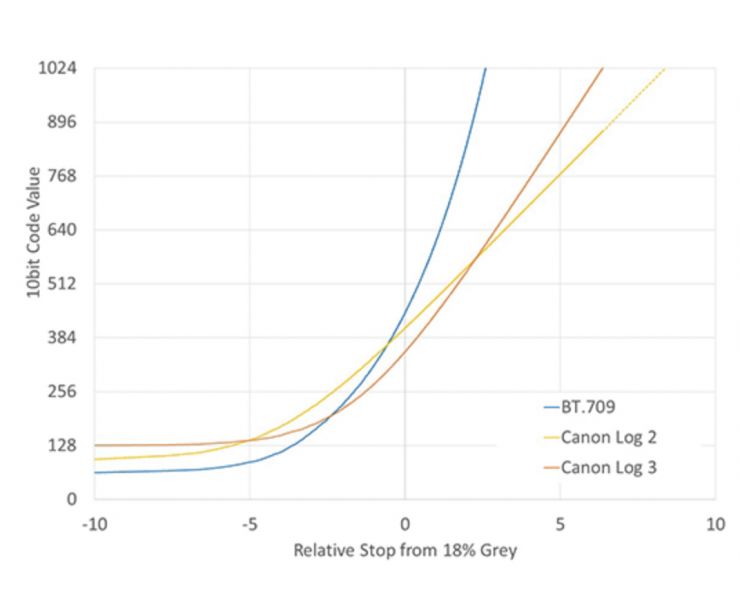
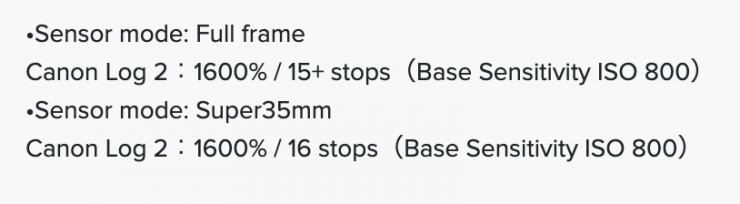
Canon claims that the R6 Mark III has 15+ stops of dynamic range. Interestingly, the R6 Mark IIIs claimed dynamic range when shooting in full frame is 1 stop less than the C80 and C400.
Just like with the C50, C80, C400, and C500 Mark II, the EOS R6 Mark III uses an oversampling process from the 7K image capture to produce 4K (DCI or UHD). Canon claims that this enhances image sharpness, curtails moire, and produces a lowered visibility of noise at the higher ISO settings. Canon states the image will be sharper with better detail and will resolve color better when shooting in 4K, 2K, and HD.
Dual Base ISO?
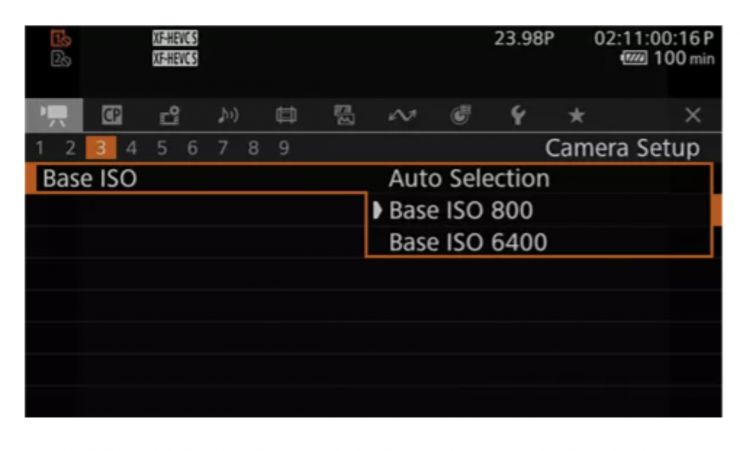
Unlike the C80, which features triple base ISOs, I am assuming that the EOS R6 Mark III, like the EOS C50, supports 2 base ISO levels (800 and 6400). The camera also features Auto Selection, which will switch from one of the two base ISO values to the other if it has a higher S/N ratio while maintaining the dynamic range accordingly.
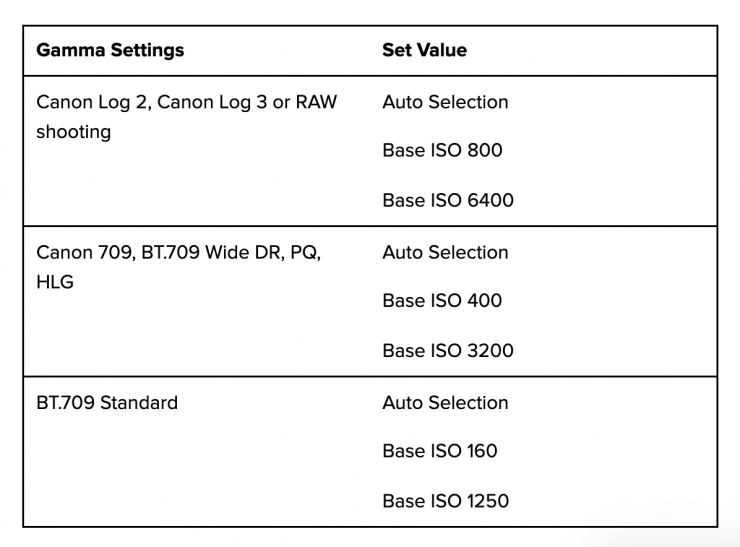
Above, you can see what the various dual base ISOs are when shooting in various modes.
Recording Capabilities

The EOS R6 Mark III is capable of recording in resolutions up to 7K in Open Gate. It can also record in 4K DCI, UHD, 2K DCI, and HD. The previous R6 Mark II could only record in 4K (UHD) up to 60p. The camera can output 7K RAW via the HDMI output, which could then be recorded on an Atomos Ninja V+ recorder in ProRes RAW.
4K 60p recordings are done from approx. 5.9K oversampling. 4K at up to 30p recordings are done from approx. 7K oversampling.
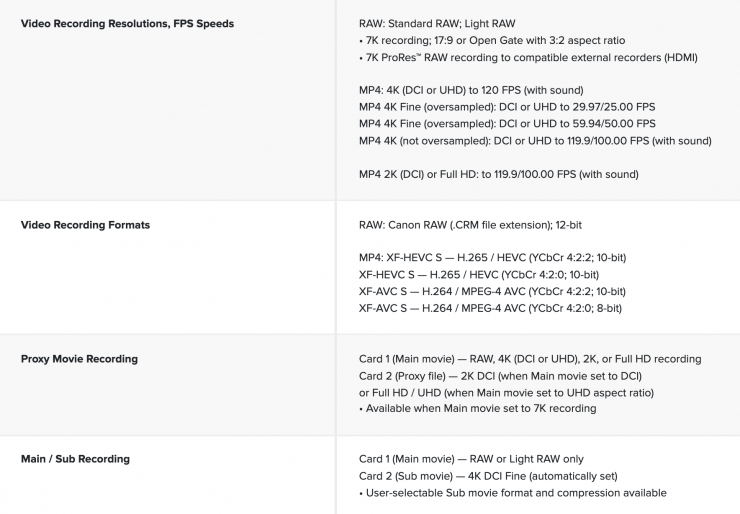
Just like the EOS C50, the EOS R6 Mark III offers a variety of options in terms of onboard recording. You can record in Canon RAW 12-bit (.CRM file extension), (XF-AVC, XF-HEVC S (H.265), or XF-AVC S (H.264).

The EOS R6 Mark III can record 7K Open Gate (6960 x 4640) at 23.98/24.00/25/29.97 fps in Canon RAW Lite. It can also record up to 4K 120p in XF-AVC, XF-HEVC S (H.265), or XF-AVC S (H.264).

You can only shoot 7K Open Gate at up to 30p in Canon RAW Lite. The max resolution in XF-HEVC S (H.265) and XF-AVC S (H.264) is 4K.
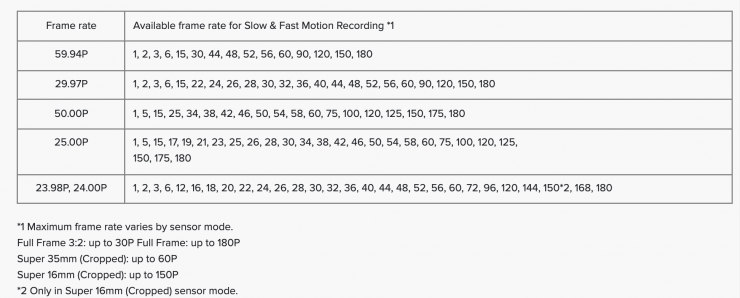
The camera can also shoot in 2K or HD at up to 180fps. In 2K 180p mode, there is a small crop as the angle of view becomes approximately 12% narrower.
When shooting 4K 120p, there is no crop.
If you are shooting in 7K Open Gate, you can extract a full 4K vertical 9:16 image.
On-Board Recording
- 7K Cinema RAW Light in Open Gate up to 30p
- 7K Cinema RAW Light (6960 x 3672) up to 60p
- 7K Open gate in XF-HEVC S (H.265), or XF-AVC S (H.264) at up to 60p
- 4K DCI or 4K UHD digital production formats with XF-AVC Intra
- 2K DCI or 1080-line HD digital production formats with XF-AVC Intra
| Cinema RAW Light 12-Bit | |
| 7K Open Gate (6960 x 4640) 12-bit RAW [970 to 2600 Mb/s] | 23.98/24/25/29.97 |
| 7K (6960 x 3672) 12-bit RAW [970 to 2600 Mb/s] | 23.98/24.00/25/29.97/50/59.94 fps |
During slow-motion recording, simultaneous recording may not be possible depending on the shooting frame rate.
Raw 12-Bit
6960 x 4640 at 23.98/24.00/25/29.97 fps [970 to 2600 Mb/s]
6960 x 3672 at 23.98/24.00/25/29.97/50/59.94 fps [970 to 2600 Mb/s]
H.264/MP4/XAVC S 4:2:2/4:2:0 8/10-Bit
6912 x 4608 up to 23.98/24.00/25/29.97 fps
DCI 4K (4096 x 2160) at 23.98/24.00/25/29.97/50/59.94/100/120 fps
UHD 4K (3840 x 2160) at 23.98/25/29.97/50/59.94/100/120 fps
DCI 2K (2048 x 1080) at 23.98/24.00/25/29.97/50/59.94/100/120/150/180 fps
1920 x 1080 at 23.98/25/29.97/50/59.94/100/120/150/180 fps
H.265/MP4/XF-HEVC S 4:2:2/4:2:0 10-Bit
6912 x 4608 at 23.98/24.00/25/29.97 fps
DCI 4K (4608 x 2160) at 23.98/24.00/25/29.97/50/59.94/100/120 fps
UHD 4K (3840 x 2160) at 23.98/25/29.97/50/59.94/100/120 fps
DCI 2K (2048 x 1080) at 23.98/24.00/25/29.97/50/59.94/100/120/150/180 fps
1920 x 1080 at 23.98/25/29.97/50/59.94/100/120/150/180 fps
| H.264/MP4/XAVC S 4:2:2/4:2:0 8/10-Bit H.265/MP4/XF-HEVC S 4:2:2/4:2:0 10-Bit | |
| 7K (6912 x 4608) | 23.98/24.00/25/29.97 fps |
| 4K (4096 x 2160) | 23.98/24/25/29.97/50/59.94 S&F Mode: 61-120fps |
| UHD (3840 x 2160) | 23.98/24/25/29.97/50/59.94 S&F Mode: 61-120fps |
| 2K (2048×1080) | 23.98/24/25/29.97/50/59.94 S&F Mode: 113 – 180fps |
| HD (1920×1080) | 23.98/24/25/29.97/50/59.94 S&F Mode: 113 – 180fps |
Having Canon’s Cinema RAW Lite in the EOS R6 Mark III is no real surprise. First introduced in the EOS C200 and then implemented into other Canon cameras, Cinema RAW Lite is a proprietary Canon RAW format. The good news is that most NLEs can read it with plugins.
Canon added three new Cinema RAW Light formats in a firmware update that came out for the C500 Mark II, and one of those options is in the C50, C80, C400, and R6 Mark III. This allows you to record in 12-bit at all frame rates. One of the advantages the C400 has over the R6 Mark III and C50 is that it can record in Cinema RAW Light LT, ST, and HQ formats, giving you the choice of four different RAW recording options, instead of just one.
While the file sizes and recording times may seem overwhelming to someone who isn’t used to shooting RAW, they are actually pretty small compared to most other digital cinema camera RAW formats. The original Cinema RAW Light files were about a 1/3 to 1/5 the size of Canon’s Cinema RAW format, which had to be recorded externally from the EOS C300 Mark II and EOS C700. The benefit of having these smaller RAW files is that they can be recorded internally to SD cards.
Canon’s Cinema RAW Light isn’t uncompressed, but the files still contain more than enough information to give you very clean images, good color accuracy, and a smaller chance of seeing any image artifacts. Unlike traditional RAW recording, Cinema RAW Light does not record in a frame-by-frame file structure. Instead, the RAW information is compiled into a single Canon RAW Movie file (.CRM).
The integrity of the RAW signal is protected by eliminating video processes like the Linear Matrix that selects the color gamut, and employing a special RAW OETF that optimizes the digital coding over the entire transfer curve for all ISO settings
When you are recording in RAW to the CFexpress cards, you can also record proxy files to an SD card.
No Simultaneous Crop Recording
Unlike the EOS C50, there is no simultaneous crop recording when using the EOS R6 Mark III.
There is, however, Relay recording and Proxy recording.
Below you can see what combination of gamma, color sampling, and bit depth is available in the various codecs.
H.264
| GAMMA | Color sampling | Bit Depth | Codec |
| Standard (SDR) | 4:2:0 | 8-bit | H.264 |
| Standard (SDR) | 4:2:2 | 10-bit | H.264 |
| Canon 709 | 4:2:0 | 8-bit | H.264 |
| Canon 709 | 4:2:2 | 10-bit | H.264 |
| BT 709 Standard | 4:2:0 | 8-bit | H.264 |
| BT 709 Standard | 4:2:2 | 10-bit | H.264 |
| HDR PQ | 4:2:0 | 8-bit | H.264 |
| HDR PQ | 4:2:2 | 10-bit | H.264 |
| Canon Log 2 Canon Log 3 | 4:2:0 | 8-bit | H.264 |
| Canon Log 2 Canon Log 3 | 4:2:2 | 10-bit | H.264 |
| PQ HLG | 4:2:0 | 8-bit | H.264 |
| PQ HLG | 4:2:2 | 10-bit | H.264 |
H.265
| GAMMA | Color sampling | Bit Depth | Codec |
| Standard (SDR) | 4:2:0 | 10-bit | H.265 |
| Standard (SDR) | 4:2:2 | 10-bit | H.265 |
| Canon 709 | 4:2:0 | 10-bit | H.265 |
| Canon 709 | 4:2:2 | 10-bit | H.265 |
| BT 709 Standard | 4:2:0 | 10-bit | H.265 |
| BT 709 Standard | 4:2:2 | 10-bit | H.265 |
| HDR PQ | 4:2:0 | 10-bit | H.265 |
| HDR PQ | 4:2:2 | 10-bit | H.265 |
| Canon Log 2 Canon Log 3 | 4:2:0 | 10-bit | H.265 |
| Canon Log 2 Canon Log 3 | 4:2:2 | 10-bit | H.265 |
| PQ HLG | 4:2:0 | 10-bit | H.265 |
| PQ HLG | 4:2:2 | 10-bit | H.265 |
Easy-to-manage folder structure
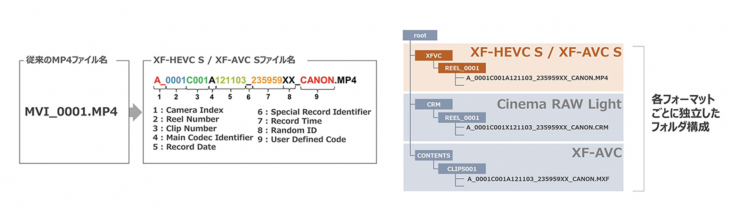
With XF-HEVC S / XF-AVC S, the folder structure has been changed from the conventional MP4 format, and video files can be saved in a folder with the same structure as Cinema RAW Light and XF-AVC. This means that the folder structure will be the same regardless of which video format is used, making video file management more efficient during shooting and editing.
No Anamorphic De-Squeeze Options
Unlike the EOS C50, which has 1.3x, 1.5x, 1.8x, and 2.0x anamorphic de-squeeze options, the R6 Mark II has no anamorphic de-squeeze options.
This is a little strange given the fact that the camera can shoot in Open Gate. Hopefully, this is something that gets added in a firmware update.
Canon Log 3 / Cinema Gamut
To create some type of consistency with the Cinema EOS cameras, Canon has tried to standardize the GAMMA/COLOR SPACE settings across its range.
The EOS R6 Mark III has the ability to record in Canon Log 3 / Cinema Gamut and Canon Log 2, so it is easier to match and use alongside Cinema EOS cameras and the EOS R series.
What does it record to?
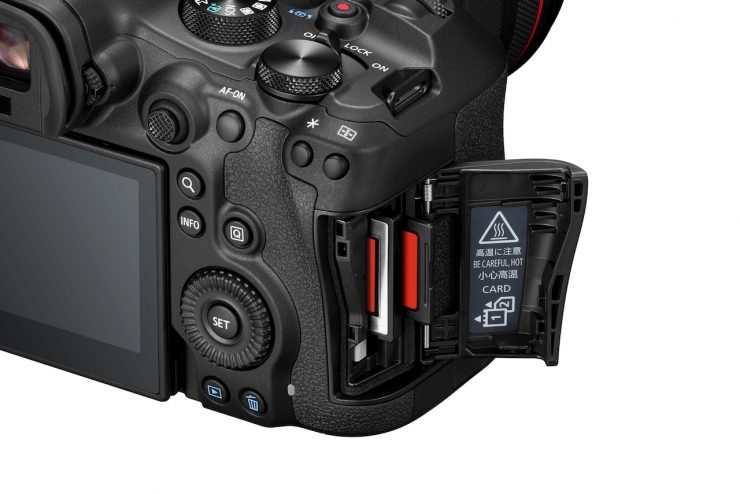
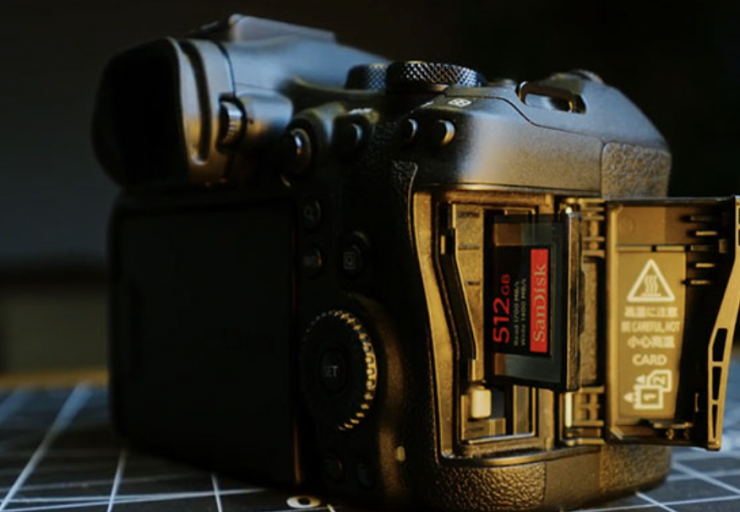
Unlike the C70 and C80, which both utilize dual SD card slots, the R6 Mark III, just like the C50, has one CFexpress Type B card and one SD UHS-II card slot. The media card slots are located on the right-hand side of the camera, behind where you would grip it.
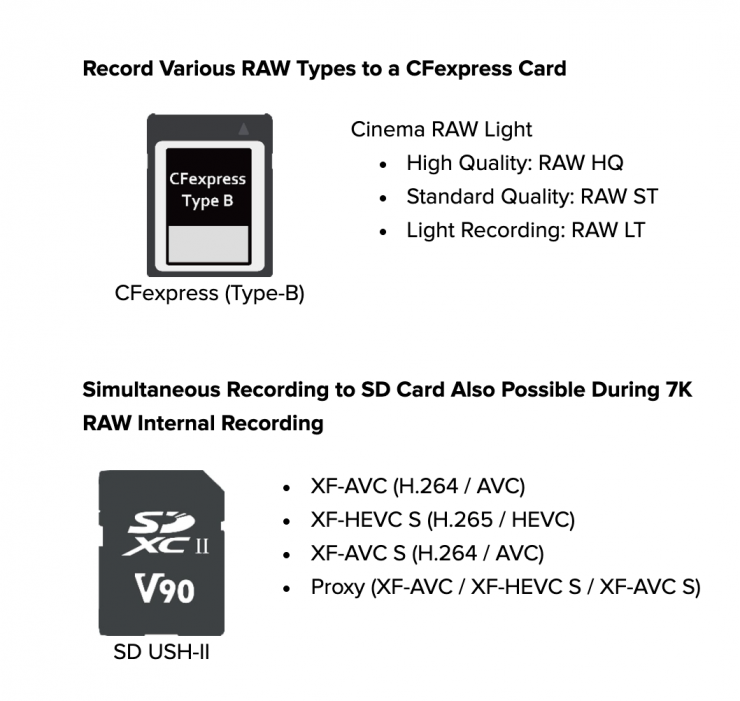
If you are going to record 7K Open Gate, then you need to use the CFexpress Type B card.
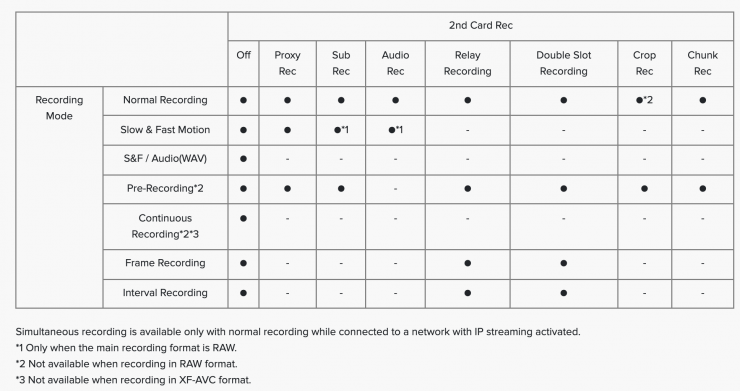
By having dual slots, the R6 Mark III can simultaneously record some of the same resolution and frame rates to two cards at once, or you can simultaneously record different formats at once, or you can do relay recording. As the camera can also record proxies, you could choose to record your main footage to one card and proxies to the other.
What can it output over HDMI?
According to Canon, the settings you can choose when outputting over HDMI are Auto / 1080p / 1080i.
The camera is capable of 7K ProRes RAW recording to compatible external recorders over HDMI.
What about the heat?
Unlike the Canon EOS C50, which features an in-built fan, the R6 Mark III is fully weather sealed, and that means it will generate significant heat.
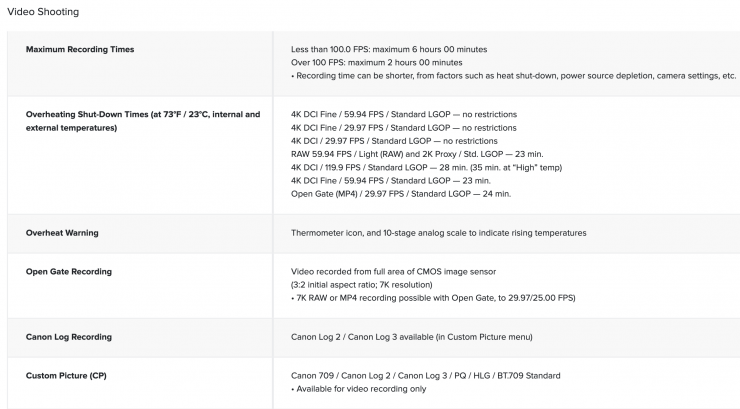
Unlike the C50, which can record for over 60 minutes continuously, even in 7K Open Gate at 60p in Canon RAW Lite, there are more stringent recording time limitations with the EOS R6 Mark III due to heat when shooting in selected recording modes. All times below are continuous recording times based on Canon testing at ambient temperature (23 °C) with Auto power off temperature setting set to high:
- 7K 60p RAW (23 mins)
- 4K 120p DCI (35 mins)
- 4K 60p FINE (23 mins)
- 7K 30p Open Gate (36 mins)
- 2K 180p (120 mins)
Other modes, such as 4K 60p Standard and 4K30p FINE (oversampled), have no restrictions due to heat.
Additional information:
4K DCI Fine / 59.94 FPS / Standard LGOP — no restrictions
4K DCI Fine / 29.97 FPS / Standard LGOP — no restrictions
4K DCI / 29.97 FPS / Standard LGOP — no restrictions
RAW 59.94 FPS / Light (RAW) and 2K Proxy / Std. LGOP — 23 min.
4K DCI / 119.9 FPS / Standard LGOP — 28 min. (35 min. at “High” temp)
4K DCI Fine / 59.94 FPS / Standard LGOP — 23 min.
Open Gate (MP4) / 29.97 FPS / Standard LGOP — 24 min.
Dual Pixel CMOS AF II

The EOS R6 Mark III utilizes the same Dual Pixel CMOS AF II (DAF) Technology that is found in cameras like the C50, C80, R3, and C400.
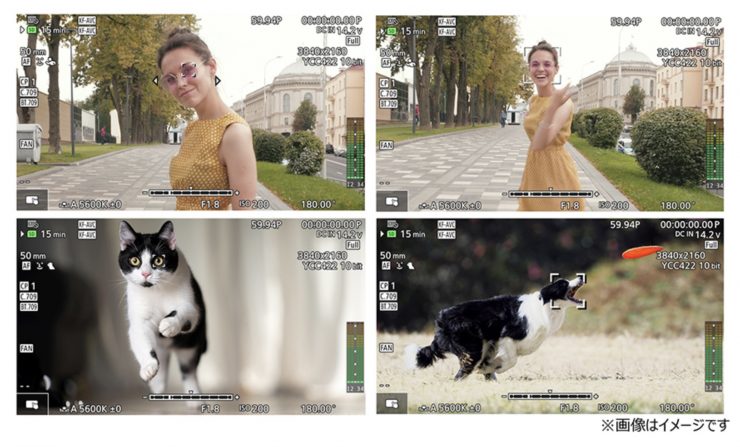
How does DPAF work? Two independent image signals can then be detected at each photosite. By implementing phase-difference AF, smooth focusing is accomplished with much higher speed and accuracy than was possible with previous technologies.
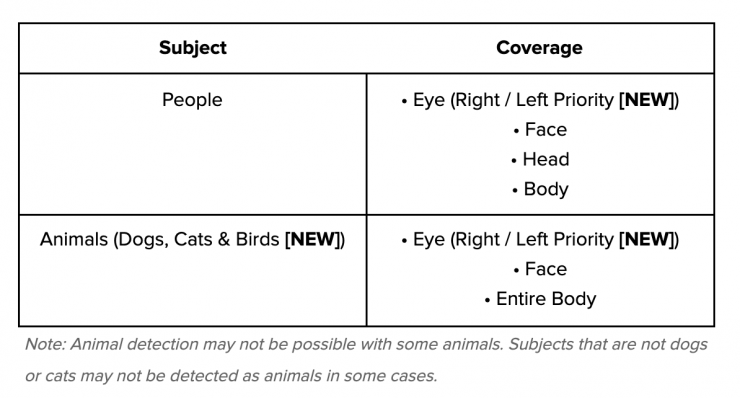
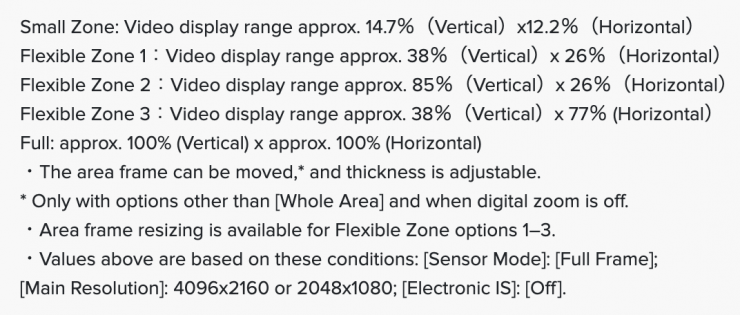

An improved Dual Pixel CMOS AF II system covers the entire sensor area for faster, more responsive, and more precise focusing performance. This upgraded phase-detection focusing system also has enhanced subject detection and tracking, with the ability to intelligently recognize eyes, faces, heads (including helmets), and animals, and tracking will automatically lock onto these subjects and maintain sharp focus.
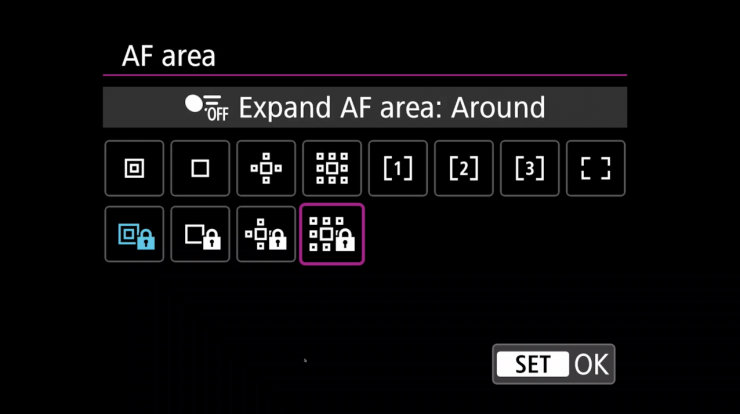
To further fine-tune AF performance, the camera has the ability to set the AF tracking speed and response.
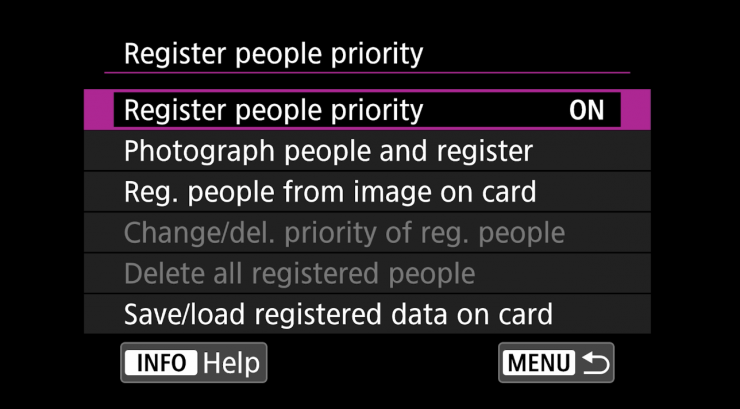

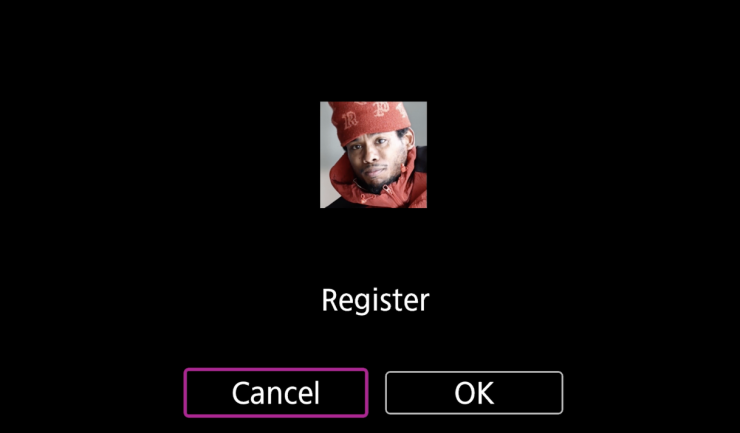
The camera also has the ability to use the Register People Priority feature.
IS
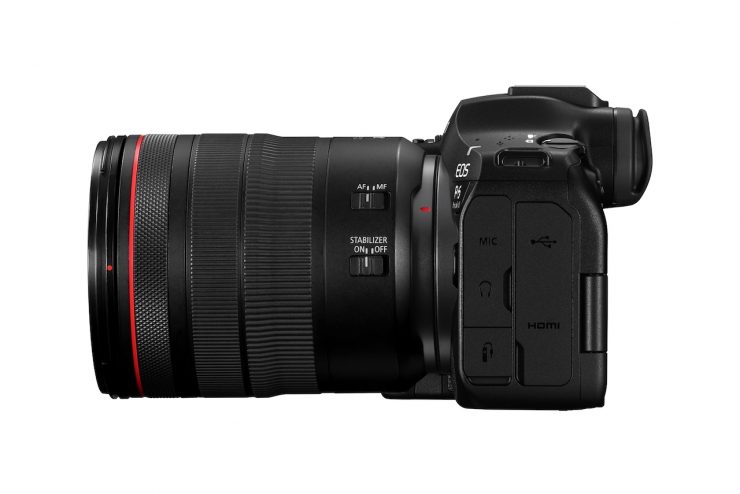
The EOS R6 Mark II is claimed to offer effective IS performance of up to 8.5 stops of coordinated control image stabilization. Using the combined IS, optical, and in-body, the camera can shoot long exposures, handheld, with clarity and sharpness.
RF Mount
The RF mount is a lot more versatile than the EF mount, and it allows users to use a variety of different lenses through the use of adapters. The EF mount was designed in the ’90s, and it technically reached its limits, and that’s why Canon moved in a different direction.
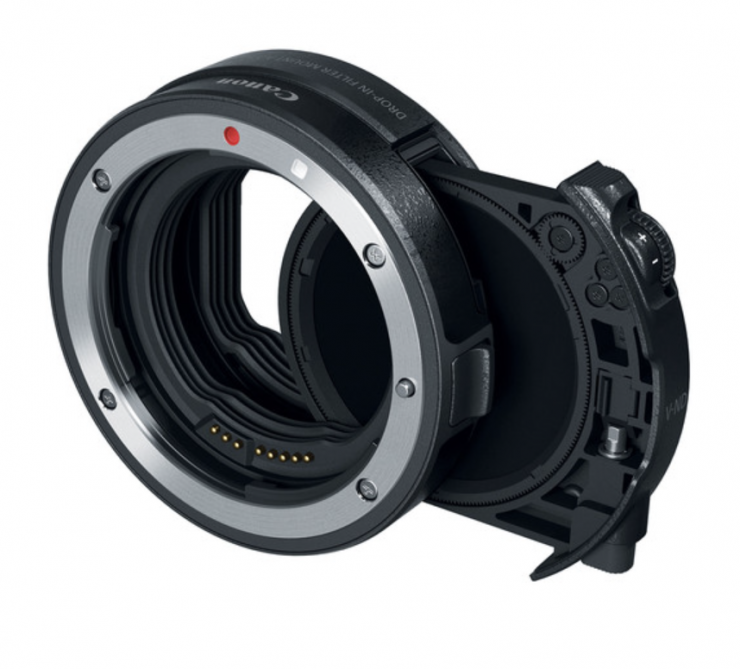
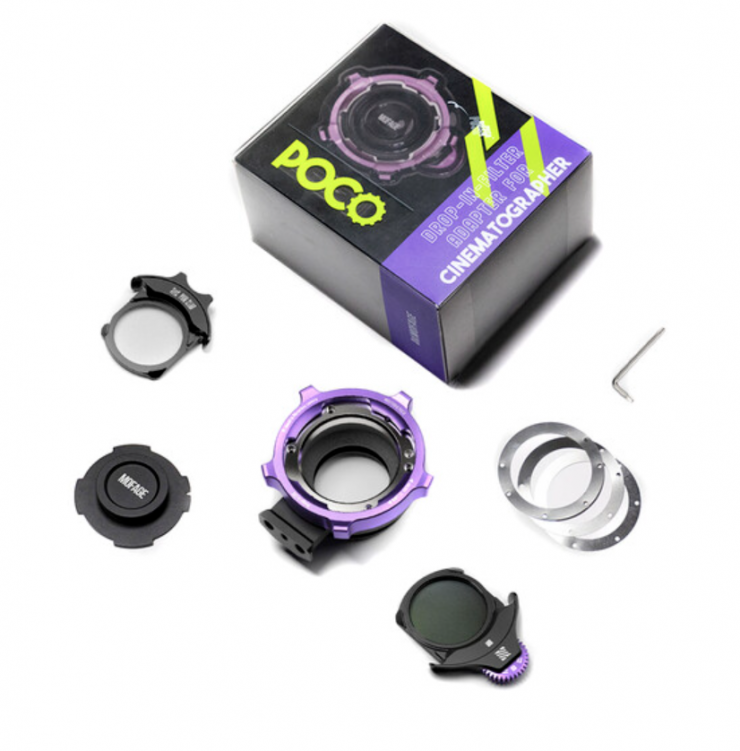
Some users of the EOS R6 Mark III who still own EF glass are likely to use Canon’s EF-EOS R Drop-in filter lens adapter. You could also use products like the MOFAGE POCO Drop-In Filter Lens Mount Adapter Kit (Canon RF to PL) if you are running PL glass.
40fps in stills mode
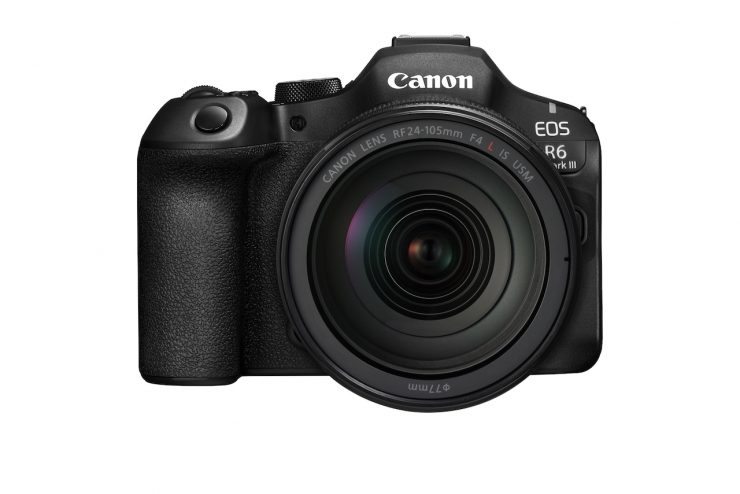
The EOS R6 Mark III can shoot continuously at up to 40fps in RAW/JPEG/HEIF.
The EOS R6 Mark III can also record action before shooting starts, with a Pre-continuous shooting mode. This allows you to capture up to 20 frames in RAW/JPEG/HEIF.
Other Features
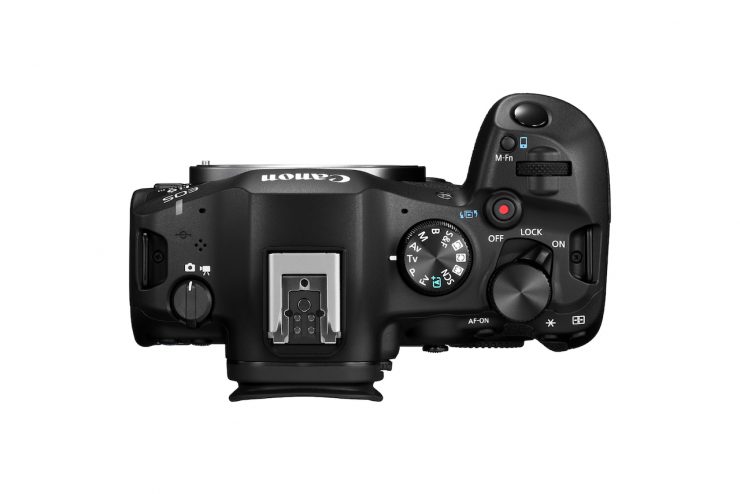
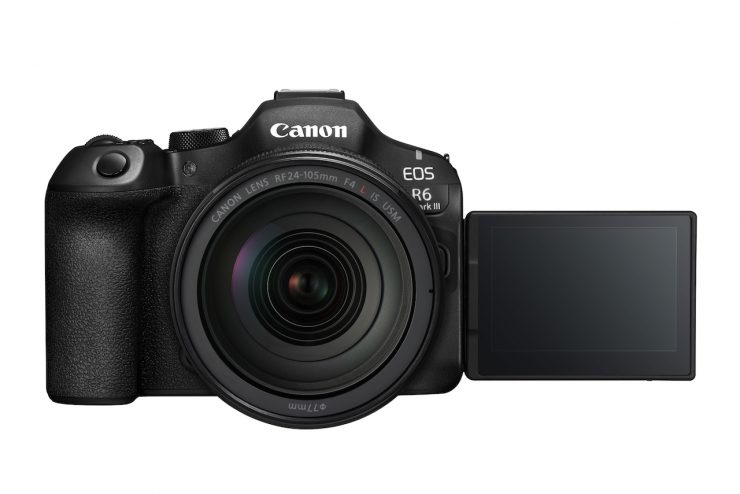
The camera features dust and weather sealing on all external doors and inputs. It appears to use the same 3.69M dot EVF with a refresh rate of 120 fps that is found in the current EOS R6 Mark III.
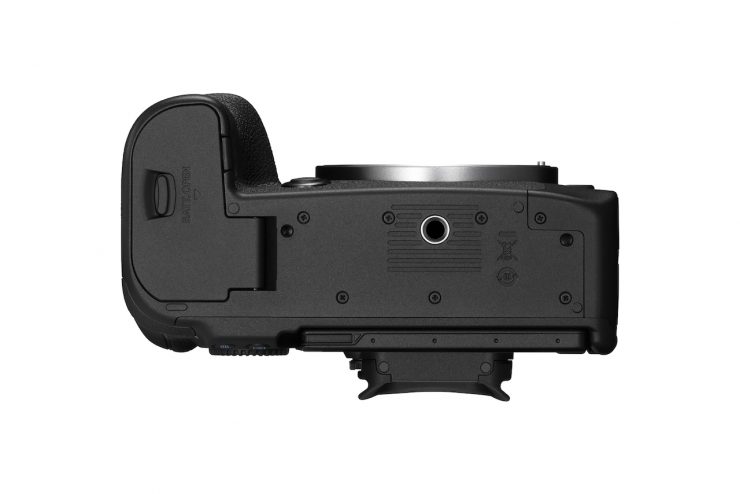
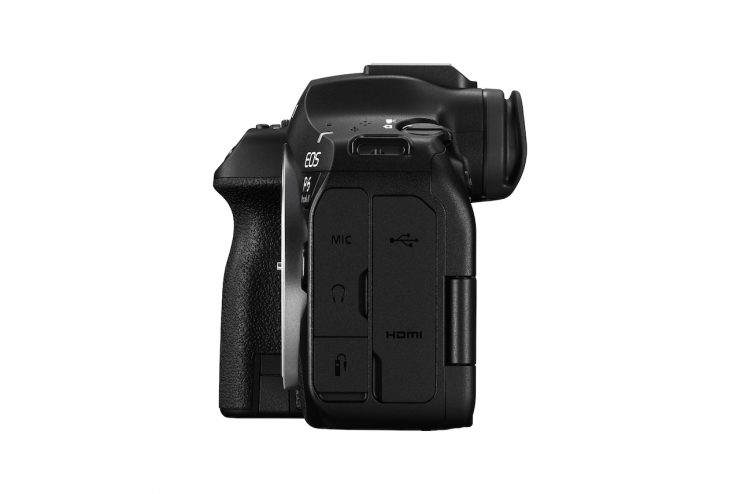
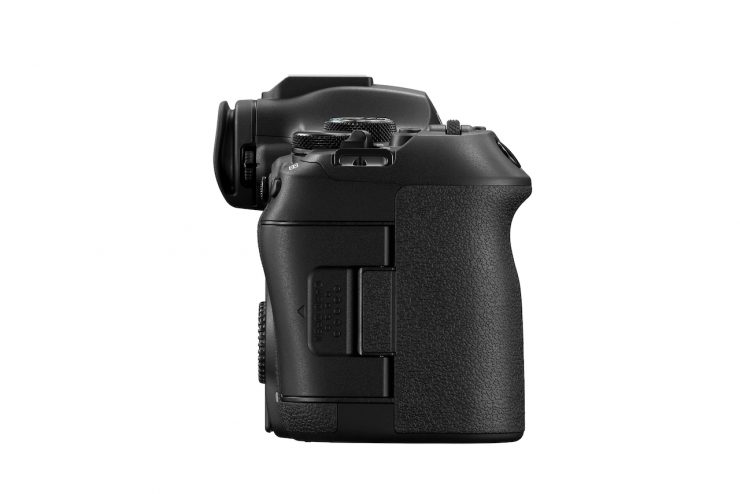
The camera is also compatible with the same LP-E6NH batteries and BG-R10 battery grip as the EOS R6/R6 Mark II.
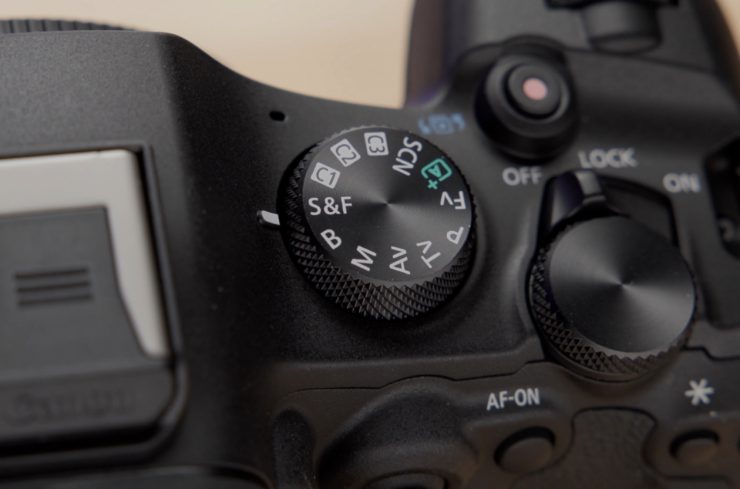
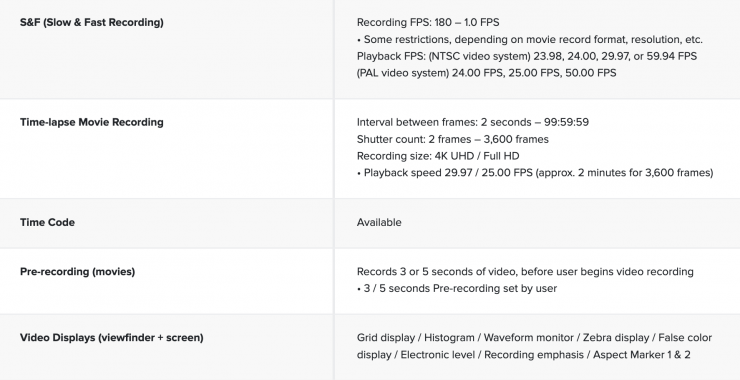
The new Slow and Fast (S & F) Mode on the mode dial offers new UI control over resolution, frame rate, playback speed, and compression. It also provides incremental frame rates for precise recording frame rate tailoring to playback speed. Though audio is disabled, videographers can now embed their frame rate in-camera for easier social media content creation.
Unlike the R6 Mark II, which featured a Micro-HDMI Output, the R6 Mark III has a full-sized HDMI output.
Connectivity

The camera features updated Bluetooth v.5 and Wi-Fi (5GHz), so that it can be easily connected to a smartphone and networks, allowing high-speed file sharing and FTP/FTPS/SFTP transfer. The camera can also be remotely controlled using the Camera Connect and EOS Utility apps, tethered to a PC, Mac, or smartphone via Wi-Fi or high-speed USB-C. The EOS R6 Mark III also supports the automatic transfer of image files from the device to the Canon Cloud Platform, so users can easily share and print images.
The EOS R6 Mark III can be used as a webcam on PC and Mac computers running video-call apps such as Skype, Zoom, and Teams, without having to install additional software. This plug-and-play capability is powered by industry-standard USB Video Class (UVC) and USB Audio Class (UAC) drivers that are built into Windows and MacOS operating systems.
Multi-function shoe
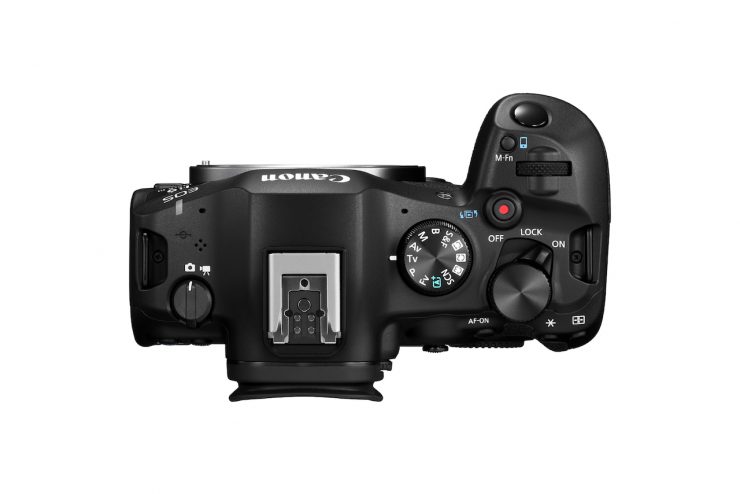
Just like the EOS R6 Mark II, the EOS R6 Mark III features a multi-function shoe with a next-generation interface. This allows the camera to utilize a range of Canon accessories without the need for cables, and in some cases without batteries.
Price & Availability
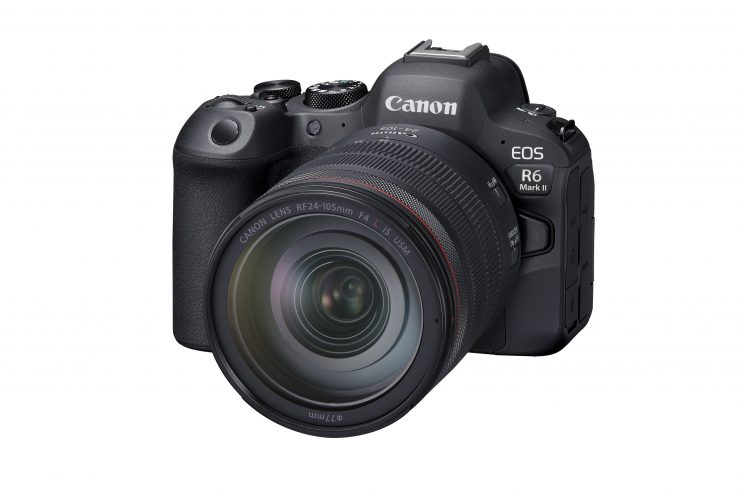
The EOS R6 Mark III is now available to order for $2,799 USD.
You can also buy it with a 24-105mm f/4 Lens in a kit for $4,049 USD.
As a comparison, the EOS R6 Mark II retailed for $2,499 USD at launch. You can now buy it for $2,099 USD.
Thoughts
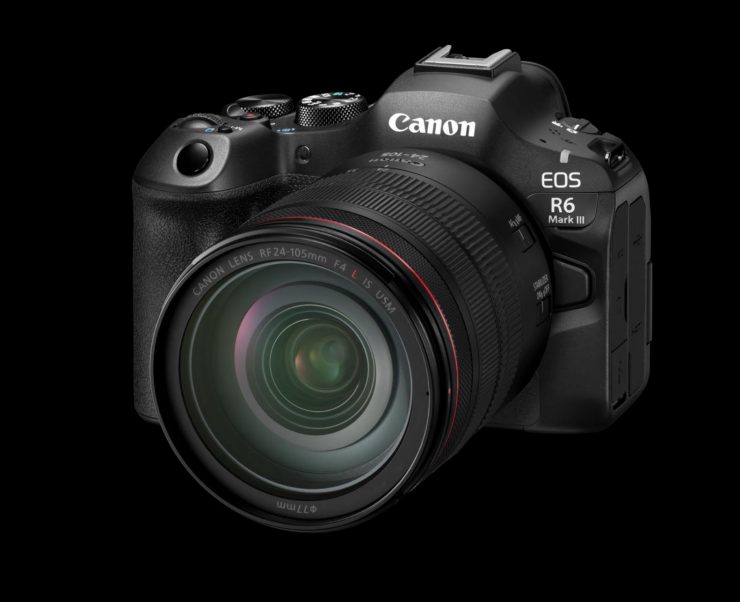
Like just about all mirrorless hybrids that are being released today, the Canon EOS R6 Mark III is a solid offering. We have certainly reached a point where every camera is now more than capable of producing great results.
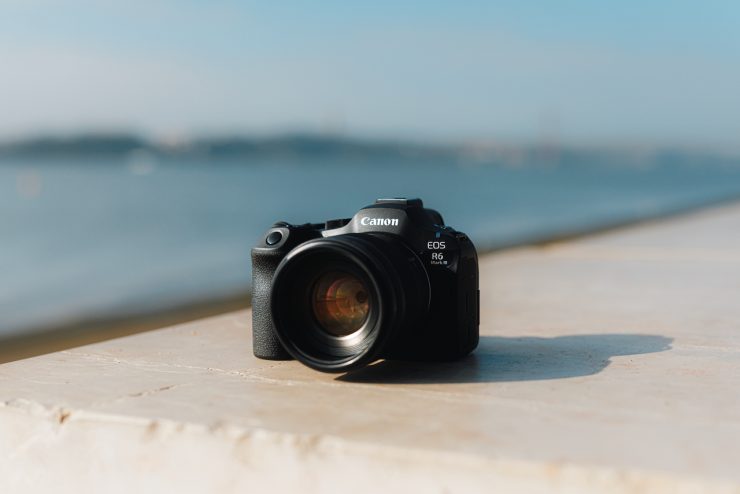
The Canon EOS R6 Mark III looks to inherit a lot of the features of the C50, but in a more photo-centric body. It is good to see open gate video recording, but in saying that, if you primarily want to capture video, then the C50 is going to be a better option. Arguably, it would have made more sense for Canon to focus on improved still capabilities.
What Canon has done with the EOS R6 III and the EOS C50 is almost like what Sony did with the a7S III and FX3. I’m only saying that with respect to having two very similar cameras that share a lot of the same features and functionality.
Specifications