Sony has released version 3.0 of Catalyst Prepare, along with version 3.0 of the Catalyst Prepare Plugin for Premiere and the Catalyst Prepare Plugin for DaVinci Resolve.
Catalyst Prepare ver. 3.0 integrates the previous Catalyst Browse and Catalyst Prepare into a single application: Catalyst Prepare. This allows you to do everything from reviewing clips to color grading all within a single application.
The biggest improvements are arguably the new user interface and the added support for the FX5’s new X-OCN C1/C2 formats.
What’s New in Catalyst Prepare ver. 3.0?
- Released Catalyst Prepare V3 with a redesigned user interface.
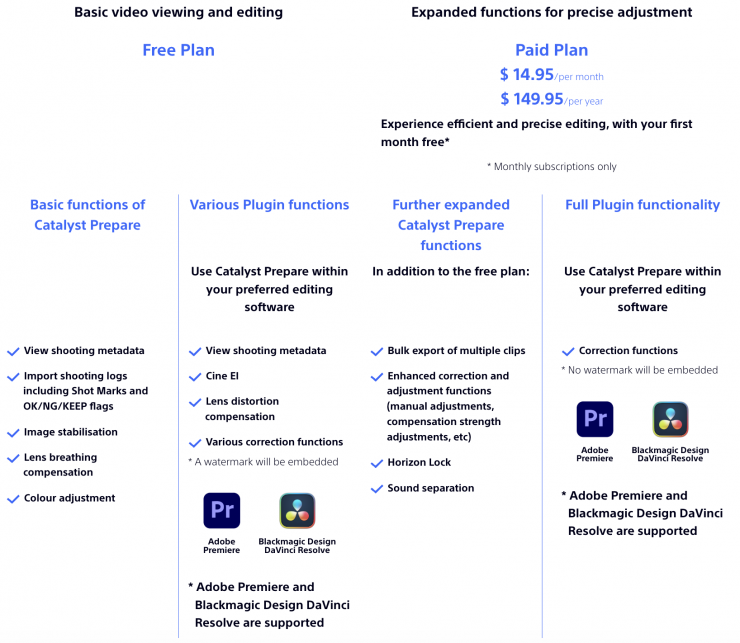
- Users with a paid Catalyst Prepare license can now use Catalyst Prepare Plugin without any restrictions.
- Added support for the X-OCN C1/C2 format.
- Added support for making size adjustments to the right pane width and the left folder tree/file list.
- Added tooltips.
- Added the ability to rename folders.
- Added the ability to delete folders.
- Added the ability to move files and folders.
- Added the ability to browse Ci (Cloud) workspaces.
- Added the ability to download from Ci (Cloud).
- Added a thumbnail preview function on mouse hover.
- Added a UI for adjusting the number of thumbnail frames in Settings.
- Added the ability to customize the fields (list columns) displayed in the file list.
- Added the ability to pin metadata.
- Added the ability to view the full text by hovering the mouse over truncated file names and other text.
- Added the ability to import LUTs from the UI.
- Added the ability to display color-related indicators in a separate window.
- Added the ability to apply clip adjustments (such as image stabilization) to multiple clips at once.
- Added the ability to filter clips by whether they have effects applied.
- Fixed an issue that could cause the application to crash during clip analysis.
- Fixed an issue where the frame could jump back when playback was stopped.
- Limited playback to a single clip when multiple clips are selected.