There is a new update to the Parallax Monitor (ZR Ctl) app for iOS that adds features such as multicam, stills mode, multi-screen cast, and X-zone false color.
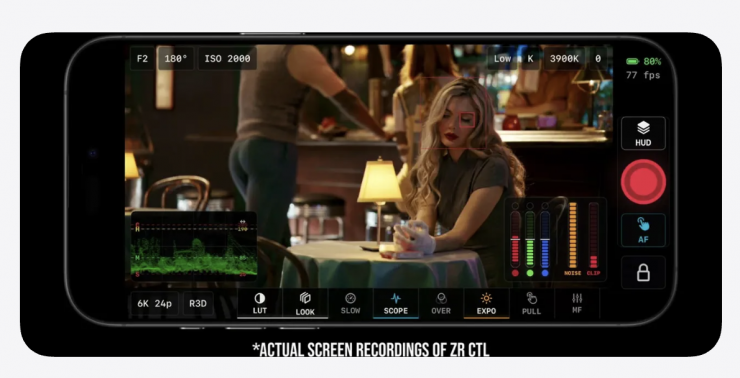
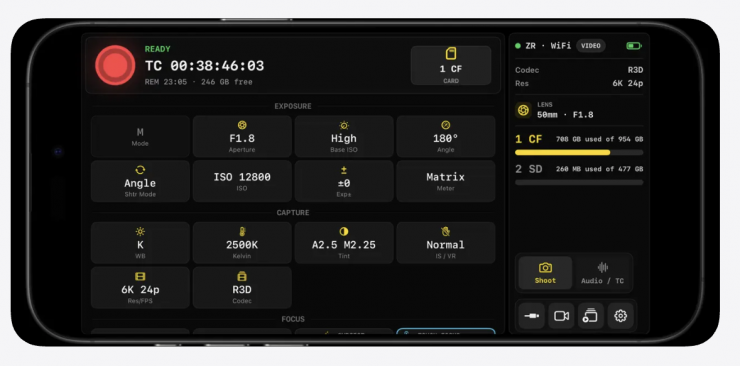
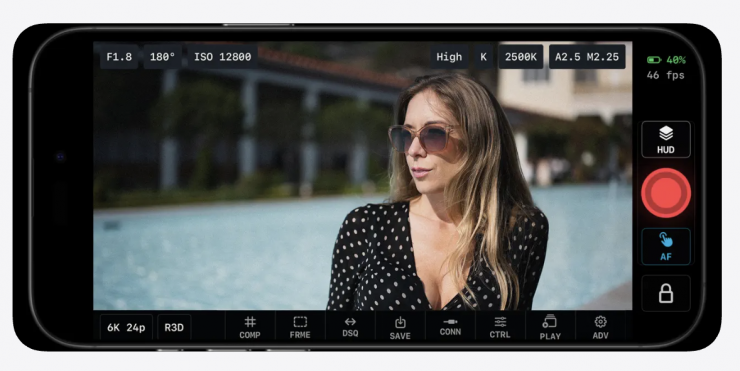
Parallax Monitor (formerly known as ZR Control) was created by Mike Aguado, and it is now available to download on the iOS App Store. It essentially turns your iPhone into an external monitor for compatible Nikon cameras, such as the Nikon ZR.
Users can connect to a compatible Nikon camera, watch Live View, adjust shooting settings, check exposure, tap focus, roll video, capture stills, share the feed to nearby screens, and review camera-card clips without bouncing between tools.
What is new?
- Full Multicam control center for up to 8 cameras via WiFi
- X-zone and other requested false color updates
- Multiscreen casting, send your monitor feed to all of your devices via Wifi
- Playback file management controls, including delete and bulk delete of files
- Stills mode updates
- Tons of bug fixes and stability
Custom LUTs & False Color: Users can now use a “quick LUT” hot bar for easy switching and access new false color options, including the Exone zone-based system.
Multi-Screen Cast: A new ultra-low-latency feature allows users to cast their host monitor screen to other devices (iPad, Android, etc.) on the same network.
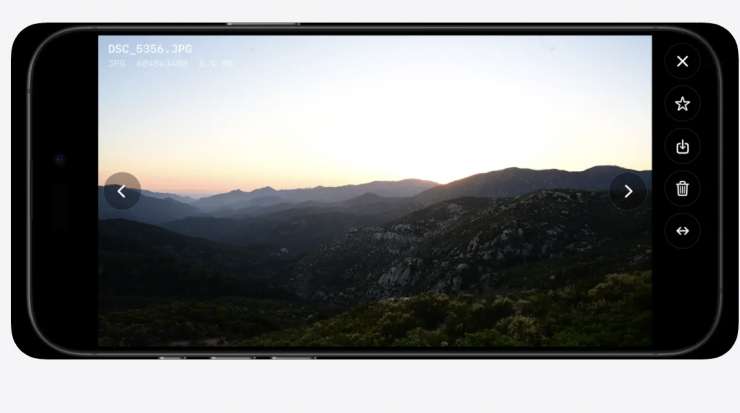
Stills/Photo Mode: A dedicated mode for photographers that includes an accurate exposure meter, review duration controls, quick play for previewing images, and the ability to download RAW files directly to the device’s photo library.
Multicam Control: This update enables the simultaneous control of multiple cameras. The interface supports side-by-side viewing for matching looks, a spotlight mode to focus on one camera, and synchronized recording.
All Features
X-LIGHTS EXPOSURE
X-Lights are Parallax’s custom exposure assists for quick on-set decisions. They summarize, highlight, and shadow pressure from the pre-LUT live-view signal, while waveform, histogram, zebras, false color, and exposure posts give deeper confirmation when the shot is critical.
Monitor with a LUT without hiding the signal. Parallax keeps the look and exposure readout separate, so a pleasing preview does not cover up clipped highlights, crushed shadows, or a risky exposure choice.
STILLS MODE
Switch from motion to stills without leaving the operator surface. Parallax supports photo-mode workflows where available, including still capture, photo-focused readouts, tap focus behavior, quick still review, favorite/save actions, and playback-side photo preview.
Use it for BTS frames, thumbnails, continuity references, social images, client stills, or productions where one Nikon body moves between motion and stills.
SET TO SOCIAL REVIEW
Review what you shot while the crew is still packed around the camera. Parallax can scan camera media, load thumbnails, stream playable MP4/MOV clips, scrub takes, check audio, and preview playback through your selected monitoring LUT.
Save source clips to Photos or render a LUT-baked copy from playback for quick sharing, producer review, or handoff to social apps and editors.
NATIVE H.265 PLAYBACK
Parallax uses iOS-native playback for playable camera files, including H.265/HEVC media where supported by the device, camera format, and connection path. High-resolution files can be reviewed with cache, scrub, volume, thumbnails, favorites, delete, and save workflows.
LIVE VIEW AND GUIDES
Use Live View with LUT preview, waveform, histogram, zebras, false color, focus peaking, X-Lights, camera level, audio meters, recording border, recording timer, presets, and frame guides.
Frame for the edit before the edit asks for it: thirds, golden ratio, safe areas, 1.85, 2.00, 2.39, 4:3, 1:1, 9:16, 4:5, custom aspect ratios, matte controls, guide opacity, and multiple simultaneous guides for cinema, vertical, and social delivery.
Anamorphic monitoring is built in with 1.33x, 1.5x, 1.8x, and 2x desqueeze workflows.
LOCAL VIEWER SCREENS
Turn nearby iPhones and iPads into extra read-only monitors on the same local network. One host device stays connected to the Nikon camera while other devices discover the host and receive the Live View feed for a director monitor, client view, focus reference, or second operator display.
NIKON OPS
Keep operator settings close: aperture, ISO, dual base ISO, shutter speed, shutter angle, exposure compensation, white balance, Kelvin, resolution, frame rate, codec, card slot, timecode, audio input sensitivity, AF trigger, AF mode, AF area mode, and record start/stop where supported.
CONNECTIONS AND FIELD SUPPORT
Connect over Wi-Fi with camera discovery, direct/AP-style connection, pairing support, and quick reconnect. Parallax also includes USB diagnostics, transport switching, connection recovery hints, and support logs to help isolate real-world setup issues.
Compatibility notes: Parallax is fully compatible with the ZR, Z8, Z9, Z50II, and ZI.
Parallax Monitor is independent and is not affiliated with Nikon, RED, or their subsidiaries.
How much does it cost?
Parallax Monitor is a one-time payment of $19.99 USD.