Panasonic has released a video showcasing how you can match select LUMIX cameras using the ARRI LogC3 upgrade key to ARRI cameras.
With the purchase of the DMW-SFU3A Software Upgrade Key, models like LUMIX S1RII, S1II, S1IIE, GH7, and GH6 can now utilize ARRI LogC3, certified by ARRI.
ARRI LogC3
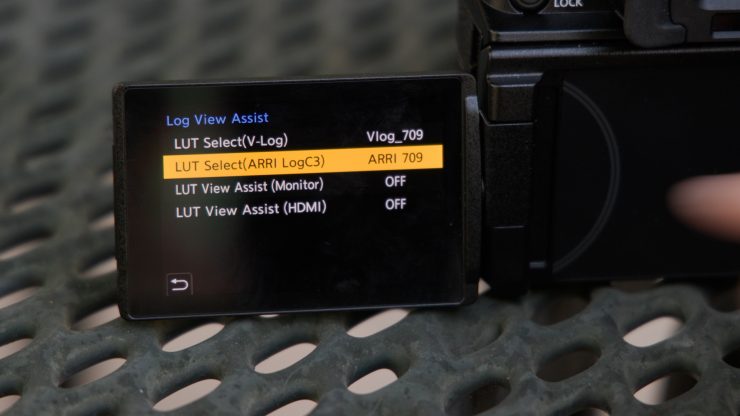

Via the paid ($197.99 USD) Software Upgrade Key DMW-SFU3A, you can utilize ARRI’s LogC3, which, according to Panasonic, enables you to seamlessly color match the LUMIX S1RII, S1II, S1IIE, GH7, and GH6 with ARRI’s digital cinema cameras. Panasonic has licensed LogC3 from ARRI.
The image processing of the ARRI LogC3 curve on LUMIX cameras has been certified by ARRI for the implementation of this function. This option to use ARRI LogC3 is only available when you are shooting in the ProRes 422, ProRes 422 HQ and ALL-Intra codecs. You can’t use ARRI LogC3 when recording in ProRes RAW, that can only be done in V-Log.
Now, while you will be able to get a pretty good match between ARRI cameras and the compatible LUMIX models, because they don’t have the same amount of dynamic range, it will clip highlights before you reach the limit of the LogC3 curve. The base ISO when shooting in ARRI LogC3 is 320, as opposed to 500 ISO when shooting V-Log.
On the LUMIX S1II, it is as follows:
Auto (Base ISO 500 / 4000): Auto / 500-51200 Extended ISO
Low (Base ISO 500): Auto / 500-4000 Extended ISO
High (Base 4000): Auto / 4000-51200 Extended ISO
These ISO levels are because the LogC3 curve was designed to be used with cameras that have a higher dynamic range. You will not want to underexpose your image when shooting in ARRI LogC3, as you will introduce a lot of noise.
ARRI cameras that shoot LogC3 tend to lean green, while Panasonic LUMIX cameras tend to lean magenta. I don’t think you would get an exact color match just by applying a LUT, but you could make minor adjustments to make it match.
Video data shot with a compatible LUMIX camera in ARRI LogC3 can easily be converted to your favorite look. The ARRI Look Library contains 87 high-quality ARRI Looks to choose from. It is also possible to store the LUT package for 709 conversion (ARRI Look Library LogC3 to Rec709 3D-LUTs) in the LUT Library of a LUMIX camera, and combine it with the REAL TIME LUT function to capture videos with ARRI LUTs straight out of the camera.
Using the ARRI Look Library (log-to-log), you can color grade videos recorded with ARRI LogC3 and apply the desired ARRI Look within the log space. Additionally, by using the LUT package (ARRI_LogC3_v12_LUT_Package) you can convert the color space of various display devices, allowing you to output the ARRI Look according to the desired color space in SDR and HDR.
Shooting in ARRI LogC3 on a LUMIX camera looks to be a good solution if you want a small-sized B-cam, C-cam, etc. that can match larger ARRI cameras.
Now, Panasonic previously told me that they believed that the natural progression from a LUMIX camera was to something like an ARRI, but I don’t personally believe that is true. The jump from a mirrorless hybrid is usually to an affordable sub $10,000 USD digital cinema camera. Usually, people who start off with a mirrorless hybrid move up to a smaller-sized, affordable digital cinema camera, but the problem is that Panasonic no longer has a cine division, so there is nowhere for them to go, except to another brand. This is the biggest issue Panasonic faces, as unlike the majority of their competitors, they don’t have cine products anymore.